
Granted Role Access
Some access needs to be temporary, such as covering an employee’s leave, giving a consultant access for a specific project, or providing approval rights until a certain date. Granted Role Access lets you assign a role for a specific period and automatically removes the access when the period ends.
To manage temporary access, Open it from .
Create a grant
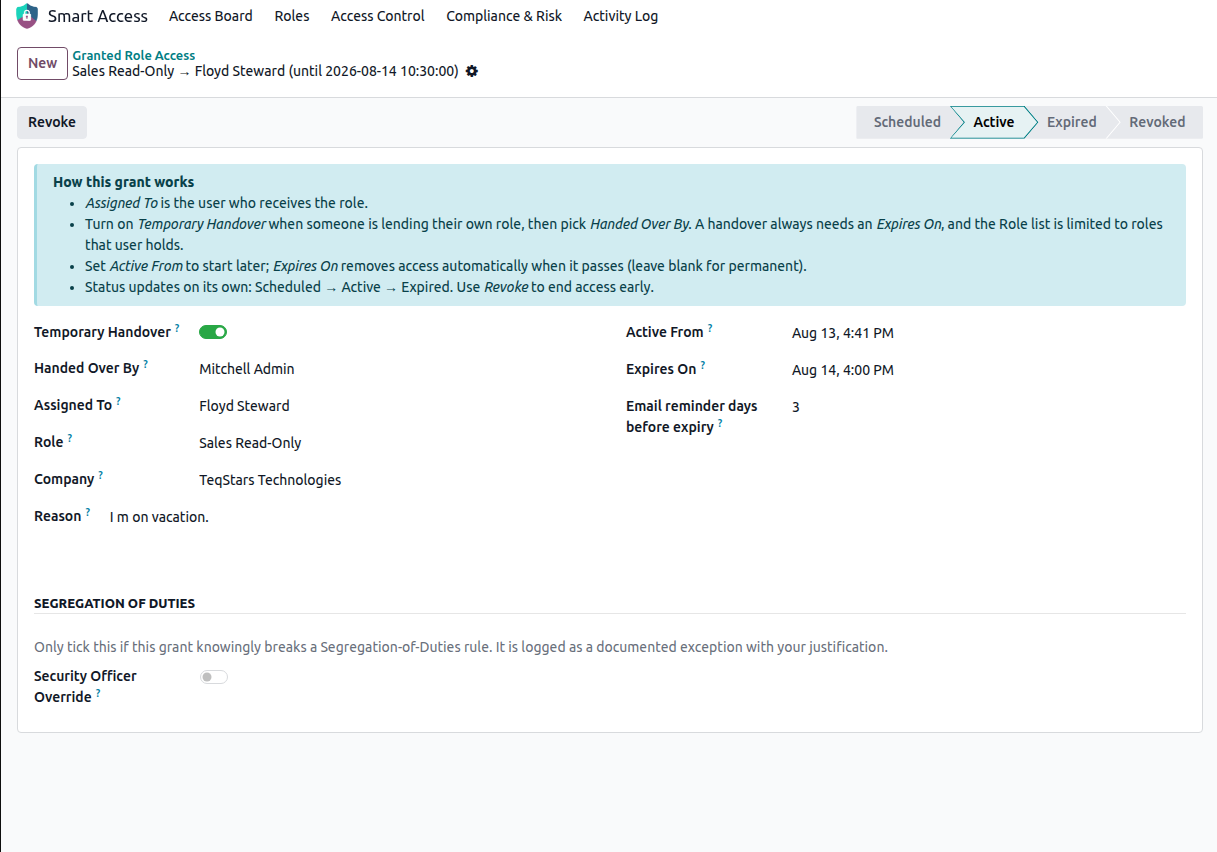
Assigned To — The user who receives the role.
Role — The role being granted.
Company — The company the grant belongs to.
Active From — When the role becomes effective. Defaults to the current date and time.
Expires On — When the role is removed automatically. Leave it empty for permanent access.
Reason — Why the access was given. This is stored with the grant and appears in the Activity Log.
Email reminder days before expiry — How many days before the expiry date the user receives a reminder e-mail. Defaults to 3 days.
Note
A user cannot have two open-ended assignments of the same role. Revoke the existing one or set an expiry date on it first.
Temporary handover
Enable Temporary Handover when one user is covering for another.
Handed Over By — The user who is handing over their access.
Only roles that the selected user currently holds can be handed over.
An expiry date is required, because a handover is always temporary.
Status
The status of a grant is calculated automatically:
Scheduled — The start date is in the future; the role is not active yet.
Active — The current date is inside the validity period; the role applies.
Expired — The expiry date has passed; the role no longer applies.
Revoked — The grant was cancelled manually before its expiry date.
Important
Access expires immediately. Once the expiry date and time have passed, the role stops applying to the user on their next action. No scheduled job needs to run for the access to expire.
Revoke a grant
Click Revoke on the grant to remove the access immediately. Once Revoked:
The role no longer applies to the user.
The grant status changes to Revoked.
The reason for the revocation is recorded.
Revoked and expired grants remain visible in the list, allowing you to review the user’s access history.
Expiry reminders
A daily scheduled action checks active grants and sends reminder emails to users whose access is approaching its expiry date.
The reminder is sent based on the Email reminder days before expiry value configured on each grant.