
Seller Policy Management
eBay seller policies define the payment, fulfillment (shipping), and return terms for your listings. The connector allows you to import and manage these policies in Odoo.
Importing Seller Policies
Go to the menu in Odoo.
Click on the
Operationsbutton from the instance record.Select Import Operation and then select Import Policies option.
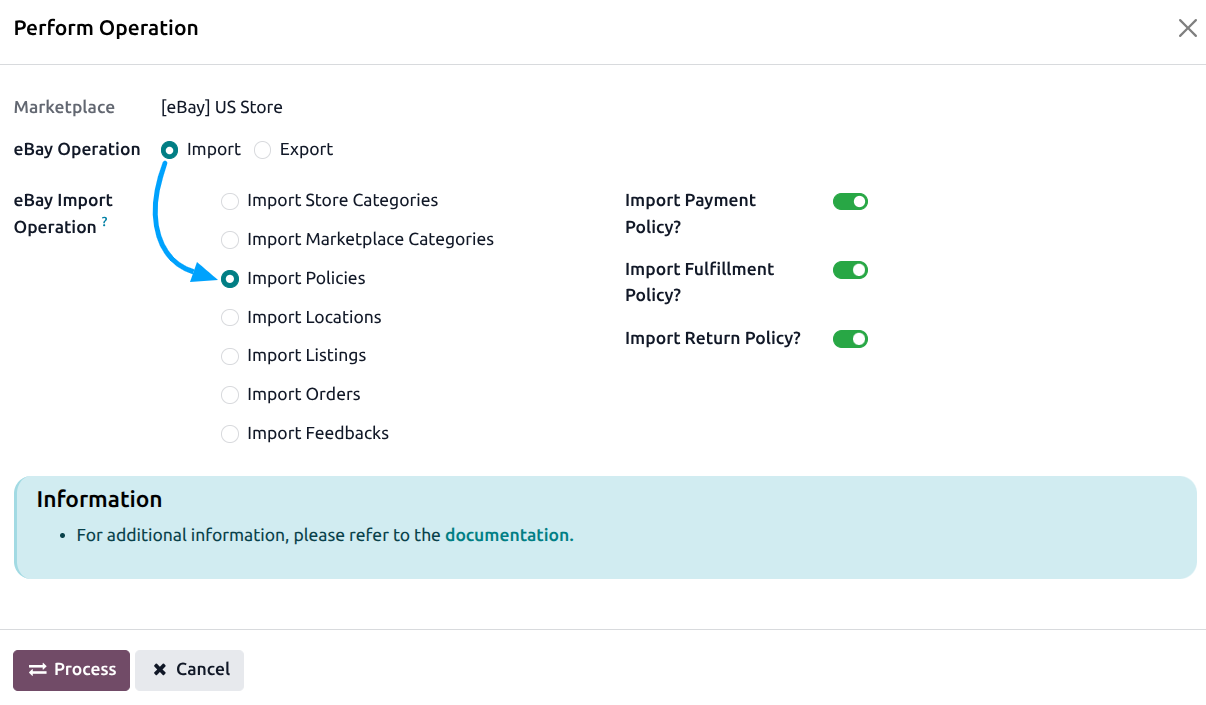
Choose which types of policies to import:
Import Payment Policy: Imports your eBay payment policies.
Import Fulfillment Policy: Imports your eBay shipping/fulfillment policies.
Import Return Policy: Imports your eBay return policies.
Press
PROCESSbutton.
Managing Policies
You can view and manage imported policies under the following menus:
Note
Policies are imported as read-only records. You cannot create, edit, or delete policies from Odoo. Manage your policies directly on eBay and re-import them when changes are made.
Each listing must have a payment, fulfillment, and return policy assigned before it can be exported to eBay.
See also