
Import Brands From BigCommerce
Brands in BigCommerce are an independent classification used for filtering and landing pages. The connector mirrors the BigCommerce brand list in Odoo so that imported listings can reference their original brand.
When Brands Are Imported
Brands are imported in two situations:
Automatically during instance confirmation — when you click Confirm on a new instance, the connector imports all BigCommerce brands so that subsequent listing imports find them already present in Odoo.
Manually via the operations wizard — useful when you add or rename brands in BigCommerce after the instance has been confirmed.
How To Import Brands Manually
Go to the menu in Odoo.
Click on the Operations button from the instance record.
Choose Import as the operation type, then from Import Operation, select Import Brands.
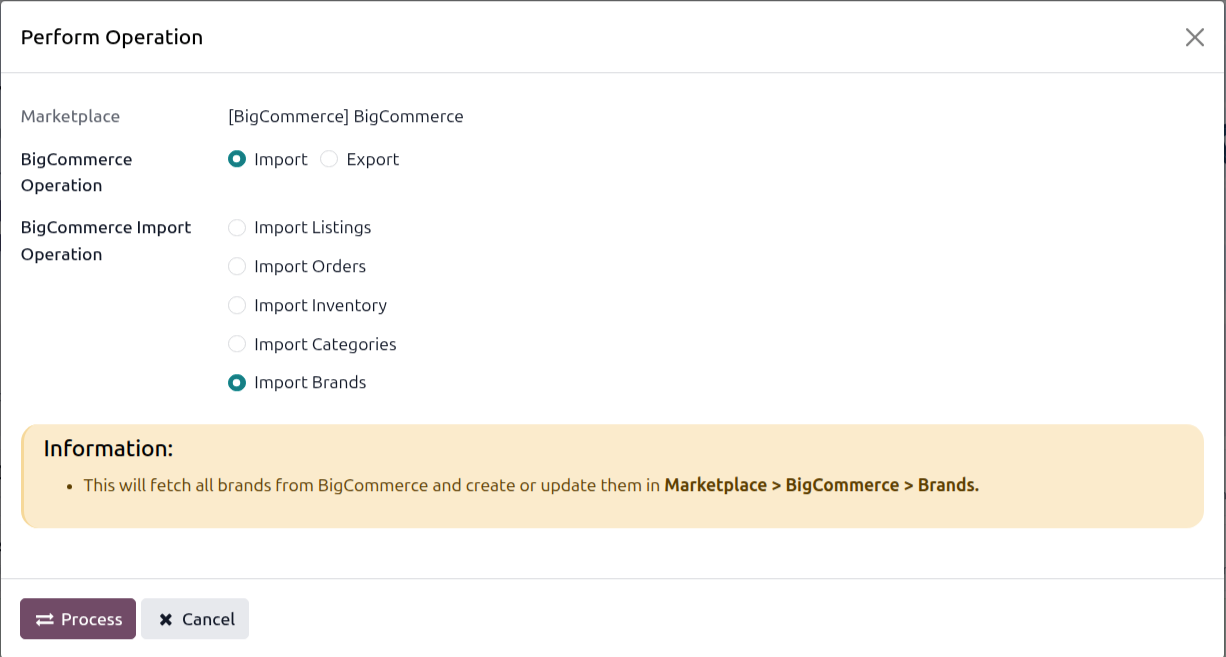
Click PROCESS.
The connector fetches all brands from BigCommerce and creates or updates the matching Odoo records, keyed by their BigCommerce brand ID so that re-running the import never produces duplicates.
You can browse imported brands at .
Where Brands Are Used
On a Listing, the BigCommerce Product Brand field links the listing to one of the imported brands. The brand is sent to BigCommerce on both Export Listings and Update Listings.
Brands are not propagated to Odoo’s product master data — they live entirely in the BigCommerce-specific records and are visible on the Listing.