
Access Requests
Instead of requesting access through email or chat, users can submit access requests directly from Odoo. Each request is recorded for review and, once approved, the requested access is automatically assigned as a role.
To submit a request, Open it from . This is the only Smart Access Manager screen available to users with the User level.
Raise a request
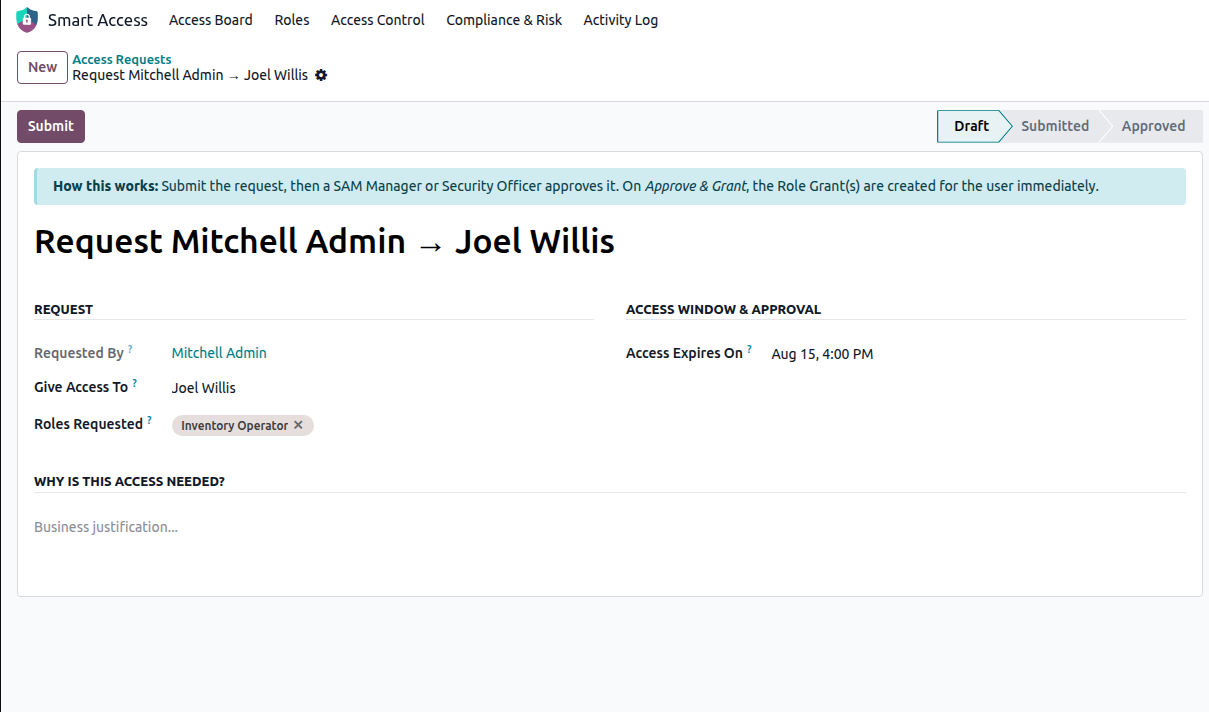
Requested By — The user submitting the request. This field is filled in automatically.
- Give Access To — Select the user who should receive the access. A manager can also submit a request on
behalf of another user.
Roles Requested — Select one or more roles that the user needs.
- Why is this access needed? — Enter the reason for requesting the access. This information is saved with the
request and copied to the resulting role assignment.
- Access Expires On — Set an optional expiry date for the access. Once approved, the access will automatically end
on this date. Leave it empty if the access should remain permanent.
Click Submit to send the request for review. Only requests in Draft status can be submitted.
Approve or reject
Requests are reviewed by users with the Manager level and above.
- Approve — Approves the request and immediately creates the role assignment for the selected user. If an expiry
date was provided, it is applied to the assignment automatically. The request status changes to Approved.
Reject — Rejects the request and changes its status to Rejected. You can also add a reason for the rejection.
Note
If the user already holds the requested role permanently, approving the request does not create a duplicate assignment.
Status
Draft — The request is being prepared and has not been submitted.
Submitted — The request has been submitted and is waiting for review.
Approved — The request has been approved and the requested access has been granted.
Rejected — The request has been rejected.
Visibility
Users with the User level can see only requests they submitted or requests related to them. Users with the Manager level and users with the Security Officer level can view all access requests.
All submissions, approvals, and rejections are recorded in the Activity Log, providing a clear history of why and when access was requested and granted.
See also