
Live Shipping Rate Lookup
Rate lookup lets Odoo display the exact ShipStation-billed shipping cost the moment a customer or salesperson selects a delivery method.
When Rates Are Fetched
The connector implements ShipStation as a standard Odoo delivery provider. Rates are fetched at the standard Odoo entry points:
On a sales order at , click Add a shipping method (or open the existing delivery line and click Update Shipping Cost / Get Rate). Pick a delivery method whose Provider is ShipStation.
On the delivery order itself, the Get Rates button in the Shipping Information section fetches live rates directly on the transfer.
At eCommerce checkout, when the customer reaches the Delivery Method step.
In every case the connector calls ShipStation in real time and returns the live carrier price. The full rate list is shown so the customer or salesperson can pick a rate; the cheapest is preselected.
Required Inputs
The request is built from the active sales order. Before sending, the connector validates:
The order has at least one line.
Every line product has a Weight greater than zero.
The Warehouse address (street, city, state, country, ZIP) is complete.
The customer’s delivery address is complete.
The delivery method has a Store configured.
If any check fails, the user receives an inline warning explaining exactly which field is missing. No request is sent, so the user never sees a generic carrier error.
Returned Price
The connector returns the total shipping price (shipment cost + any other carrier-side cost) and lists every rate that came back, with the cheapest preselected:
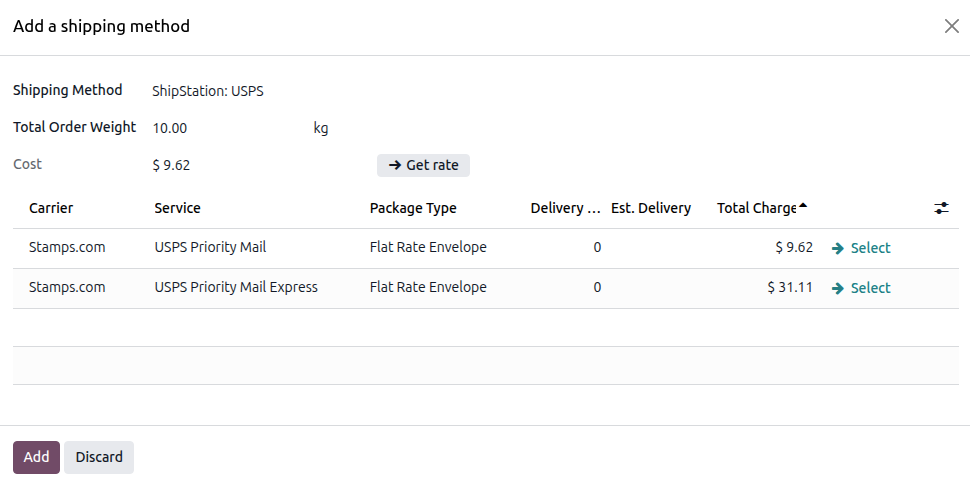
API v1: rates for the selected carrier. When no specific service is set on the delivery method, ShipStation returns a rate for every service of that carrier; when a service is set, only that service’s rate is returned.
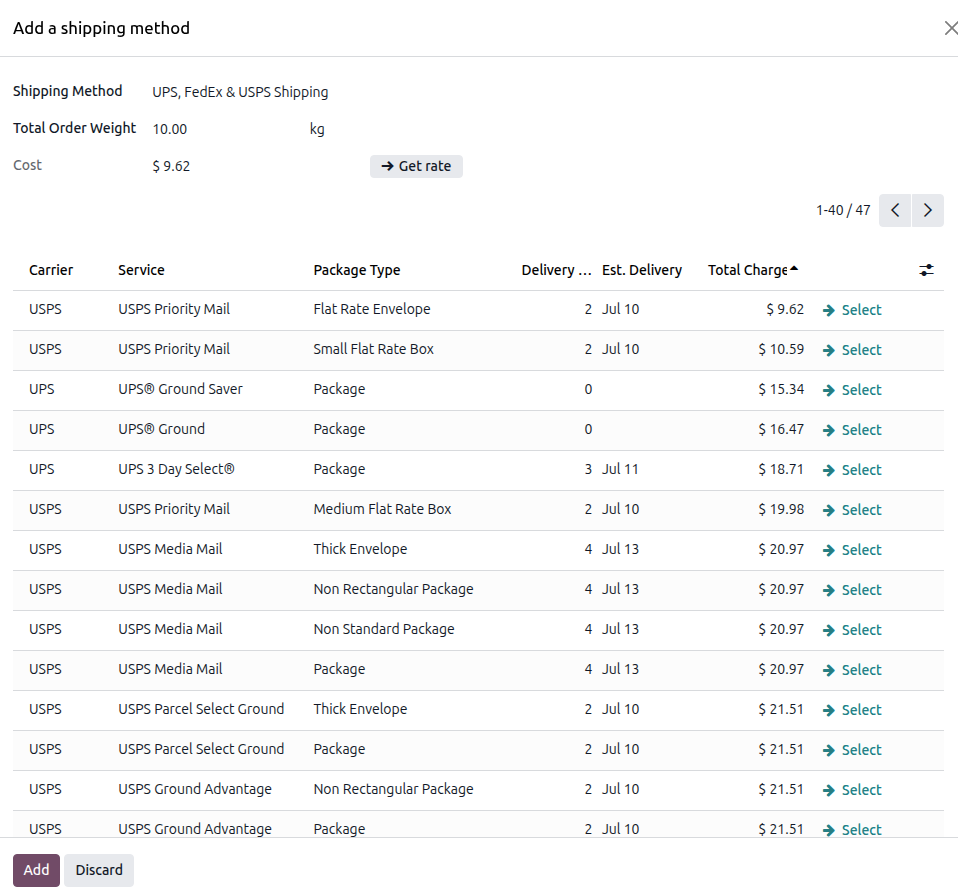
API v2: multi-carrier rate shipping, rates are compared across all carriers, services, and packages selected on the delivery method, in a single call.
The chosen rate is stored on the sales-order delivery line (or the delivery order) so the customer or salesperson sees the live carrier price before confirming the order.
API v1: rates for the selected carrier’s services if no service is selected:
API v2: multi-carrier rates compared across the selected carriers, services, and packages:
Error Messages
Common errors raised by the validation helper:
“Please define ShipStation Store in delivery method”: pick a store on the delivery method form.
“Please define Weight in products” (with the SKU list): set a weight on every order-line product.
“Please define following details in (warehouse / customer) address: City / State / Zip / Country”: complete the address.
“Order has no items, can’t get rates”: the order has no eligible product lines.