
Import Octopia Orders In Odoo
The Octopia Odoo Connector lets you import Octopia orders into Odoo as Sale Orders, with their lines, shipping charge, VAT and the Octopia commission, keeping inventory, accounting and fulfillment centralized in Odoo.
Before importing, configure the relevant Orders Configuration and Order Workflow Configuration on the instance.
You can import orders manually from the operations wizard or on schedule through the Import Order automatic job.
Method - 1: Manual Order Import
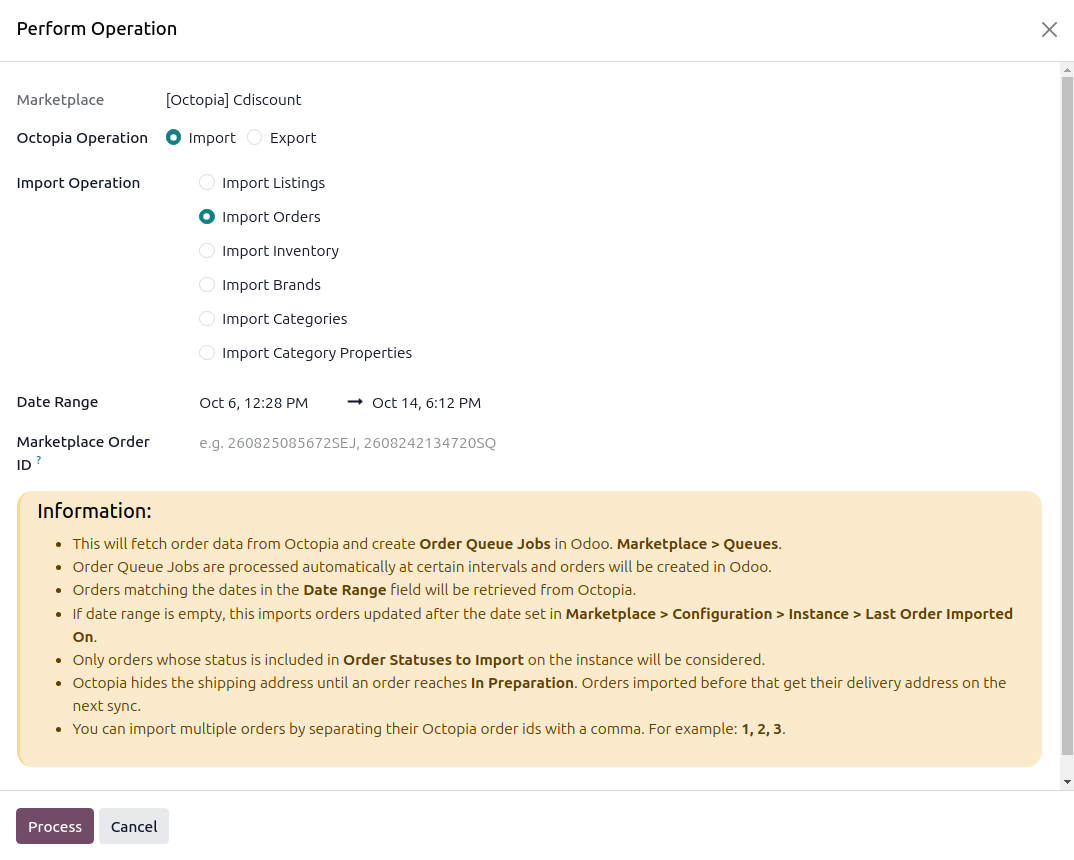
Go to the menu in Odoo.
Click on the Operations button from the instance record.
Choose Import as the operation type, then from Import Operation, select Import Orders.
The wizard exposes the following options:
Date Range: Orders updated within the selected date range are retrieved from Octopia.
Marketplace Order ID: Import specific Octopia orders by entering their order ids, separated by commas, for example
1, 2, 3. Specific orders are processed straight away, without a queue.
Click Process.
The connector fetches orders from Octopia and adds them to a Queue Job visible at . The queue job is processed automatically, each order is created in Odoo following the Marketplace Workflow matched to the order’s Payment Gateway and Order Status.
If some orders fail because no matching workflow is configured, the queue line writes a log entry with a Configure Workflow button. Add the workflow and retry the failed queue line, only that order is fetched again.
Method - 2: Automatic Order Import
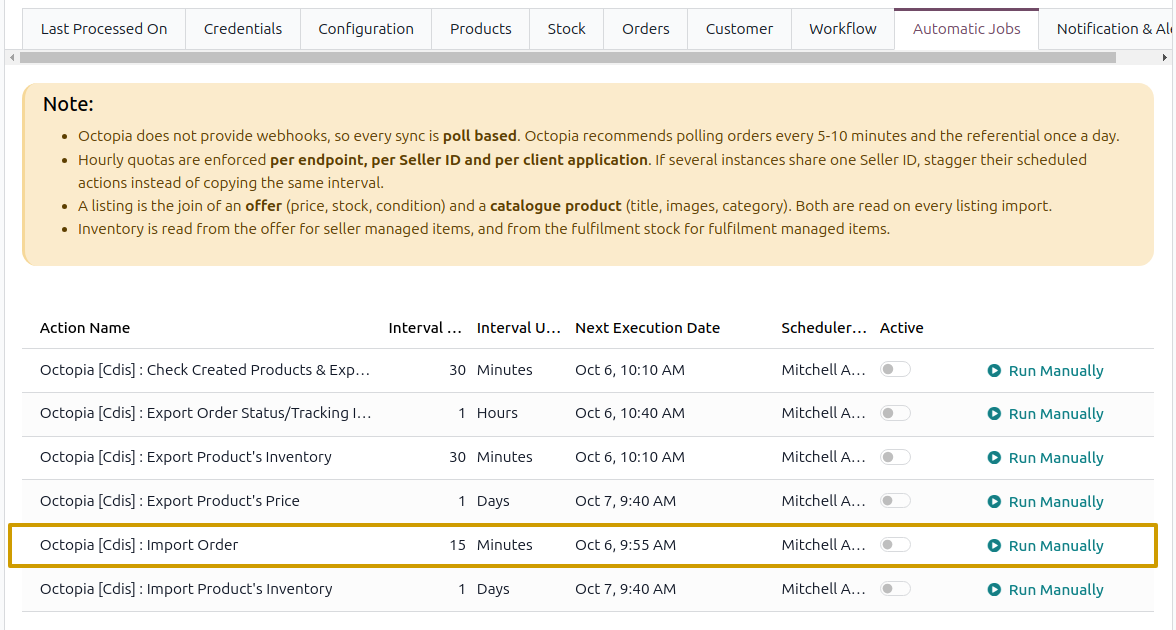
Go to your Octopia instance by navigating to .
Open the Automatic Jobs tab. Configure the Import Order automatic action by setting Interval Number, Interval Unit, and then enable Active (every 15 minutes by default).
Once the schedule action is active, Odoo automatically imports the latest orders at the specified intervals and processes them according to the configured order workflow.
Which Orders Are Imported
Orders of the instance’s Sales Channel only. An order of another channel is skipped and logged.
Orders updated since the last order import minus one hour, or the last 3 days when the instance has never imported, unless you give a Date Range.
Orders whose Octopia status is in Order Statuses to Import, each status is read separately.
Orders created before Import Order After are skipped.
An order already in Odoo is updated in place, a Cancelled, Refused or Rejected order that was never imported is skipped.
What Is Created
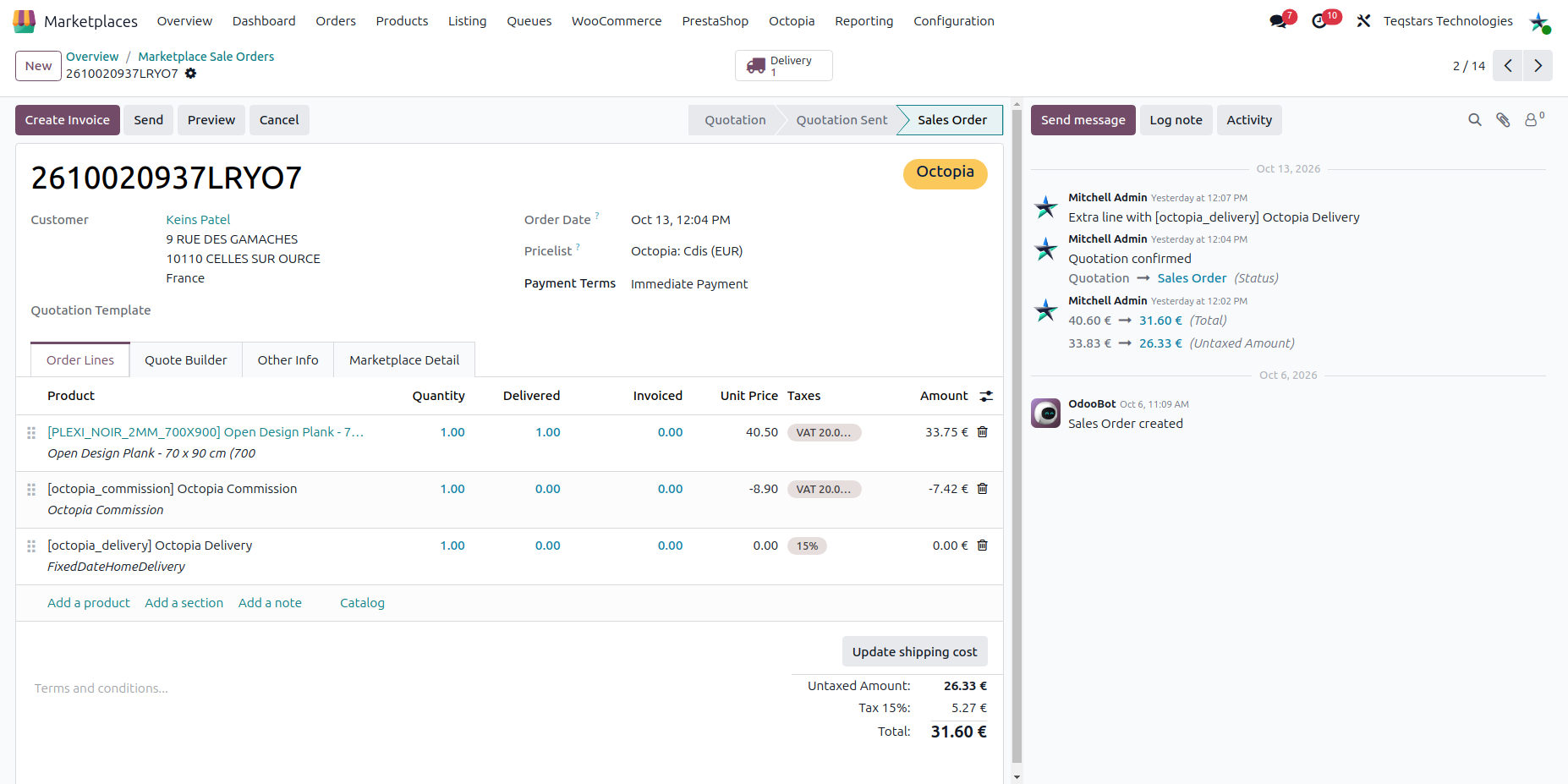
Sale order: Octopia order id, reference, status, sales channel, payment method, purchase date and Ship Before date. The reference is also the customer reference, and names the order when Use Marketplace’s Order Sequence? is on.
Order lines: One line per ordered offer at the price the customer paid, with the offer’s supply mode and line status shown as optional columns. When the offer price was higher than the selling price, the difference is stored as a marketplace discount.
Delivery line: Shipping is reported per line by Octopia and summed into one delivery line. The carrier is matched by name and delivery mode, and created when none exists.
Commission line: One negative line on the Commission Product with the total commission Octopia keeps, VAT included when its rate can be found. Leave the product empty to import no commission line.
Taxes: Octopia prices include VAT, so taxes are applied as included taxes according to the instance Tax System.
Customers: See Customer Creation During Order Import.
Note
The Octopia order is processed by the workflow of the instance: it can stay a quotation, or be confirmed, invoiced and paid automatically.
Orders That Change After Import
When an order that is already in Odoo is imported again:
The Octopia status and the status of every line are refreshed.
A Cancelled, Refused or Rejected order is cancelled in Odoo. If a delivery is already done, it is only flagged and a note is posted.
A CancelRequest on a line posts a note on the order, handle it in the Octopia seller portal.
A Shipped or Delivered order has its delivery validated automatically in Odoo.
The delivery address is added when it appears, because Octopia withholds it until the order is In Preparation.
Fulfilment Orders
Orders fulfilled by Octopia are imported so your records are complete. Their lines carry the Fulfillment supply mode.
Odoo creates the delivery for the whole order like for any other order, whatever the supply mode of its lines.
Only the Seller lines are declared to Octopia as shipped, the Fulfillment lines are skipped because Octopia ships them. See Octopia Update Order Status from Odoo.
The stock Octopia holds for fulfilment managed offers is never imported from, or exported to, Octopia.