
Import Brands From ManoMano
ManoMano keeps a list of brands. When you prepare a listing for ManoMano, you can name the brand of the product from that list.
Odoo fetches the ManoMano brands into Odoo so you can pick the right one on a listing.
You find the brands under .
When Brands Are Imported
The brands are imported when you confirm the instance. See Create a ManoMano instance in Odoo.
If that import fails, Odoo shows this message: IMPORT MASTER DATA: Categories and brands could not be imported after confirming the instance. Please use the import actions to retry. In that case, import the brands manually as shown below.
There is no scheduled job for brands. Fetch them again when a brand you need is missing in Odoo.
How To Import Brands Manually
Go to .
Click Fetch Brands.

Odoo reads the brands from ManoMano and shows the message Brands imported successfully. The brands are listed on the same screen.
If the import fails, check the following:
ManoMano API Key is missing on instance …: fill in the API Key on the Credentials tab of the instance.
ManoMano is temporarily unavailable …: ManoMano does not answer right now. Try again in a few minutes.
ManoMano did not return a valid response.: try again. If it keeps failing, click Test Connection on the instance to check the connection.
Brand Details
Open a brand from the list to see its details.
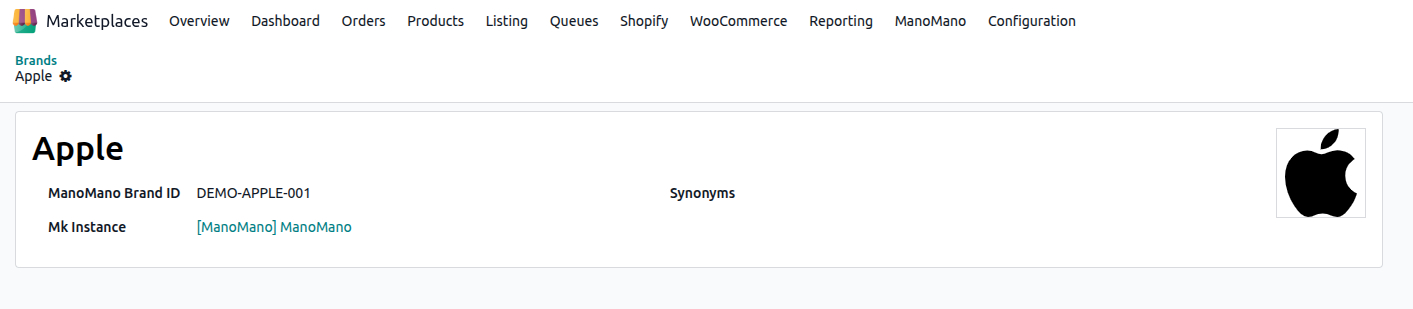
Brand: the name of the brand.
ManoMano Brand ID: the number ManoMano gives the brand.
Logo and Logo URL: the logo of the brand and the address it comes from.
Synonyms: other names ManoMano knows for the same brand. They help you find the right brand.
Mk Instance: the ManoMano instance the brand belongs to.
Where Brands Are Used
You name the brand of a product in the ManoMano Brand field of its listing, next to the ManoMano Category. How to fill in a listing before it is written to the feed is explained in Offer Details On A Listing.
The categories are fetched from ManoMano in the same way. See Import Categories From ManoMano.
Delete A Brand
Go to .
Select the brand you no longer need.
Click Delete.
The brand is removed from Odoo. If you need it again later, click Fetch Brands.