
Walmart Attribute Mapping
Note
Attribute mapping supports the Walmart product-type specifications, which are available for the United States marketplace only. See Walmart Supported Marketplaces.
Walmart uses its own attributes, such as brand, color, and size, while your Odoo products have their
own attributes. Attribute mapping tells the connector which Odoo attribute corresponds to each Walmart
attribute, so listings can be created and imported without manually entering the values again.
Mappings are created for you when a product type specification is fetched, and you refine them here.
Tip
Until a product type specification has been fetched there is nothing to map. See Import Walmart Product Types In Odoo.
Attribute Mappings
Go to .
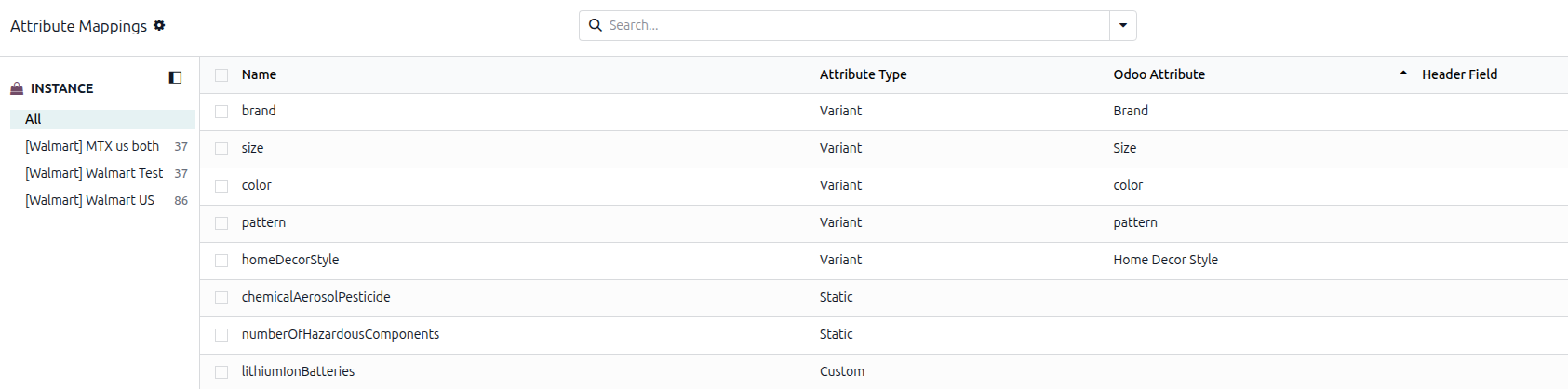
Each row is one Walmart attribute, with:
Name: the Walmart attribute, as Walmart names it. This is read-only.
Attribute Type: how the connector should handle it. This is the important choice, and it is editable:
Type
Meaning
Header
The value comes from a standard field on the listing, such as its name or description, and is filled in for you.
Variant
The attribute distinguishes one variant from another, such as color or size. Choose the matching Odoo attribute in Odoo Attribute.
Static
The value is the same for every variant and is entered on the listing itself. This is the default.
Custom
Handled outside the standard rules.
Odoo Attribute: the Odoo product attribute this maps to. Editable when the type is Variant.
Header Field: a note of which listing field the value comes from. It is for your reference only; changing it does not change what is sent to Walmart.
Data Type and Instance: Informational fields that are hidden by default. Use the optional columns button to display them.
Edit rows directly in the list; there is no separate form.
Note
Rows here cannot be added or deleted by hand. They appear when a product type specification is fetched, so if an attribute is missing, fetch the specification for the product type that uses it.
Note
The connector classifies attributes automatically when the spec is fetched. If you change a row by hand, your choice is kept and the related value mappings are refreshed.
Tip
Use the Header, Variant, Static and Custom filters to review one type at a time, and group by Attribute Type or Instance when you run more than one Walmart instance.
Attribute Value Mappings
Knowing that Walmart’s color maps to your Color attribute is only part of the mapping. The connector
also needs to know that Walmart’s value Navy Blue corresponds to your Odoo value Navy. Value mappings
define these value-level mappings.
Go to .
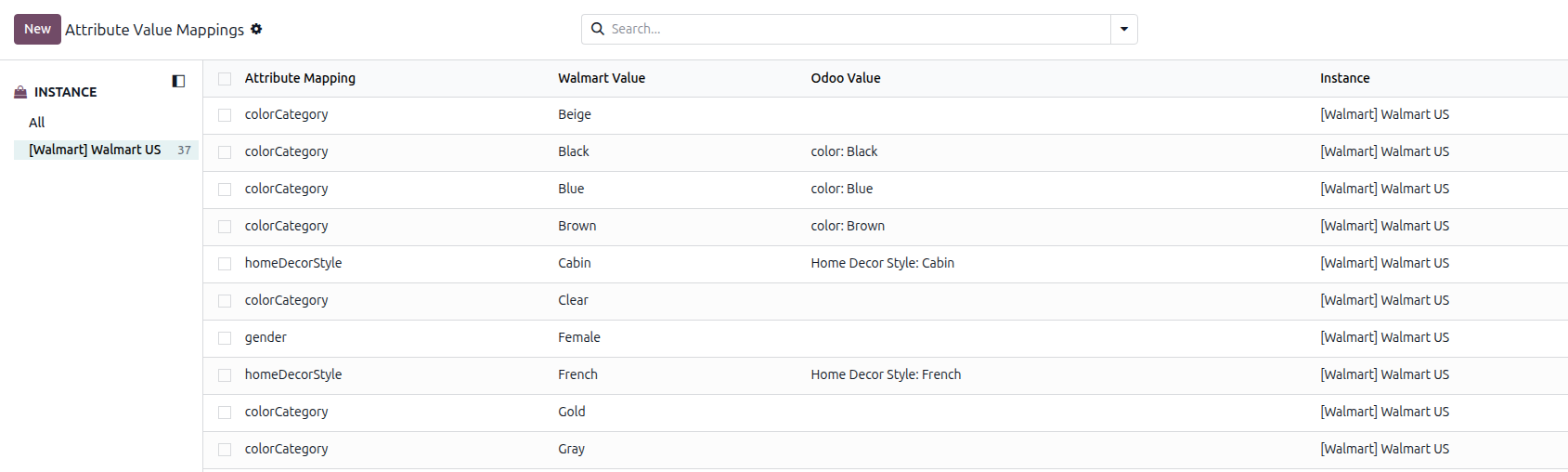
Each row shows:
Attribute Mapping: the attribute the value belongs to.
Walmart Value: the value as Walmart expresses it.
Odoo Value: the matching value in your Odoo attribute.
Instance: the instance the mapping belongs to.
Rows can be added or deleted directly from the list. After a row is saved, the Walmart Value and its attribute cannot be changed. Only the Odoo Value can be changed.
Tip
Use the Unmapped filter to find values that still need an Odoo value, and group by Attribute Mapping to work through one attribute at a time.
Note
A Walmart value must be one that Walmart actually allows for that attribute. If you enter something else, Odoo refuses it with a message telling you to use a value from the fetched product-type spec. This prevents a listing being rejected later for a value Walmart would never accept.
Mapping For A Single Product Type
The mappings above apply across your whole catalog. Occasionally a product type needs its own mapping: the same Walmart attribute pointing to a different Odoo attribute for that product type only.
Go to and open the product type.
Open the Attribute Mappings page and click the attribute you want to override.
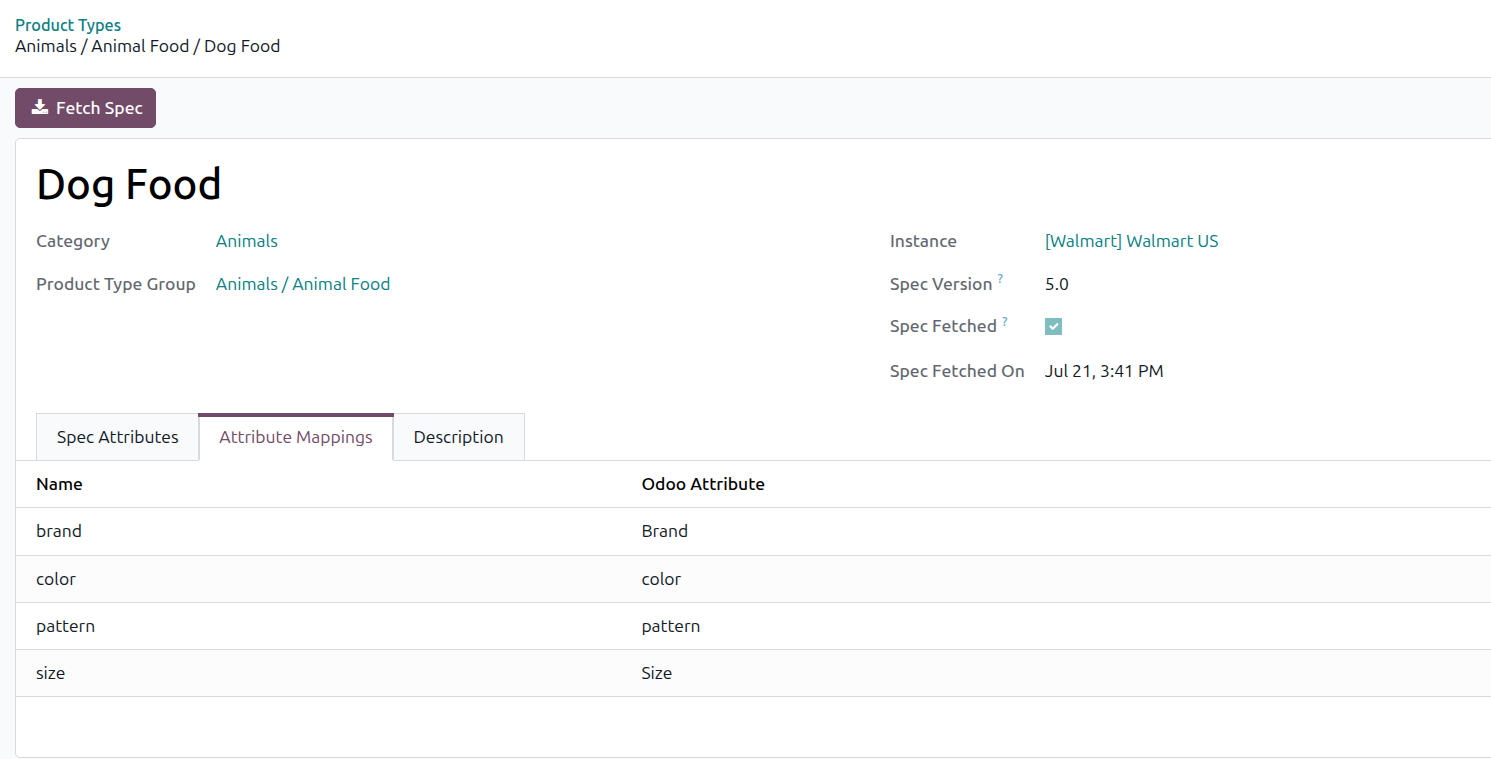
Set the Odoo Attribute for this product type, and map its values on the Value Mappings page.
A per-product-type mapping takes precedence over the general mapping.
Note
If two Walmart attributes in the same product type are pointed at the same Odoo attribute, Odoo warns you. Only the first of the two is used when exporting; the second is ignored.
How Mappings Are Used
Importing listings: Walmart attributes flagged as variant attributes are matched to your Odoo attributes and values, so imported listings arrive with the right variants instead of a flat product.
Exporting listings: your Odoo attribute values are translated back into the values Walmart expects, so Walmart accepts the listing.