
Records Behind the Numbers
Every number on a dashboard opens the exact records it counts, in Odoo’s own list. You then use search, filters, group by, export, open and edit as everywhere in Odoo.
Open the Records
A number: Click it. Its tooltip names what opens, such as See the 14 opportunities.
A bar, slice, point or country: Click it. The pointer becomes a hand and the tooltip says Click to see the records. When the dashboard has a filter for that split, a small menu opens first. See Focus and Break Down Bars.
A list card: Click See all. The list opens in the card’s own order.
Any card: Choose Show records in the card’s ⋯ menu.
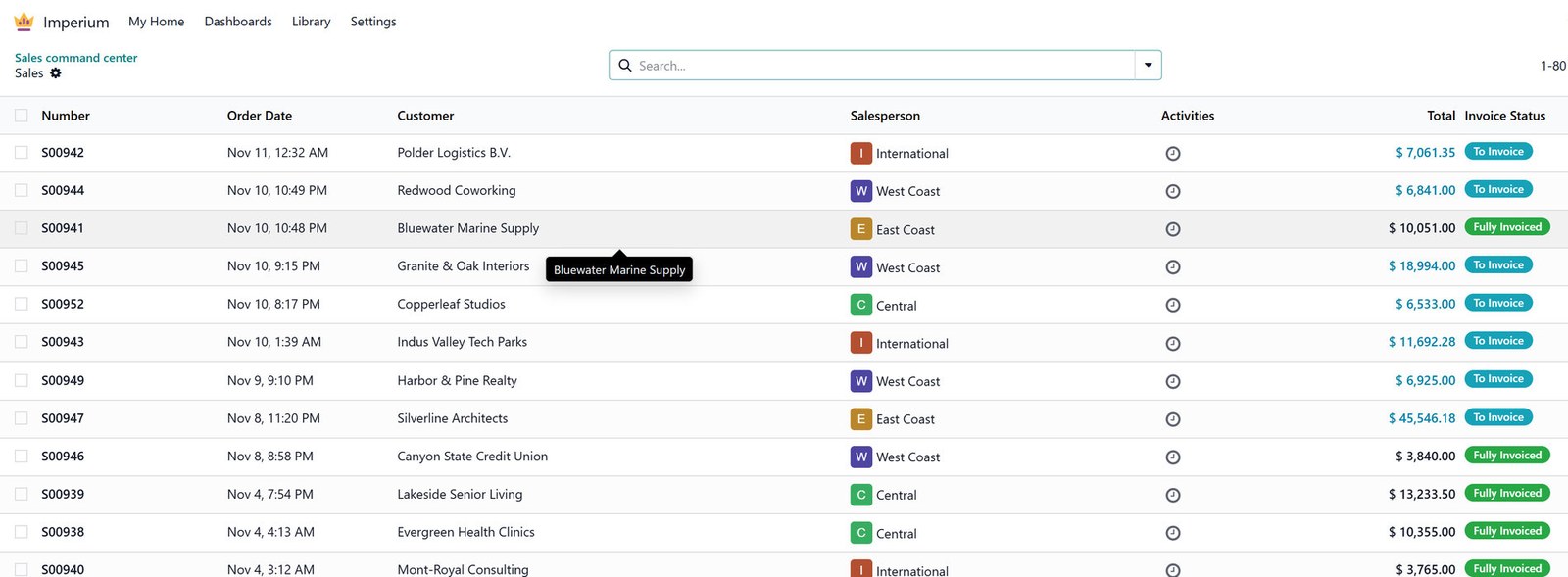
The list is named after the card and the value, such as Sales by salesperson · Marc Demo. A count opens as many records as it says, and a total opens the records it adds up.
On a phone or tablet, the first tap on a bar, slice or point shows its tooltip (Tap again to see the records) and a second tap opens them, so scrolling past a chart never leaves the page.
What Opens
A card built on Sales analysis, Purchase analysis or Invoice analysis opens the orders or invoices behind its lines, one row per order, never the report lines.
When one click holds two kinds of records, such as sales orders and shop orders, the larger kind opens and a notice offers the other, such as Also 4 shop orders · Show them.
A value with no records behind it says No records match this period and these filters. instead of opening an empty list.
Records always follow the dashboard’s period and filters, never a period you compare with.
On a phone, records the app shows as cards (opportunities, orders) open as cards first.
Back to the Dashboard
Odoo’s breadcrumb brings you back to the dashboard as you left it: its period, filters, comparison, open tab and place on the page. The address of the list keeps the dashboard, so a refresh or the link in a new tab brings you back to it too.