
Reporting & Analytics Tools
The MCP Server bundles five families of reporting tools the AI can call to summarise, visualise, and share Odoo data.
Pulse Report — operational health
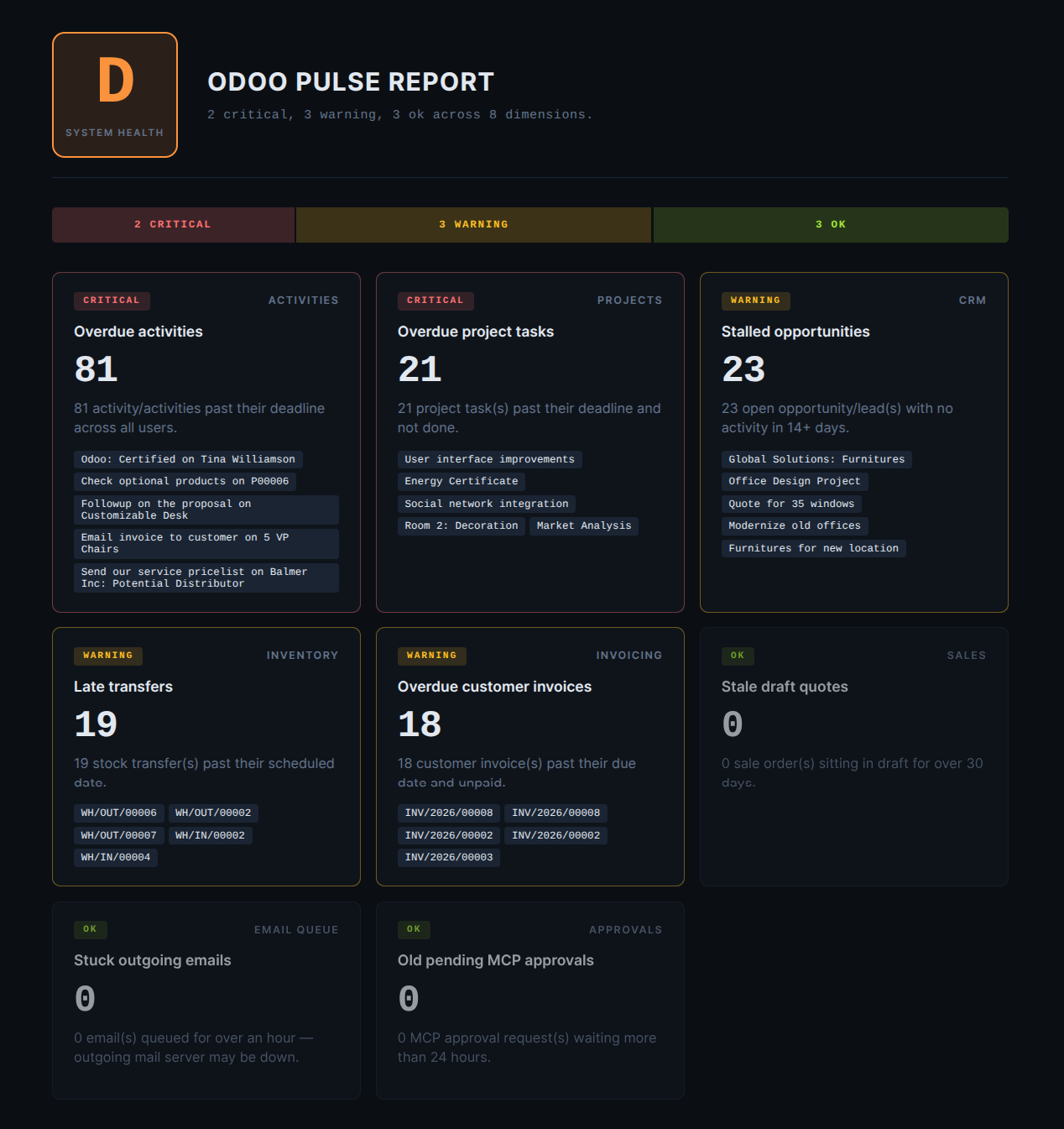
pulse_report runs an operational health diagnostic
across up to eight standard dimensions:
Sales — stale draft quotes older than 30 days.
Invoicing — overdue unpaid invoices.
CRM — stalled opportunities with no activity for 14+ days.
Activities — overdue
mail.activityrecords.Email queue — stuck outgoing emails.
Approvals — MCP approval requests waiting more than 24h.
Inventory — late stock transfers.
Projects — overdue tasks.
The result is graded A–F with a dark-themed HTML dashboard plus structured findings.
Category: read. Risk: low.
Dashboards — compose_dashboard
Build a polished Command-themed dashboard (dark slate background, cyan accent, mono numbers, sparklines, trend deltas). The AI passes a recipe with sections:
kpi/kpi_row— big number tiles with optional sparklines and percent-change pills.chart— bar, line, or donut chart with smart defaults (date groupby auto-detects line; >8 categories auto-becomes horizontal bar; etc.).table— a paged data table with title and “Showing X of N” badge.
Returns html (an inline artifact for clients that can
render HTML) and a schema describing the dashboard’s
contents.
Category: advanced. Risk: low.
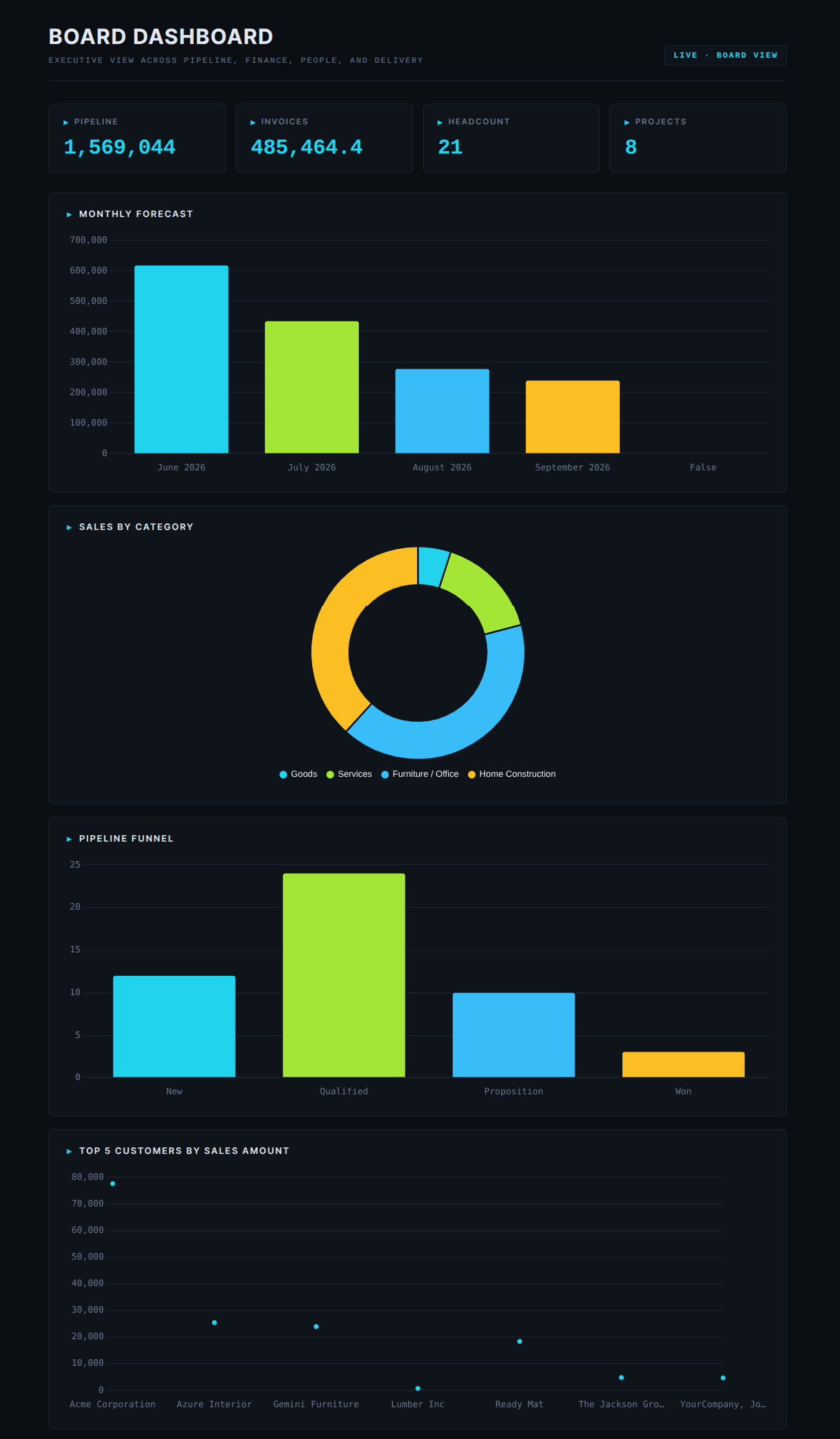
After rendering, the AI asks the user whether to save the
dashboard as a Shared Page. If yes, it calls
save_dashboard_as_page.
Charts — generate_chart, update_chart, compose_chart
The Visualisation Studio. See Charts for the full feature page.
generate_chart— create a reusable chart definition (mcp.chart.ts) with 9 chart types (bar, line, pie, scatter, gauge, radar, funnel, treemap, sunburst).update_chart— patch an existing chart (change type, filter, recolour).compose_chart— render the chart to HTML + structured data for inline display in Claude Desktop / Claude.ai. For clients that can’t render HTML, the AI summarises the top buckets fromdata_points.save_chart_as_page— persist the chart as a token-gated public URL.
Category: write / read. Risk: low.
Odoo reports — generate_report, list_reports
list_reportsLists available reports for a given Odoo model. The AI uses this when the user asks “what reports do you have for customer X?”.
generate_reportRenders an Odoo report (PDF or HTML) and returns a download URL. The user clicks the URL to grab the file.
The Enable Report Generation master toggle in Server Settings can disable this family globally if you do not want the AI to produce printable reports.
Category: read / advanced. Risk: low / medium.
Knowledge tools — knowledge_search, knowledge_read, knowledge_ask
The Knowledge Layer surface — see Knowledge Search Modes for the full feature page.
Briefly:
knowledge_search— hybrid full-text + vector search over everyir.attachmentin Odoo. Returns ranked snippets.knowledge_read— read the full text of one chunk or every chunk of a document.knowledge_ask— one-shot question answering: searches, formats the top chunks as LLM-ready context with citation numbers, and asks the AI to answer using only that context.
All three respect ir.attachment ACLs — users only see
chunks from files they’re allowed to read.
Category: read. Risk: low.
Ontology tools — ontology_describe, ontology_search
The Ontology Layer surface — see Ontology Concepts for the full feature page.
ontology_describe— returns the business concepts available (Party, Order, Transaction…) plus their related concepts.ontology_search— search records by business concept with optional cross-concept filters.
Category: read. Risk: low.
Event tools — subscribe_events, unsubscribe_events
Let the AI subscribe to record changes (create / write / unlink) on any model so it can react when something interesting happens — either back into the running AI session or, more usefully, persistently via an HTTPS webhook that keeps firing long after the chat is closed. See Event Subscriptions for the full feature page and Webhook Delivery for the delivery payload format and signing.
subscribe_events— register a new subscription. Required:model. Optional:event_type(create / write / unlink / all, default all),domain(Odoo domain scoping which records trigger),fields(for write events — fire only when one of these fields changes),webhook_url(HTTPS endpoint that persists beyond the AI session),webhook_payload_template(custom JSON body shape for destinations like Slack / Teams that expect a specific structure), andenrich_fields(dotted field paths to pull from the fired record and expose as template variables).unsubscribe_events— deactivate an existing subscription. Pass thesubscription_idreturned bysubscribe_events.
Category: event. Risk: low.
Session tools — get_session, update_session_context
Each AI conversation gets its own MCP Session with a small JSON context blob the AI can use as short-term memory — recent models, last queries, user-defined bookmarks, the currently “active” record, anything conversation-scoped. These two tools read and write that blob so the next turn can resume from where the previous left off without re-asking the user. See Sessions for how sessions are stored, listed, deactivated, and cleaned up.
get_session— return the current session’s context blob. The AI calls this when it needs to remember what was in focus last (e.g. “continue with the active customer”).update_session_context— patch the context blob with new fields (add a bookmark, change the active record, store a step in a multi-turn workflow).
Category: read. Risk: low.