
Mark As Paid Orders From Odoo To Shopify
You can use this feature to automatically mark an order as Paid in Shopify when it is fully paid in Odoo. If you prefer to manage payment status only from Shopify, you can disable this option so that Odoo does not update the payment status in Shopify.
Method - 1: Manual Mark As Paid Orders In Shopify
Note
The order is in Confirmed (Sale Order) state.
The Shopify payment status is not already Paid, Refunded, Partially Paid, or Voided.
If an invoice already exists with payment status Paid or In Payment, and after enabled the Mark Order as Paid option, the
Mark Order as Paidbutton appears on existing orders.
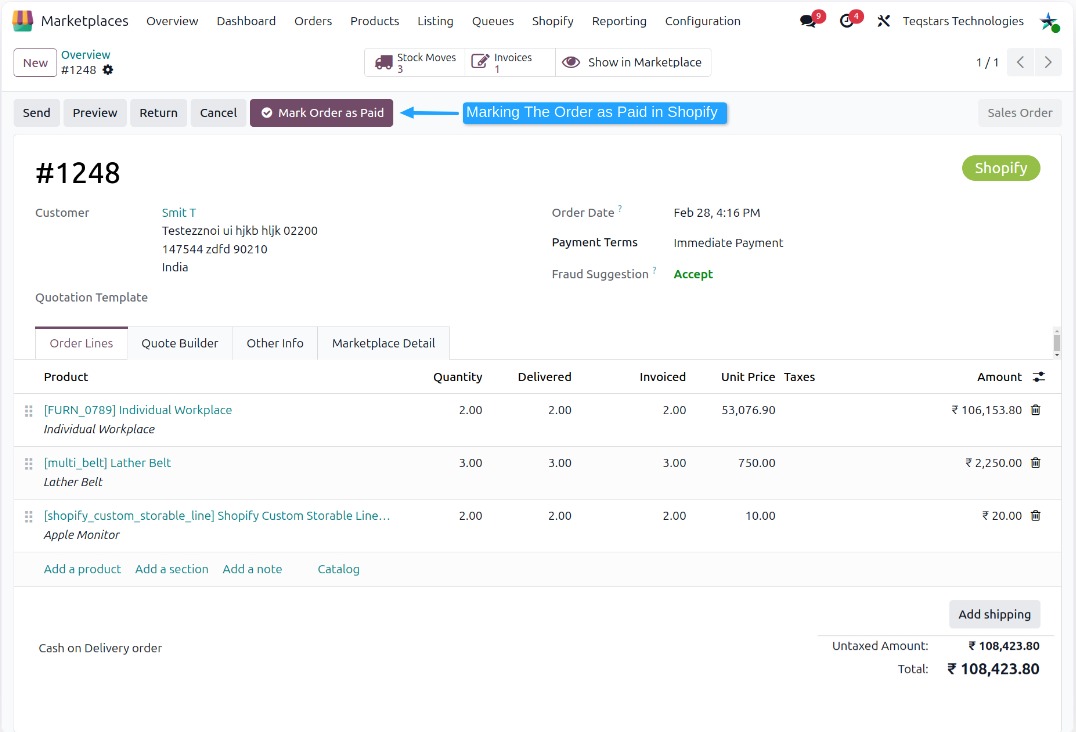
Go to and open the required order.
Make sure the order is fully paid in Odoo.
Click
Mark Order as Paidbutton.This will send the payment update to Shopify.
Once successful, the order is marked as Paid in Shopify.
Method - 2: Automatic Mark As Paid Orders In Shopify
Enable the Mark Order as Paid option in the Order Configuration to use this feature.
When an order is fully paid in Odoo, it is automatically marked as Paid in Shopify.
This ensures that both systems stay in sync without any manual action.
Note
When the order workflow is set to Register Payment, the order is not marked as paid in Shopify.