
PrestaShop Languages
Your PrestaShop store can show product names, descriptions and other texts in several languages. The Languages list shows the languages of your store in Odoo. Each language is matched to an Odoo language, so Odoo knows which text to use when it imports data from PrestaShop.
Languages List
To see the store languages, go to .
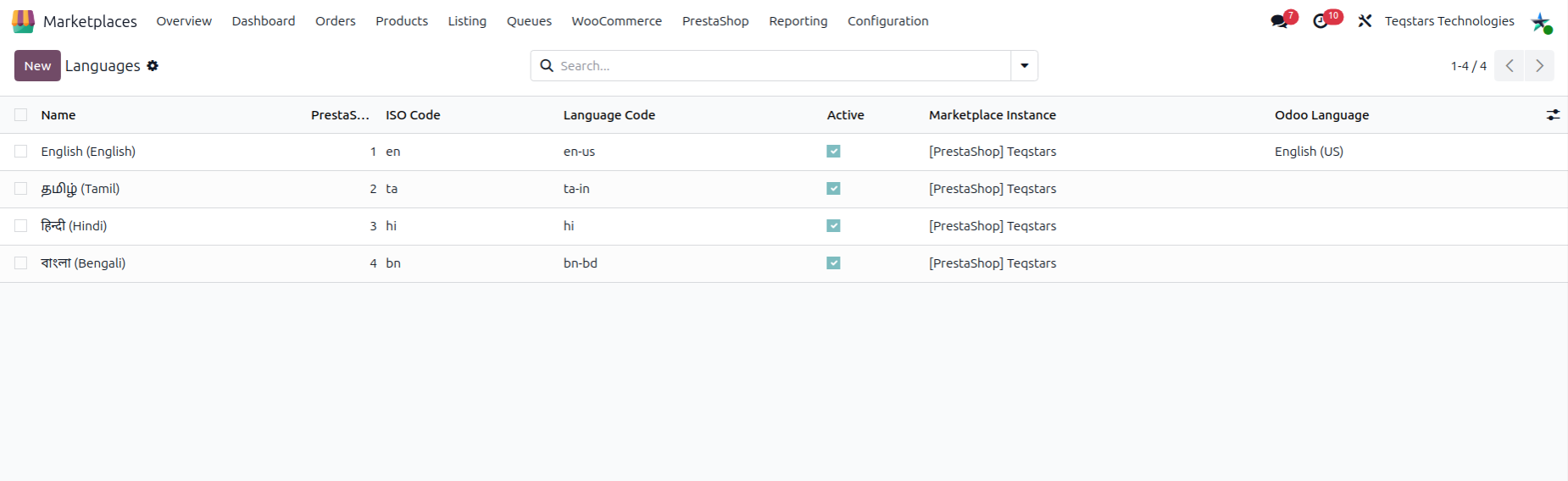
Each language shows the following information:
PrestaShop ID: The ID of the language in your PrestaShop store.
Name: The name of the language.
ISO Code: The short code of the language, as your store gives it (e.g. en or fr).
Language Code: The full code of the language, as your store gives it.
Active: Shows whether the language is active.
Marketplace Instance: The PrestaShop instance the language was synced from. When it is empty, the language is global and not tied to one instance.
Odoo Language: The Odoo language that matches this store language.
Match to Odoo Languages
When you import from PrestaShop, the app matches each store language to an Odoo language by its ISO Code. The result shows in the Odoo Language field.
This match matters because Odoo uses it to read texts that your store keeps in more than one language.
Go to .
Open a language.
Check the ISO Code and the Odoo Language.
