
Product Attribute Mapping
Etsy calls product details such as Color, Size, or Material attributes (item specifics). Odoo has its own product attributes. To make sure the right information is sent to Etsy, the two must be linked. This linking is done with Product Attribute Mapping (attribute-to-attribute) and Product Attribute Value Mapping (value-to-value).
The connector supports mapping at two levels:
Global level - applies across all Etsy categories on the instance.
Category-specific level - applies only to listings in a particular Etsy category.
When a listing is imported or exported, the connector first looks for a category-specific mapping for that listing’s Etsy category. If none is found, it falls back to the global mapping. What happens when neither is found depends on the direction:
- Import (Etsy to Odoo): the listing is not imported. The queue line fails and the log names the Etsy attribute or value that has no mapping.
Add the mapping and retry the failed line.
Export / Update (Odoo to Etsy): the Odoo attribute is left out of the variant properties without an error. A variation listing exported without mappings therefore has no variant properties on Etsy.
Global Level Mapping
Use the global level when an Odoo attribute should map to the same Etsy attribute everywhere - for example, your Odoo Colour attribute always maps to the Etsy Primary color property regardless of the listing category.
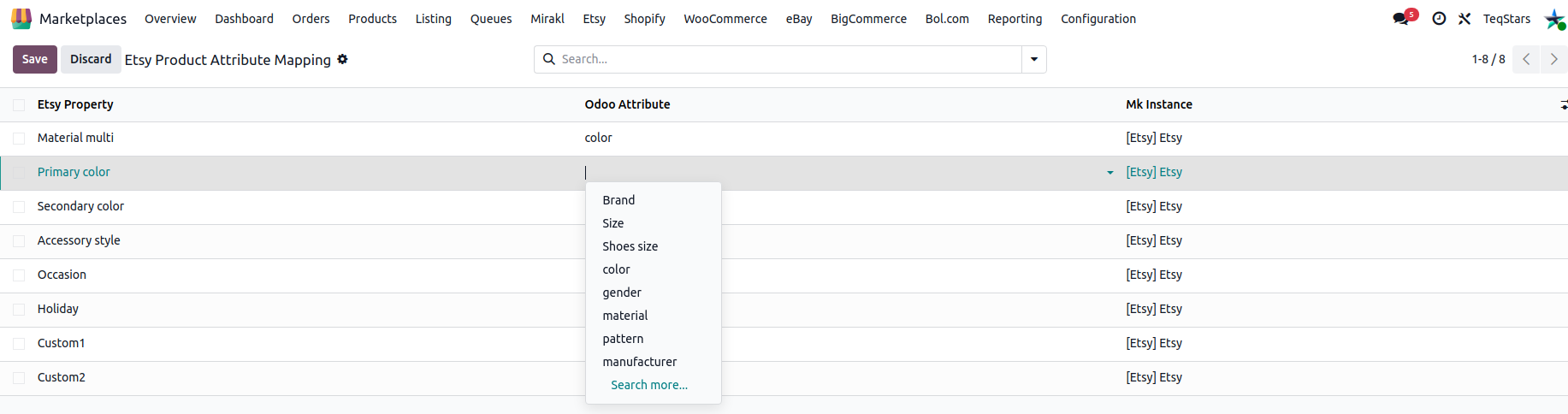
Product Attribute Mapping (Odoo attribute ↔ Etsy attribute)
Go to .
The lines are created automatically for every Etsy attribute (taxonomy property) when the properties of a category are fetched. You cannot add lines or change the Etsy Attribute; pick the matching Odoo Attribute on each line. Lines with no Odoo attribute can be found with the Not Matched Yet filter.
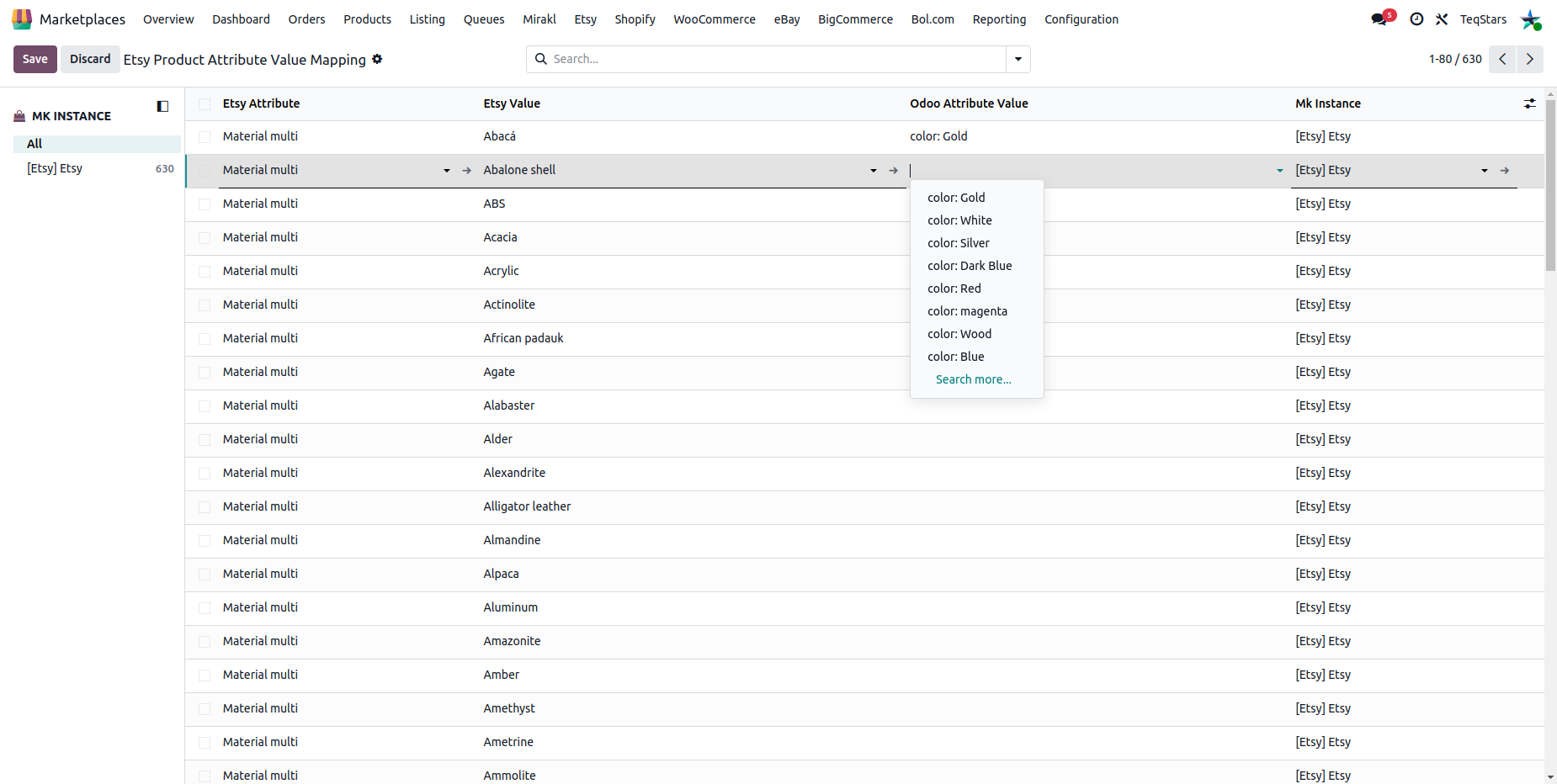
Product Attribute Value Mapping (Odoo value ↔ Etsy value)
Go to .
Pick the Etsy Attribute, the Etsy Value, the matching Odoo Attribute Value, and the Instance. Allowed Odoo values are limited to the values of the Odoo attribute linked through the Attribute Mapping above; when the Etsy attribute is not mapped yet, every Odoo value can be selected. The same Etsy value can only be mapped once per instance.
Category-Specific Level Mapping
Use the category-specific level when an Odoo attribute should map differently depending on the listing’s Etsy category - for example, your Odoo Size attribute may need to use Ring Size for jewelry categories and Shoe Size for shoe categories.
Go to and open the category you want to configure.
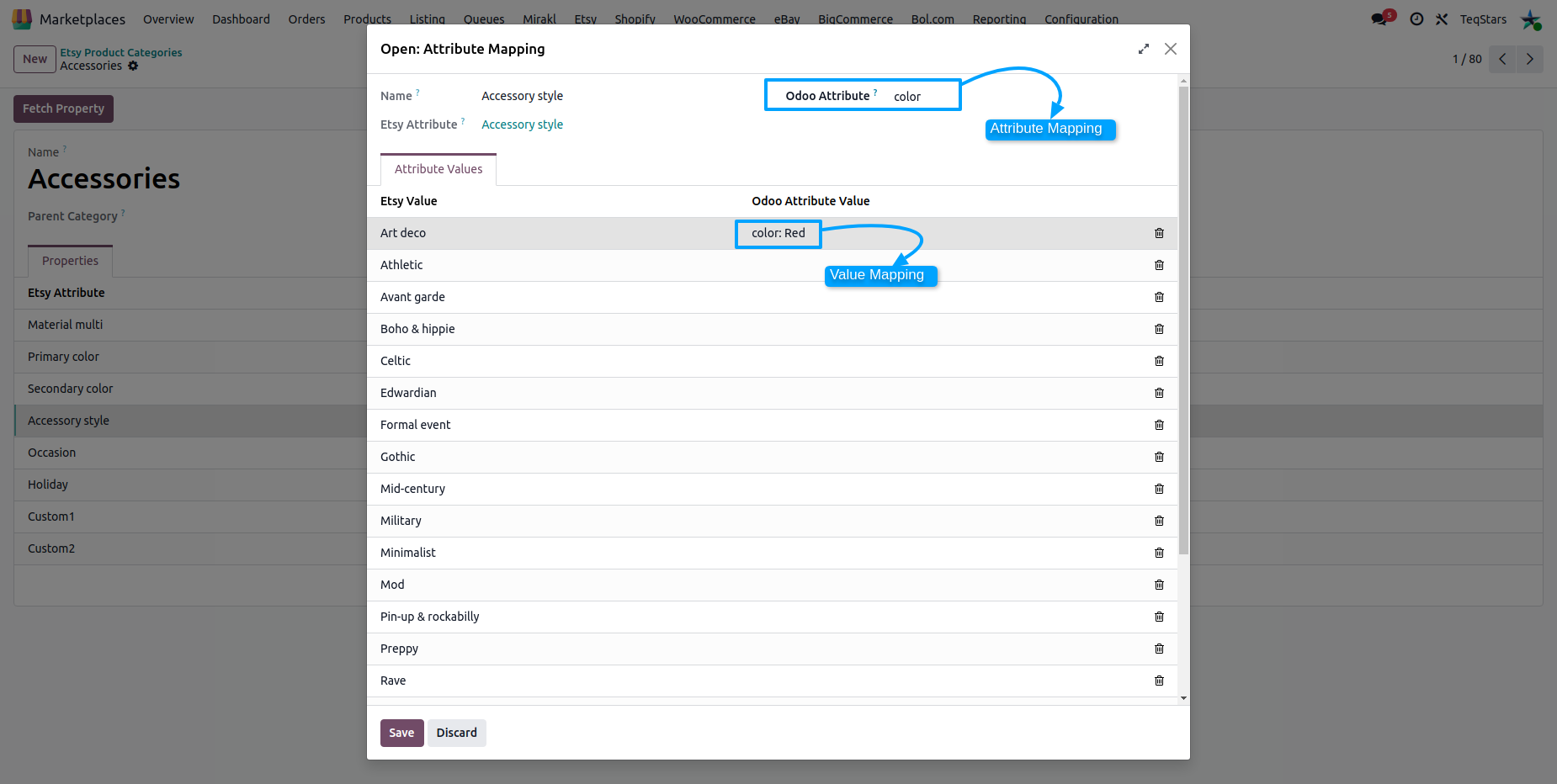
On the category form, open the Properties tab. It lists the Etsy attributes fetched for this category (use Fetch Property if it is empty). Lines cannot be added or deleted; pick the matching Odoo Attribute on each line. These mappings apply only to listings in this category. If the same Odoo attribute is selected on two lines, only the first one is used on export.
Open an attribute line to review or change its Value Mappings (Etsy value ↔ Odoo value) so per-category values are sent correctly.
Tip
When you fetch a category’s properties (see Product Categories), Odoo auto-maps an Etsy value to an Odoo value if both have the same name. Unmatched entries are created so you can map them manually.
How values are auto-mapped
During the property fetch, Odoo creates an Etsy value record for every allowed Etsy value.
If an Odoo attribute value with the same name (not case-sensitive) already exists, the value mapping is filled in automatically. Likewise, an Etsy attribute is linked automatically to the Odoo attribute with the same name.
If not, the value mapping line is created empty so you can map it manually later.
Why it matters
Etsy only accepts attribute values from its own list. Mapping prevents export errors caused by unknown values. A mapped Odoo value that has no Etsy value ID is sent by name only.
Correct attributes help buyers filter and find your listing on Etsy.
Note
If an export fails because of an attribute value, check that the Odoo value has a matching Etsy value in the corresponding Value Mapping (category-specific first, then global).
See also