
Webhook Delivery
When an Event Subscription has a Webhook URL, the MCP Server sends every matching event to that URL as an HTTP POST. This page describes the payload, the security envelope, and the per-attempt delivery log.
Payload shape
By default Odoo posts a generic JSON body containing the event metadata (event id, model, event type, record ids, user id, timestamp). Endpoints that accept arbitrary JSON work straight away.
When the destination expects a specific shape (Slack,
Microsoft Teams, Discord …), the AI sets a custom
Payload Template at the moment it creates the
subscription via the subscribe_events tool. You will
see the rendered body on each row in the Deliveries
log — that is the only place an admin normally needs to
look. There is no need to author templates by hand; let the
AI build them from the user’s request.
Tip
If a webhook receiver rejects messages (HTTP 400 / 422), open one of the failed delivery rows, copy the actual payload, and compare it with what the receiver expects. Then ask the AI to update the subscription template accordingly — “the Slack webhook expects this shape: … please update the subscription”.
Webhook Secret (HMAC-SHA256)
Set a Webhook Secret on the subscription to sign every outgoing POST:
The header
X-MCP-Signaturecarriessha256=<hex_digest>of the request body.Your endpoint reproduces the digest using the shared secret and compares — equal digest = authentic call.
Use a long, random secret (32+ bytes). Rotate it by editing the field; the next delivery uses the new value.
Per-delivery log
Each webhook attempt creates an mcp.webhook.delivery row
under the subscription. The form view shows:
Status — success, failed, pending.
Response Code — the HTTP status the endpoint returned.
Payload — the exact body that was posted.
Response Body — the body returned by your endpoint.
Created on — timestamp.
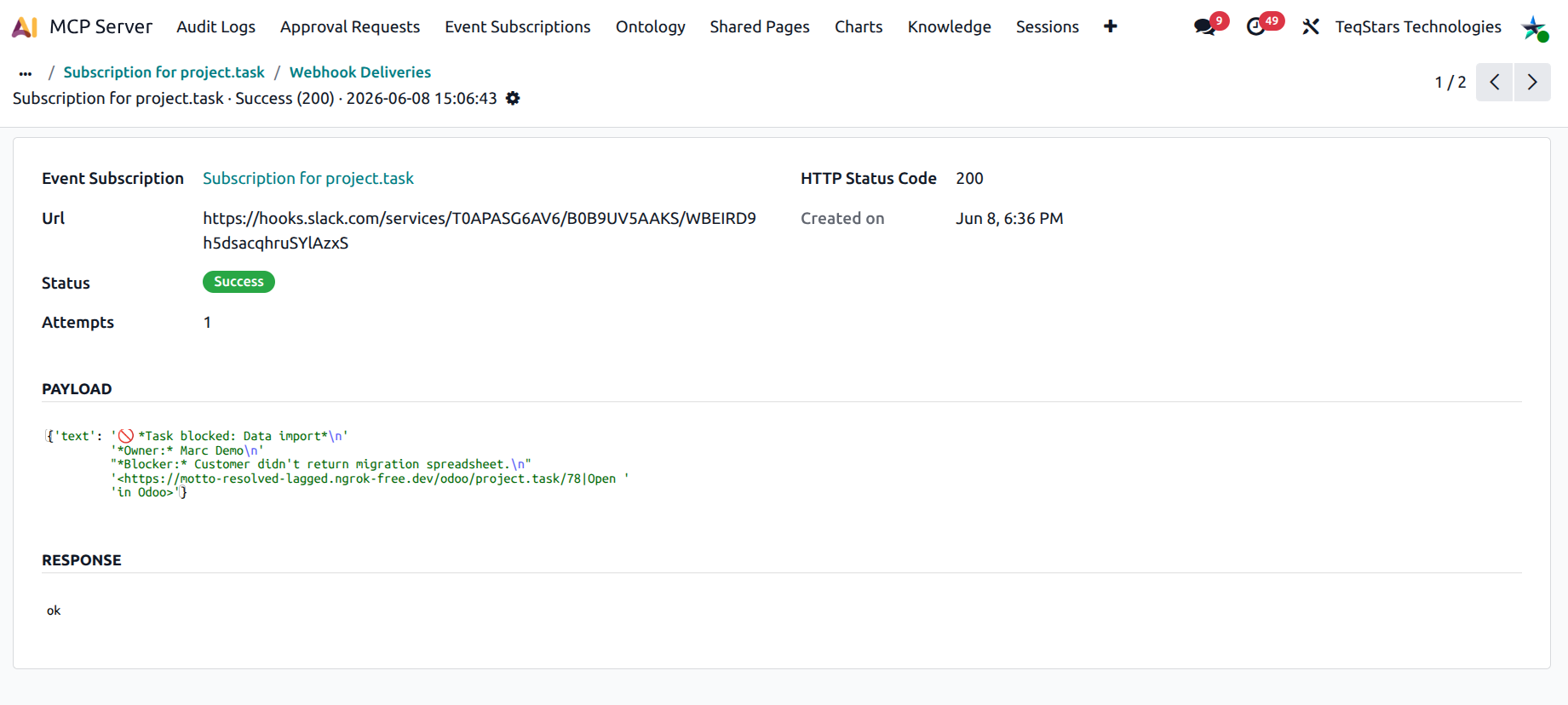
The subscription’s Last delivery status field mirrors the most recent delivery’s status as a coloured badge in the list view, so you can spot subscriptions that need attention.
Note
Delivery is one-shot per event in this release: the server posts to the URL once, with a request timeout, and records the outcome on the delivery row. There is no automatic retry / exponential backoff. If your endpoint was briefly down, the event for that moment is non-recoverable. Plan your receiver accordingly (e.g. an internal queue / relay that buffers requests).
What goes wrong, and how to fix it
404 from endpoint — the URL is wrong; update it on the subscription.
401 / 403 from endpoint — your endpoint expects a signature header or an auth token — set the Webhook Secret or change the URL.
5xx / timeout from endpoint — the receiving service is down. Because delivery is one-shot, that event is lost. Fix the receiver, then ask the user to repeat the Odoo action so a fresh event fires.
400 / 422 from endpoint — the payload shape is wrong; add or fix the Payload Template.
Each failure increments the subscription’s Failure count — a quick sort lets you spot the noisiest endpoints.
See also