
Update Walmart Listings From Odoo
Updating changes listings that already exist on Walmart. Unlike creating a listing, updating lets you choose what to send, and price and inventory can be updated from any marketplace.
Note
Updating details and images is available for the United States marketplace only, because it relies on the Walmart product-type specifications. Updating price and inventory works for every marketplace. See Walmart Supported Marketplaces.
Update A Listing
As with exporting, you can either select the listings you want or run the operation for the whole instance.
From The Listing List
Go to and tick the listings to update.
Click Export/Update to Marketplace.
Choose what you want to update, then click Update Listing.
Note
The button is on the listing list, not on an individual listing. Select only listings that are already on Walmart; if you select a mix, the listings that have never been exported are ignored, since they require a different operation.
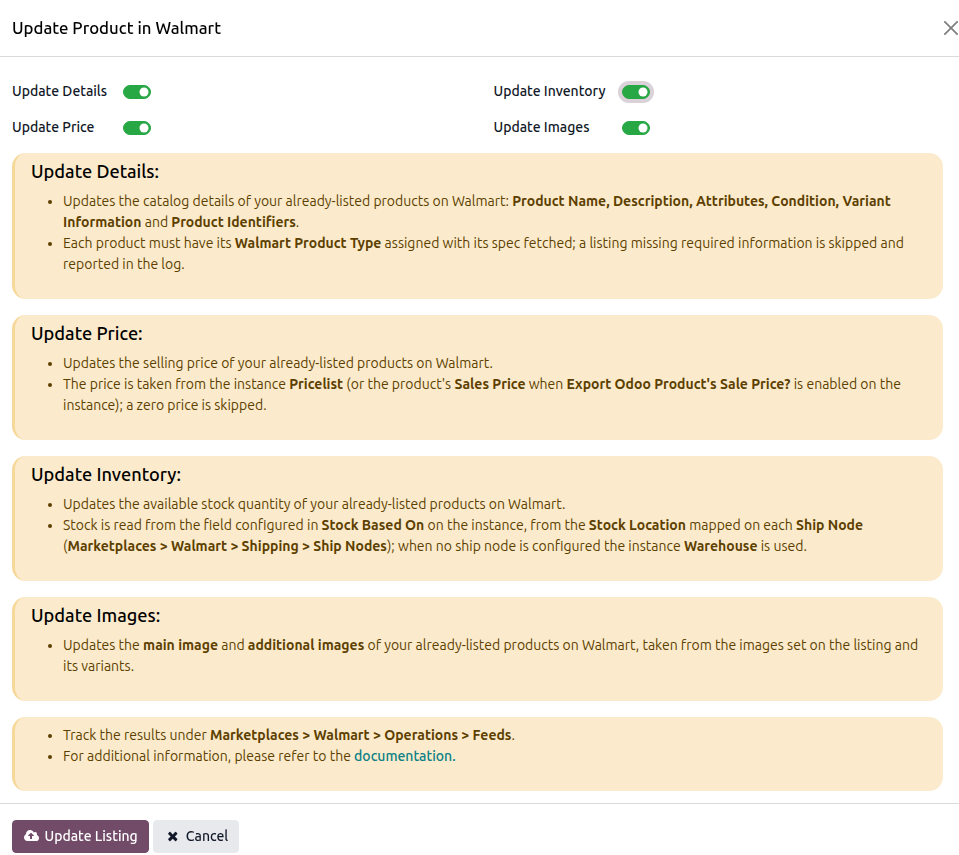
From The Operations Popup
To update everything on the instance, open the Operations button from the instance record, select
Export Operation, then Update Listings, and press PROCESS. See
Operations.
What You Can Update
Update Details: product name, description, attributes, condition, variant information and product identifiers. United States only.
Update Price: the price from the instance pricelist. All marketplaces.
Update Inventory: the stock quantity, based on your Stock Based On setting. All marketplaces.
Update Images: the images attached to the listing. United States only.
Note
On a United States instance the dialog opens with Update Details selected only, so tick Update Price or Update Inventory if you want those sent too.
On a Canadian, Mexican or Chilean instance, Update Details and Update Images are not shown, and the dialog opens with price and inventory selected.
Note
Selecting Update Details or Update Images on a non-United States instance is refused with “Updating product details or images is available for the US marketplace only. Price and inventory can be updated for any marketplace.”
Each selection is sent to Walmart separately. Details and images are sent in one feed, while price and inventory are sent in separate feeds. This means one part of an update can succeed while another is still being processed.
Track each one under . See Walmart Feed Management.