
Map Odoo Attributes To ManoMano Attributes
ManoMano describes products with its own attributes, such as a colour or a material, and often with its own list of accepted values.
The ManoMano Connector fills these attributes in the product feed from the attribute values of your Odoo products.
To do this, you match each ManoMano attribute with an Odoo attribute, then each Odoo value with a ManoMano value.
The ManoMano attributes must be in Odoo first. See Import Attributes From ManoMano.
Instance Attribute Settings
Three options on the instance control which attributes are filled and what happens to values that are not matched. Go to and open your ManoMano instance.
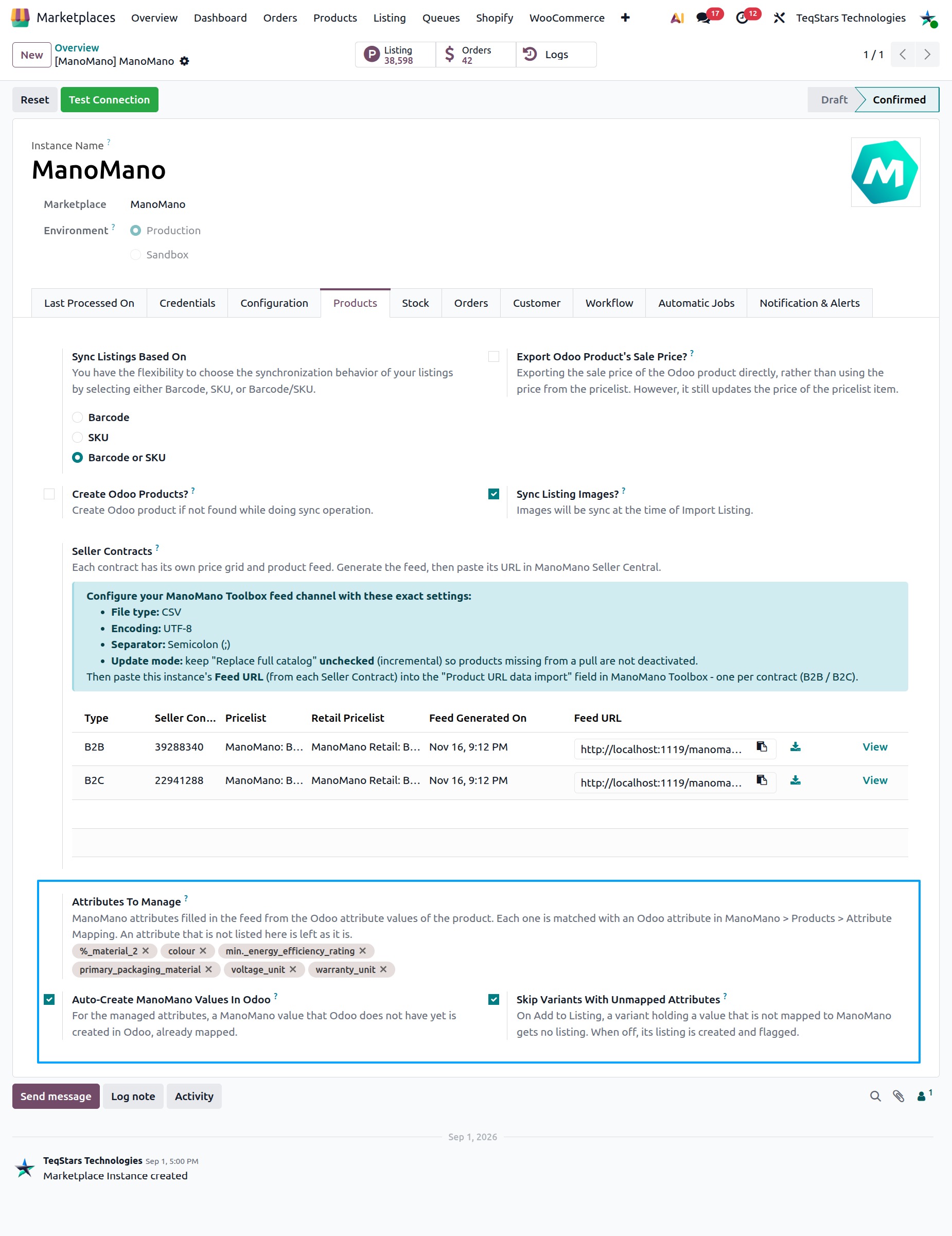
Attributes To Manage
The ManoMano attributes filled in the feed from the Odoo attribute values of the product. Each one is matched with an Odoo attribute in .
Only managed attributes are matched, filled in the feed and checked when you click Add to Listing.
Auto-Create ManoMano Values In Odoo
For the managed attributes, a ManoMano value that Odoo does not have yet is created in Odoo, already mapped.
This saves you from creating and mapping each value by hand.
Skip Variants With Unmapped Attributes
When enabled, on Add to Listing, a variant holding a value that is not mapped to ManoMano gets no listing.
When disabled, its listing is created and flagged, so you can fix it later.
Attribute Mapping
The attribute mapping tells Odoo which Odoo attribute holds the values of each ManoMano attribute.
Go to .
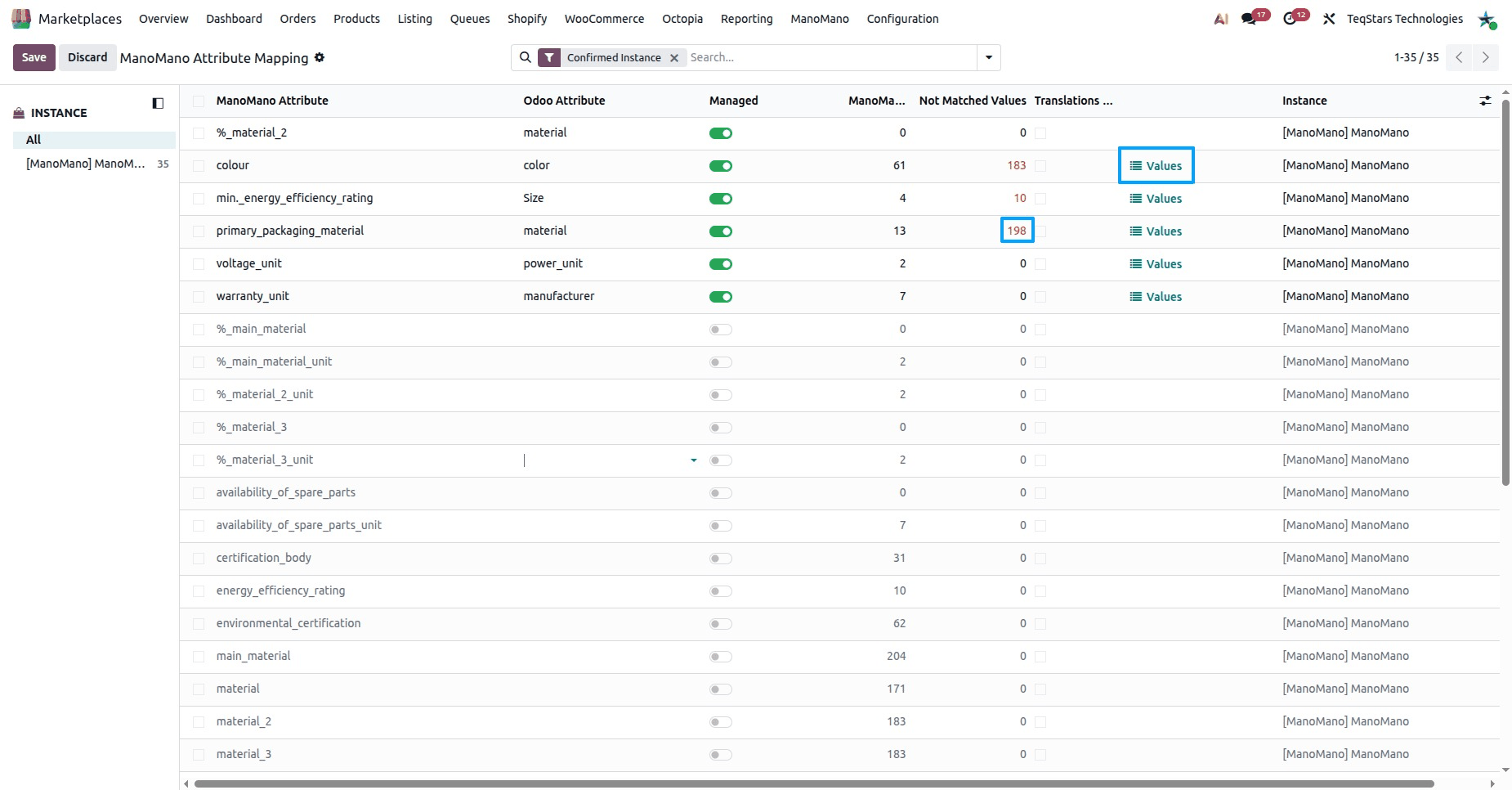
Find the ManoMano attribute in the list. Each line shows:
ManoMano Attribute: the attribute as ManoMano names it.
Odoo Attribute: the Odoo attribute whose values are sent to ManoMano for this attribute.
Managed: only managed attributes are matched, filled in the feed and checked on Add to Listing.
ManoMano Values: the number of values ManoMano accepts. Without a list of accepted values, the Odoo value is sent as it is.
Not Matched Values: the number of values that are not mapped yet.
Translations Not Aligned: ManoMano gave a translated list of another length than the English one, so its values are kept in English only.
Select the Odoo Attribute that matches the ManoMano attribute.
Click Values to open the values of this attribute and map them. See Attribute Value Mapping below.
Note
When you change the Odoo attribute or the Managed option, Odoo keeps the time of the change. The listings using this attribute are sent again.
Attribute Value Mapping
The value mapping tells Odoo which ManoMano value to send for each Odoo value.
Go to , or click Values on an attribute mapping.
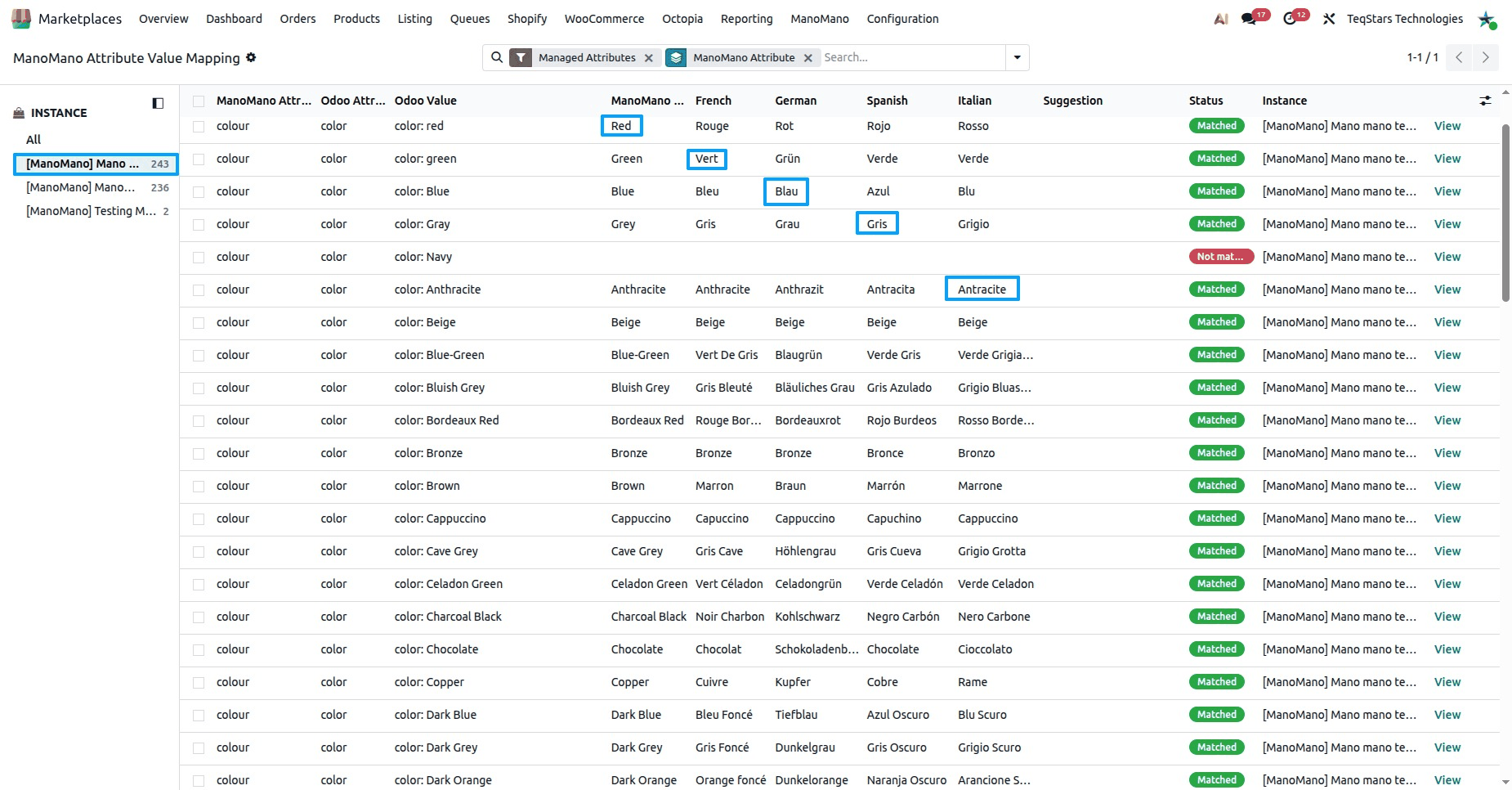
Each line shows:
ManoMano Attribute and Odoo Attribute.
Odoo Value: the value on your Odoo products.
ManoMano Value: the value sent to ManoMano for this Odoo value, in English, as ManoMano lists it.
German, Spanish and Italian: the translations of the ManoMano value. See Translations.
Suggestion: the closest ManoMano value found by name. It is used only once you accept it.
Matched By: how the value was matched:
Same Name,Created In Odoo,Accepted SuggestionorBy Hand.Status:
Matched,Not matchedorRemoved by ManoMano.
For a value that is
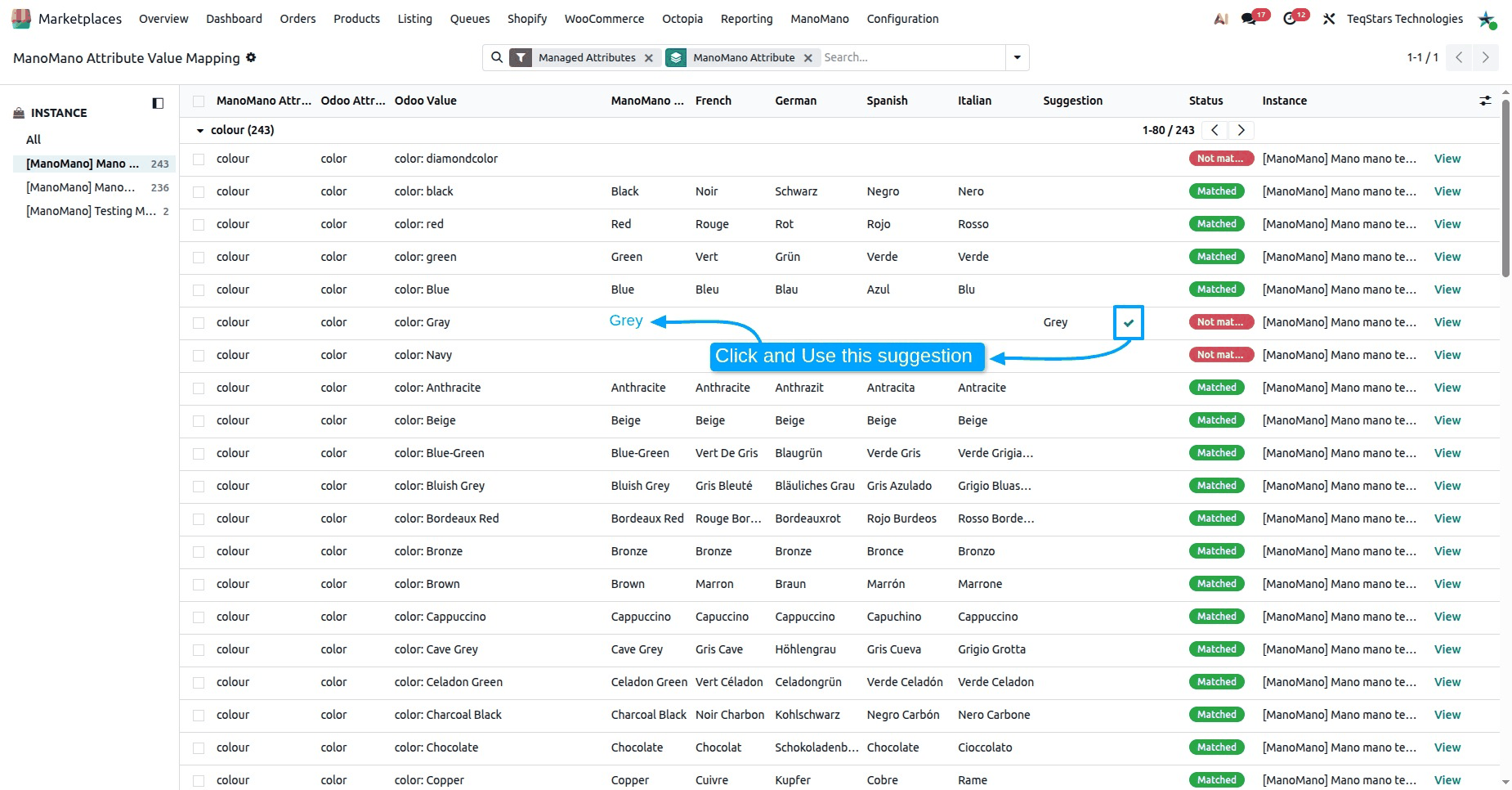
Not matched, set the ManoMano Value by hand, or accept the suggestion.
Important
The ManoMano Value must be one of the values ManoMano lists for the attribute. Otherwise Odoo shows “‘value’ is not a value of the ManoMano attribute ‘attribute’.”
Note
A value with the status Removed by ManoMano is no longer listed by ManoMano, so it is not sent in the feed. Map the Odoo value to another ManoMano value.
Accept Suggestions
Odoo looks for the closest ManoMano value by name and shows it as the Suggestion. A suggestion is never sent until you accept it, so you stay in control of what reaches ManoMano.
To accept one suggestion, click Accept this suggestion on its line.
To accept many at once:
Go to .
Select the lines whose suggestions you want to keep.
Click Accept Suggestions.
The suggestion becomes the ManoMano Value and the line shows Accepted Suggestion in Matched By.
Tip
Check each suggestion before you accept it. It is found by name only, so a close name is not always the right value.
Translations
The ManoMano Value is the English text. Its translations come from ManoMano and show in the German, Spanish and Italian columns.
You do not type the translations: they follow the value you pick.
When ManoMano gives a translated list of another length than the English one, the attribute shows Translations Not Aligned and its values are kept in English only.
When ManoMano gives no text in a language for a value, the English text is sent and the log notes “ATTRIBUTE MAPPING: ManoMano gives no … text for ‘value’ (attribute), so the English text was sent.”
ManoMano Attributes On A Listing
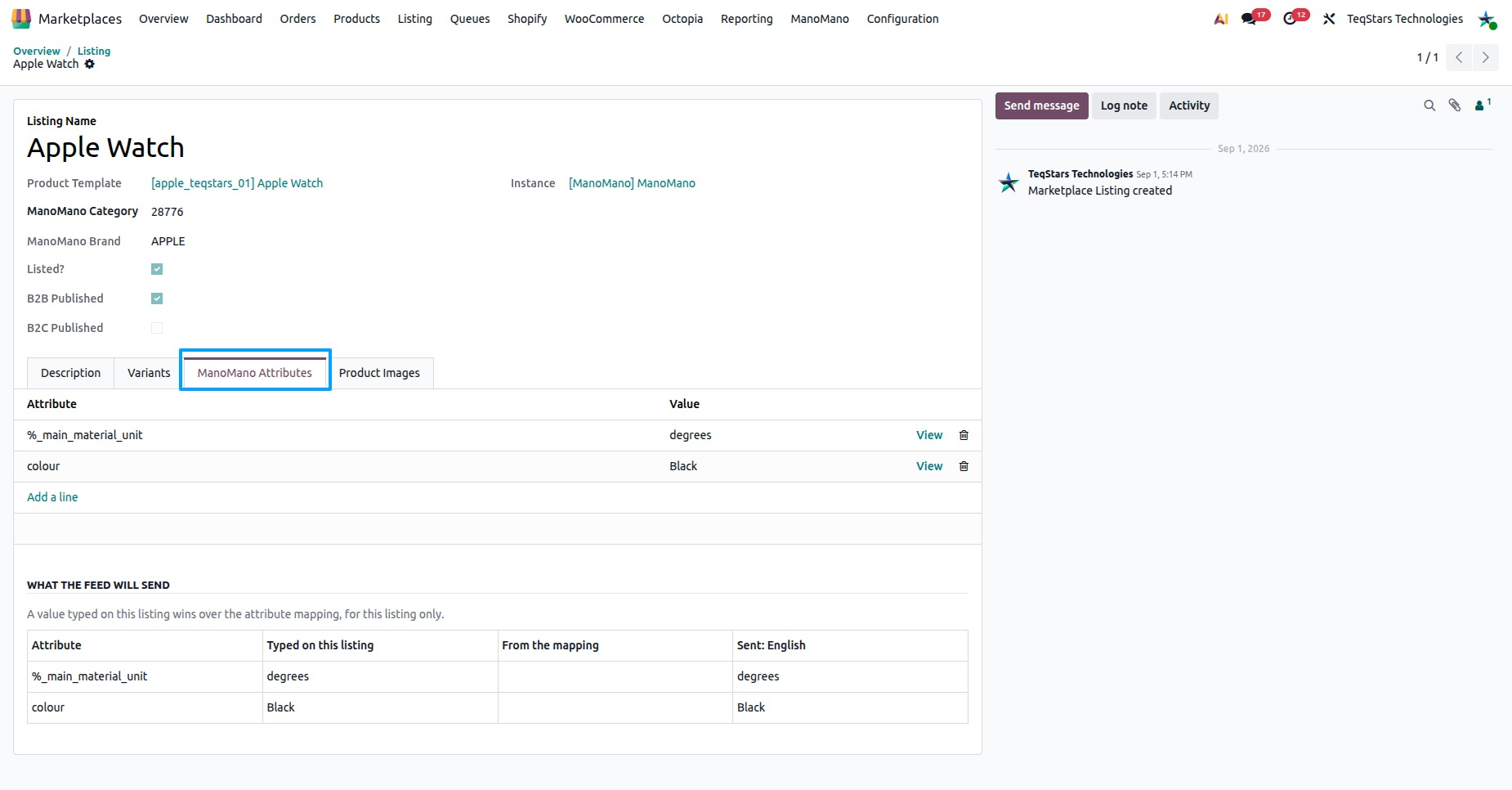
Each listing shows what is sent for its attributes, and lets you set a value for that listing only.
Go to and open a ManoMano listing.
Open the ManoMano Attributes tab.
The Attribute Mapping Preview shows, for each variant and each attribute, the value sent to ManoMano and where it comes from:
From the mappingorTyped on this listing. A value that isnot mappedis markedleft out. An attribute without a list of accepted values issent as it is.Under ManoMano Attributes, pick an Attribute and type its value to set it on this listing.
Important
A value typed on this listing wins over the attribute mapping, for this listing only.
Several values are separated by
#, for exampleBlue#Orange. This works only when the attribute accepts more than one value. Otherwise Odoo shows “The attribute ‘…’ accepts only one value.”When the attribute has a list of accepted values, the value must be in it. Otherwise Odoo shows “… is not accepted for ‘…’. Pick one of the values ManoMano allows.”
When ManoMano has no list for an attribute, it accepts any free text.
Unmapped Values In The Feed
When a product attribute value of a listing is not mapped to a ManoMano value, the listing shows: “A product attribute value of this listing is not mapped to a ManoMano value, so it is left out of the feed.”
What happens in the feed depends on the attribute:
The attribute is not mandatory: the product is written to the feed without this attribute. The log notes “ATTRIBUTE MAPPING: SKU ‘…’ was written to the feed without ‘…’ - the Odoo value ‘…’ is not mapped to a ManoMano value.”
The attribute is mandatory: the product is not written to the feed. The log notes “ATTRIBUTE MAPPING: SKU ‘…’ was not written to the feed - the mandatory attribute ‘…’ holds the Odoo value ‘…’, which is not mapped to a ManoMano value.”
To fix it:
Go to and read the ATTRIBUTE MAPPING lines.
Map the value in , or type the value on the ManoMano Attributes tab of the listing.
Check that the attribute is in Attributes To Manage on the instance and has an Odoo Attribute in the attribute mapping.
To keep such variants from being listed at all, enable Skip Variants With Unmapped Attributes on the instance. For how the feed is built and sent, see ManoMano Product Feed.