
Who Can Manage Access
Managing access is a sensitive task, so Smart Access Manager provides three dedicated user groups: User, Manager, and Security Officer.
You can assign these groups from .
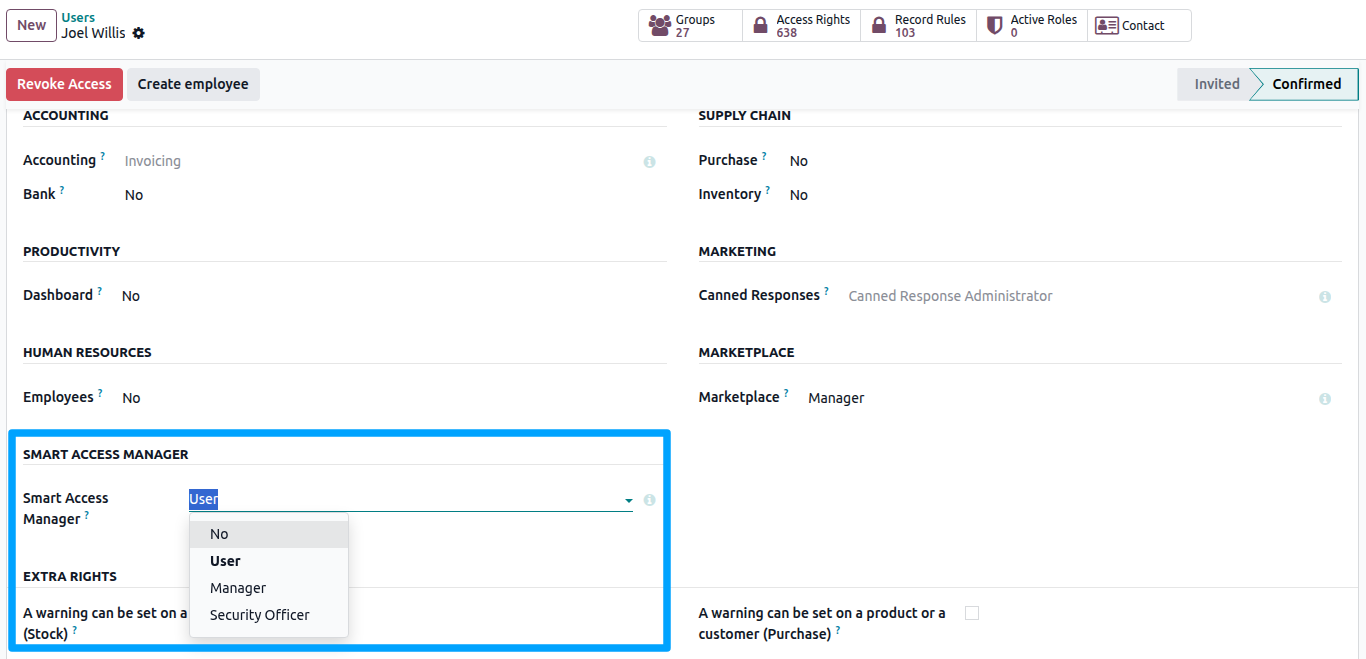
Access Levels
Each level includes all permissions from the level below it.
Group |
What the person can do |
|---|---|
User |
Access the Smart Access menu and submit Access Requests. Users can view and follow requests they created or that concern them. Other Smart Access features are available only to Managers and Security Officers. |
Manager |
Includes all User permissions, plus the ability to create and manage roles and templates, use the Access Board, grant or revoke access, approve or reject requests, use the Element Inspector, and review risk scores and alerts for all users. |
Security Officer |
Includes all Manager permissions, plus advanced governance features such as Conflict Rules (Segregation of Duties), Activity Logs, Audit Reports, protected System role templates, and Security Officer Overrides for approved access conflicts. |
Note
Users who are not assigned any Smart Access Manager group will not see the Smart Access Manager app. However, any restrictions from roles assigned to them will still apply throughout Odoo.
Administrators
Users with Settings (Administration: Settings) automatically receive the Security Officer level, making Smart Access Manager ready to use after installation.
Administrators are protected from accidental lockout. The following restrictions do not apply to users with Settings or Access Rights:
Block Login
Kill Switch
Global Read-Only
Block External API
Smart Access Manager also prevents these restrictions from being assigned to such users.
Important
To restrict an administrator with Smart Access Manager, first remove their Settings / Access Rights permissions and then assign the required Smart Access role.
Recommended Role Separation
For businesses that require strong governance, it is recommended to separate daily access management from security oversight:
Managers handle day-to-day access operations, including assigning roles, managing access requests, and using the Access Board.
Security Officers manage security governance, including Conflict Rules, approved exceptions, and audit records.