
Import Customers In Odoo
The connector brings your Shopify customers into Odoo in three ways:
With every order. The customer, the billing address and the shipping address of the order are created or reused in Odoo.
With the Import Customers operation. See the steps below.
With the Create Customer webhook, when you enable it. See Webhook Configurations in Create a Shopify instance in Odoo.
All three ways use the same matching rules to decide if a customer is new or already exists in Odoo. This page explains these rules in simple words, including what happens with existing customers and with companies.
Note
In short
The connector looks for an existing contact before it creates a new one, so the same Shopify customer is reused.
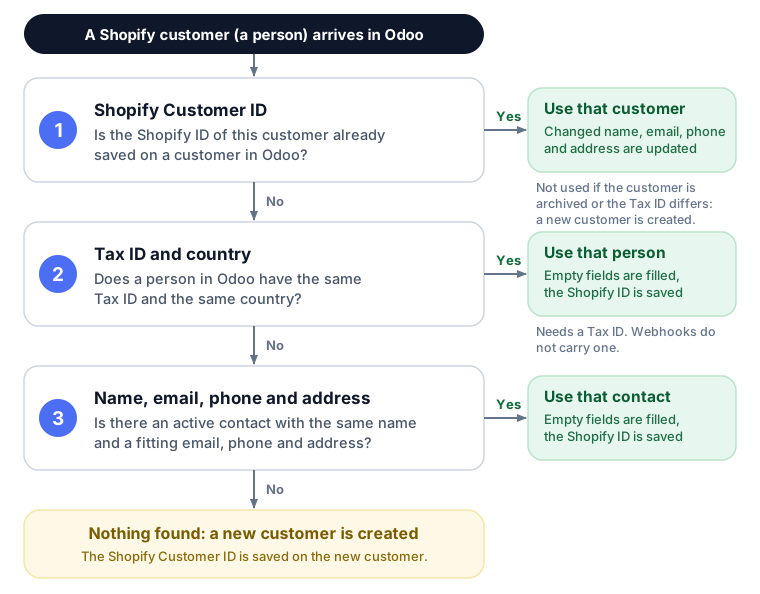
It looks in this order: the Shopify Customer ID, then the Tax ID with the country, then the name, email, phone and address.
If it finds the customer, it reuses it. If not, it creates a new one.
For an order, the invoice address and the delivery address are saved as separate contacts under the customer (or under its company).
With Create Company Contact? enabled, a company name in an address creates a company.
This page describes the customer flow of connector version 19.0.1.3.0 and later. One difference for webhooks: the connector gets no Tax ID with webhooks, so the Tax ID rules do not apply to a customer that arrives by webhook.
Import customers
To import customers in Odoo from Shopify, please follow these steps:
Go to the menu in Odoo.
Click on the
Operationsbutton from the instance record.Select Import Operation and then select Import Customers option.
Press
PROCESSbutton.
This will start fetching customer data from Shopify stores and add it to the Customer Queue for processing. A scheduled/cron job will then start processing the queues one by one. The job will only process customers that have been updated after the Last Customer Imported On. If the last execution date is not found, the job will fetch all the customers. You can find the details of the last execution of the import operation under a particular instance’s Last Processed On configuration.
You can import specific Shopify customers by entering their IDs in the Marketplace Customer ID field, separated by a comma (,) e.g. 5869502038181, 9869502038181.

Note
Customer configuration will be used while import and process customers.
The Import Customers operation and the Create Customer webhook bring the customer with the default address only. The invoice and delivery addresses are added with the orders.
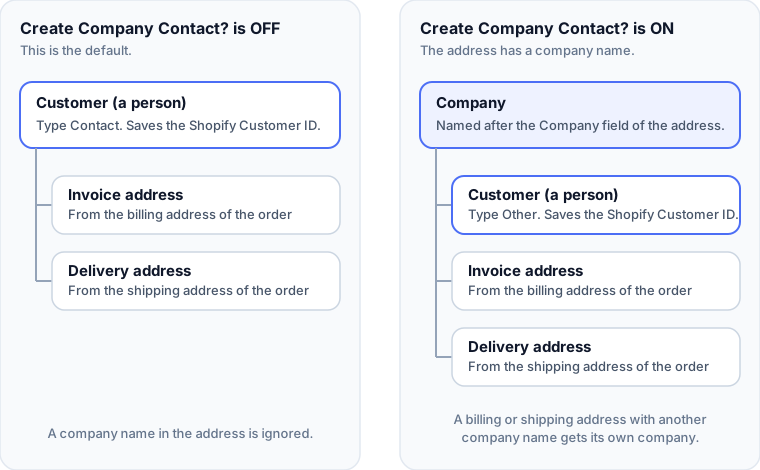
When Create Company Contact? is enabled and the default address has a company name, the address is saved on the company. The person under the company has no address of its own.
What the connector creates in Odoo
For an order, the connector works with three contacts. With companies enabled, it can add up to three companies.
Contact in Odoo |
Comes from |
Address type in Odoo |
|---|---|---|
Customer |
The Shopify customer: first name and last name. It holds the Shopify Customer ID. |
Contact (Other when the customer belongs to a company) |
Invoice address |
The billing address of the order |
Invoice |
Delivery address |
The shipping address of the order |
Delivery |
Company |
The Company field of an address, only when Create Company Contact? is enabled |
Contact, set as a company |
The sales order uses the customer as Customer, the invoice address as Invoice Address and the delivery address as Delivery Address. If an order has no billing or shipping address, the customer is used in its place.
When the order has them, the three are separate contacts, even when the addresses are the same.
The customer is named after the first and last name of the Shopify customer. If both are empty, the connector uses the name of the address, then the email. The invoice and delivery addresses use the name written in their own address.
Every contact that the connector creates or reuses gets the Shopify tag.
A new contact gets the pricelist and the Receivable Account of the instance, when they are set.
How the connector finds an existing customer
When a Shopify customer arrives, the connector checks the steps below in this order and stops at the first match. The steps are for the customer, a person. Invoice addresses and companies have their own rules, described further down.
Step 1: Shopify Customer ID
Every customer in Shopify has a number, the Shopify Customer ID. The first time a customer is imported, the connector saves this number on the Odoo customer. From then on, the number is the only thing the connector checks. It does not matter if the name, email or address changed.
You can see the number on the contact, in the Shopify tab. You can also search for it in the contacts list.
There are two exceptions. In both, the connector creates a new customer and moves the Shopify Customer ID to it:
The customer is archived in Odoo.
The customer does not belong to a company, and the order has a Tax ID that differs from the Tax ID already saved on the customer.
Step 2: Tax ID and country
If the number is not saved yet, and Shopify sent a Tax ID (VAT number) and a country, the connector compares them with the persons in Odoo that do not belong to a company. If both are the same, it is the same customer, even if the name, email, phone or address are different.
Capitals and spaces are ignored:
ro123456andRO 123456are the same Tax ID.The same Tax ID in a different country is not a match. The connector then goes on with step 3.
This step is skipped when the customer belongs to a company, and for customers that arrive by webhook, because they have no Tax ID.
Step 3: Name, email, phone and address
If there is no Tax ID match, the connector looks for an active contact that fits the Shopify data. It looks among the contacts that do not belong to a company. When the customer belongs to a company, it looks among the people of that company.
What is compared |
It matches when |
|---|---|
Name |
The name is the same. Capitals do not matter. |
The email is the same, or the Odoo contact has no email. It is only checked when Shopify sends an email. |
|
Phone |
The phone is the same, or the Odoo contact has no phone. It is only checked when Shopify sends a phone. |
Street, street 2, city, ZIP |
Every part that Shopify sends is the same in Odoo. A part that is different or empty in Odoo does not match. The one exception: a contact with no address at all matches. |
State and country |
They are the same, or empty in Odoo. They are only checked when Shopify sends a street, street 2, city or ZIP. |
Some more rules:
A contact that already has the Shopify Customer ID of another Shopify customer (of the same store) is never reused. Two different Shopify customers are never merged into one contact.
Invoice and delivery addresses are matched under the customer, or under its company: same type, same name and same address. Their email and phone are not compared.
Companies are matched by their name (capitals do not matter). The address of the company is not compared. When two companies have the same name, the oldest one is used. The billing company is the one exception: when the order brings a Tax ID and the customer has none yet, the company with that Tax ID is used first.
If two Odoo contacts fit equally well in step 3, the connector uses the oldest one and does not save the Shopify Customer ID. A line in the log asks you to check it.
Step 4: Nothing found
The connector creates a new customer and saves the Shopify Customer ID on it. With an order, it also creates the invoice address and the delivery address.
What happens when the customer is found
What the connector does with the existing contact depends on how it was found:
Found by |
What the connector does |
|---|---|
Shopify Customer ID |
It updates the name, email, phone and address with the values from Shopify, when they are different. A value that is empty in Shopify never erases the value in Odoo. |
Tax ID, or name, email, phone and address |
It only fills the empty fields (email, phone, address, Tax ID) and saves the Shopify Customer ID. Existing values are never overwritten. |
Invoice or delivery address (same customer, type, name and address) |
It fills the empty fields. A changed email or phone is updated. |
Changes made in Shopify reach Odoo with the next order or the next customer import. The only webhook for customers is Create Customer, so a change to an existing customer is not sent to Odoo by itself.
Companies
The company flow is controlled by the Create Company Contact? option of the instance. You find it in , in the Customer tab of your Shopify instance.
Create Company Contact? is off (default). The connector ignores company names. Every customer is a person.
Create Company Contact? is on. The connector reads the Company field of three addresses:
Company name found in |
What the connector creates |
|---|---|
The default address of the Shopify customer |
A company. The customer (a person, address type Other), the invoice address and the delivery address are placed under it. |
The billing address of the order, when it is not the same company as the default address |
Its own company. The invoice address is placed under it. |
The shipping address of the order, when it is not the same company as the default address |
Its own company. The delivery address is placed under it. |
The same company name written with different capitals (
ACME Ltdandacme ltd) is one company. Two people of the same company share it.A company that already exists in Odoo with the same name is reused.
The person under a company gets the address type Other. This way, changing the address of the person never changes the address of the company.
A customer that has a Shopify Customer ID and no company is moved under the new company with the next order, when a company name appears in the default address, for example after you enable the option. The old invoice and delivery addresses stay under the customer. A company name that appears only in the billing or shipping address does not move the customer.
A customer without a Shopify Customer ID, that belongs to a company, is looked up only among the people of that company. An older contact outside the company is not reused.
The connector reads the company name only from the Company field of an address. The separate B2B company records of Shopify are not imported as Odoo companies.
Tax ID (VAT number)
The connector reads the Tax ID from the tax settings of the Shopify customer.
Where it is saved
Create Company Contact? is off: on the customer.
On, and the billing address has a company name: on the billing company, when the customer has no Tax ID yet. If this company is also the company of the customer, Odoo shows the Tax ID on the customer too.
On, and the billing address has no company name: on the customer. If the customer belongs to a company, Odoo shows the same Tax ID on the company, because Odoo shares the Tax ID between a person and its company.
Import Customers operation: on the customer.
The connector never sets the Tax ID on a shipping company. A delivery address under the customer, or under the company that holds the Tax ID, shows the same Tax ID, because Odoo shares it.
Rules
The Tax ID is saved only when the contact has none yet. An existing Tax ID is never overwritten.
If the customer already has a Tax ID, it stays on the customer when a billing company appears later. The company does not get it.
An order without a Tax ID keeps the customer and its Tax ID.
A known customer without a company that orders with a different Tax ID is treated as a new customer, as described in step 1. This check is not made for a customer that belongs to a company, or when the Tax ID goes to a billing company.
Capitals and spaces are ignored when Tax IDs are compared.
The connector gets no Tax ID with webhooks. The Tax ID reaches Odoo with the scheduled or manual import of orders, or with the Import Customers operation.
If Odoo rejects a Tax ID, for example because the VAT validation of the base_vat module is installed and the number is not valid, the connector skips it, writes a line in the log and saves the rest of the customer. Without the base_vat module, the text is saved as it is.
Examples
What happens in Shopify |
What you get in Odoo |
|---|---|
A new customer places a first order |
A customer, an invoice address and a delivery address (3 contacts) |
The same customer orders again with the same addresses |
Nothing new. The contacts are reused. |
A customer with a Shopify Customer ID changes the email or phone in Shopify |
The same customer is updated with the next order. |
A customer with a Shopify Customer ID changes the name in Shopify |
The same customer is renamed with the next order. |
Shopify sends a customer that has only a phone number |
The customer is found again by its Shopify Customer ID. |
You created the customer by hand in Odoo, with the same name, email and address, but no phone number |
The contact is reused, the phone is filled and the Shopify Customer ID is saved. |
The contact in Odoo has the same name and email, but no address at all |
The contact is reused and the address is filled. |
The contact in Odoo has a half-filled address |
Not reused. A new customer is created. |
The contact in Odoo has a different email or phone (both filled), and no Shopify Customer ID yet |
Not reused. A new customer is created. You can merge them later. |
Two different Shopify customers have the same name, email and address |
Two contacts. Each Shopify customer keeps its own. |
You archived the customer in Odoo |
The next order creates a new customer. |
An order has no customer in Shopify |
The order is not imported, and an error is written in the log. A POS order uses the Default POS Customer of the instance, when one is set. |
What happens in Shopify |
What you get in Odoo |
|---|---|
The customer orders with a new shipping address |
One new delivery address under the same customer |
The billing address has a different name, same address |
One new invoice address under the same customer |
Billing and shipping are the same as the customer address |
Still three separate contacts: customer, invoice, delivery |
A customer with a Shopify Customer ID changes the default address in Shopify |
The customer is updated. New invoice and delivery addresses are added when the order addresses are different. |
What happens in Shopify (Create Company Contact? is on) |
What you get in Odoo |
|---|---|
The default address has a company name |
A company, with the customer, the invoice address and the delivery address under it |
The default, billing and shipping addresses have three different company names |
Three companies. The customer is under the first, the invoice address under the second, the delivery address under the third. |
Only the shipping address has a company name |
A company for the delivery address. The customer stays a normal person. |
Billing and default address have the same company, written with different capitals |
One company |
A customer with a Shopify Customer ID was a person before, and a company name appears in the default address |
The same customer is moved under the new company. |
Create Company Contact? is off, and the address has a company name |
The company name is ignored. |
What happens in Shopify |
What you get in Odoo |
|---|---|
The Tax ID and the country are the same as a person in Odoo, but the name and email are different |
The person is reused. |
The Tax ID is the same, but the country is different |
Not matched by Tax ID. The connector then checks the name, email, phone and address. |
A known customer without a company orders with a different Tax ID |
A new customer is created, and the Shopify Customer ID moves to it. |
A known customer orders without a Tax ID |
The same customer is kept, with its Tax ID. |
The billing address has a company name (option on) |
The Tax ID is saved on the billing company, when the customer has no Tax ID yet. |
The customer already has a Tax ID and a billing company appears later |
The Tax ID stays on the customer. |
Good to know
Shopify is the source of the customer details. If you change the name, email, phone or address by hand on a customer that is linked to Shopify, the next order can bring the Shopify values back. Keep your own information in other fields or in the notes.
Empty values never erase. A phone number or email that is missing in Shopify never removes the one in Odoo.
To see what happened to a customer, set the Log Level of the instance to All (Configuration tab). The log, in , then shows the lines EXISTING CUSTOMER FOUND and Successfully created new customer, and also the errors.
The Customers menu, , lists the customers and companies that come from your marketplaces. Open a contact to find the people and the invoice and delivery addresses under it.
After you update the connector
Customers that were created by an older version of the connector have no Shopify Customer ID yet. At their next order or import, the connector finds them by Tax ID, or by name, email, phone and address, and saves the ID. From then on it uses the ID.
If the email or phone of such a customer is different in Odoo and in Shopify (both filled), the connector cannot find it and creates a second contact. You can merge the duplicates with the standard Odoo action: select the contacts in the contacts list and choose . Odoo merges up to 3 contacts at a time, and only an administrator can merge contacts that have different emails. Afterwards, open the remaining contact and check its Shopify tab.
Frequently asked questions
Nothing. The connector does not receive deletions from Shopify, so the Odoo contact stays as it is. After you delete the customer in Shopify, remove the personal data (name, email, phone, address) from the Odoo contact and archive it. Do the same for its invoice and delivery addresses, which are separate contacts.
The connector creates a new contact when it is not sure that it is the same person. Typical reasons:
The Odoo contact has no Shopify Customer ID yet and a different email, phone or address than Shopify.
The Odoo contact is archived.
The order brought a different Tax ID for a known customer.
Merge the contacts as described in After you update the connector.