
Import Products In Odoo
The connector imports WooCommerce products and their variants into Odoo as Listings and Listing Items, preserving name, description, SKU, price, weight, attributes, categories, tags and images. Products are matched to Odoo products by SKU.
Method - 1: Manual Import
Click the Operations button on the instance card in .
Choose Import and select Import Listings.
Set the options below and click Process.
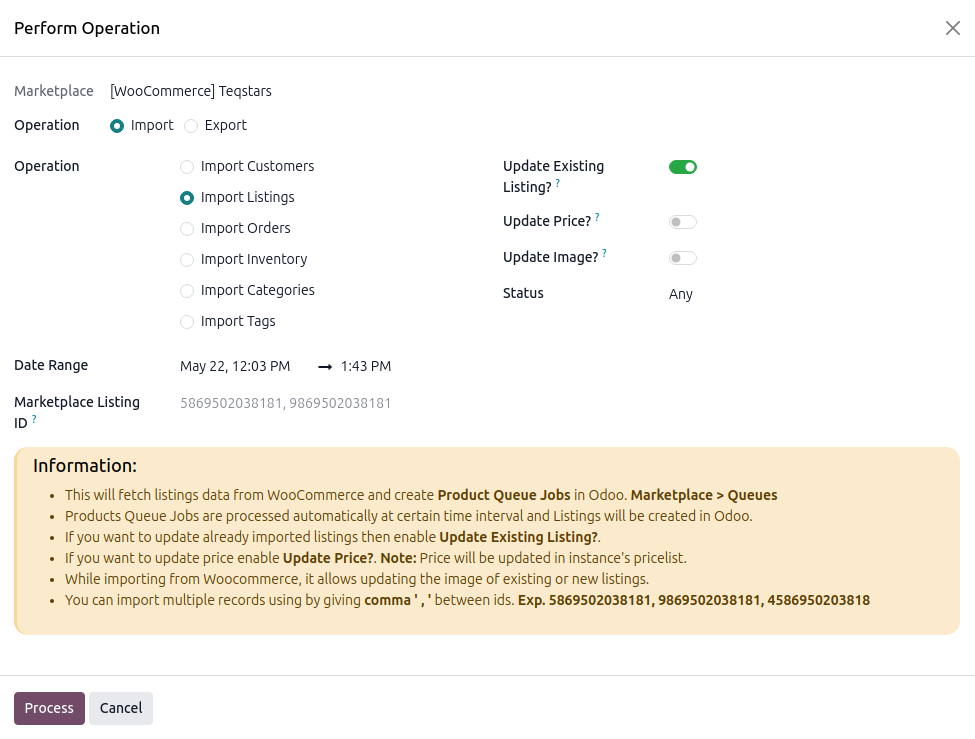
Date Range — Products modified within the range are fetched (defaults from the last import, otherwise 3 days back).
Marketplace Listing ID — Import specific products by ID, comma-separated (e.g.
58695, 98695).Update Existing Listing? — Overwrite matching listings, otherwise existing ones are skipped.
Update Price? — Also write the imported price into the instance pricelist.
Update Image? — Refresh listing/variant images.
Status — Filter by WooCommerce status (
any,draft,pending,private,publish).
What Happens Next
A Product Queue Job is created at and processed in the background, creating or updating Listings, Listing Items and (when Create Odoo Products? is enabled) the underlying Odoo products.
Important
Listings match Odoo products by SKU, with no match and Create Odoo Products? disabled, the listing stays unlinked.
Grouped products are skipped and logged.