
Answer A Return
A return waiting on the seller is answered from the return itself: approve it, turn it down, or refund part of it, one unit at a time.
The answers offered are TikTok Shop’s own. They are read from TikTok Shop when the popup opens, and differ by unit, by what the buyer asked for and by market.
Answer The Return
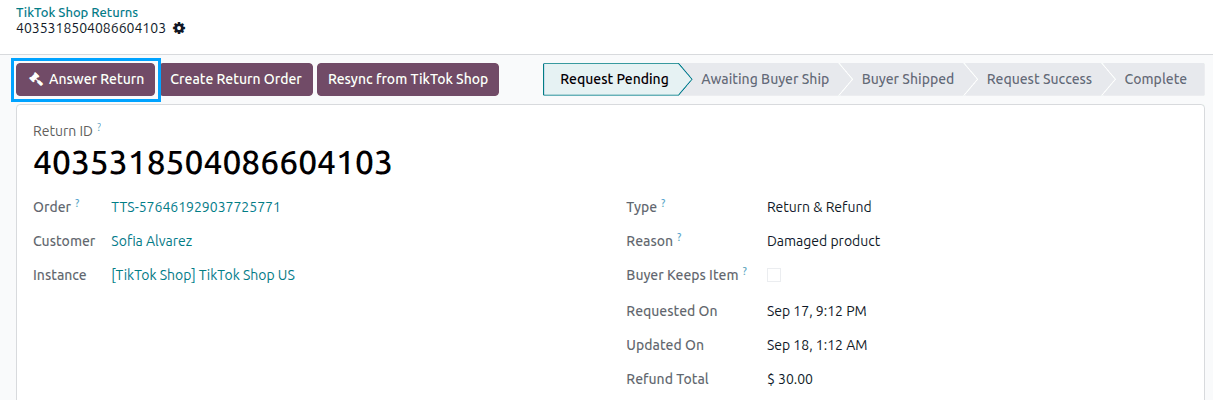
Go to and open the return.
Click the Answer Return button. It is shown until TikTok Shop completes, refunds or cancels the return.
The Answer Return popup lists the units being answered for. For each unit, set:
Answer: what TikTok Shop is willing to take for that unit: approving the request, rejecting it, or refunding part of it.
Rejection Reason: asked for when the answer is a rejection, and limited to the reasons TikTok Shop offers for it.
Partial Refund: asked for when the answer is a partial refund, within the least and most TikTok Shop allows for that unit.
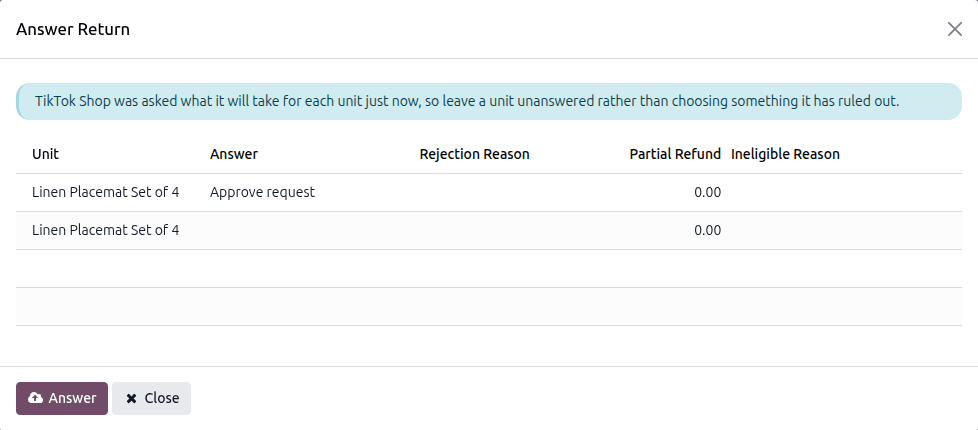
A unit TikTok Shop will take no answer for shows the Ineligible Reason in TikTok Shop’s own words.
Press Answer.
What TikTok Shop refused to take is reported rather than hidden, so a partly accepted answer is visible.
After Answering
The return is read again, so its Status reflects the answer at once.
An approved Return & Refund moves on to the buyer sending the goods back. Bring them in with Create Return Order. See Import TikTok Shop Returns In Odoo.
With the Return Status Change webhook active, a return answered outside Odoo is picked up too. See Webhook Configurations.
Important
TikTok Shop pays the buyer’s refund itself. Odoo records it as the credit note created when TikTok Shop reports the refund, and in the statement that settles it. See Import TikTok Shop Statements In Odoo.