
Import Walmart Listings In Odoo
The Walmart Odoo Connector allows you to import Walmart listings into Odoo. This can be a useful way to streamline your product management processes and keep your product catalog up-to-date.
Before importing listings, it’s necessary to configure certain product configuration in the Instance.
Importing listings is normally the first thing you do after setting up an instance, because orders, price exports and stock exports all work through listings.
Note
Listing import is run manually from the Operations popup.
Import Walmart Listings
Go to the menu in Odoo.
Click on the
Operationsbutton from the instance record.Select Import Operation and then select Import Listings option.
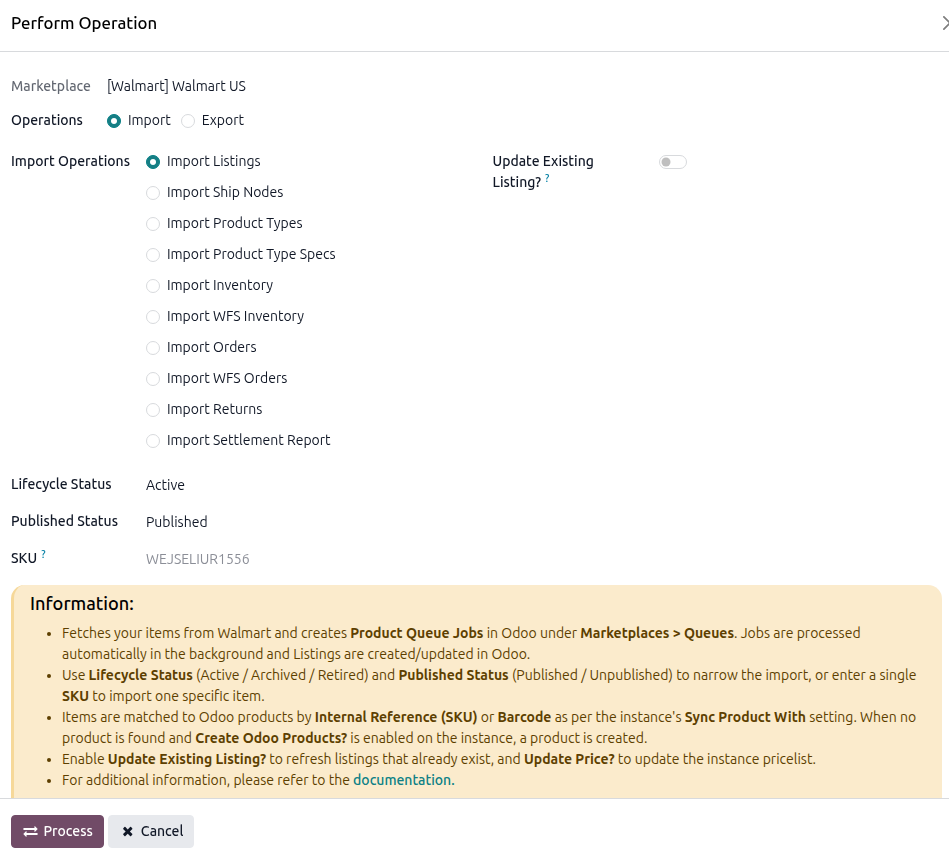
The listing import operation has the following options:
Lifecycle Status: Import listings with a specific status:
Active,Archived, orRetired. Defaults toActive.Published Status: import only
PublishedorUnpublishedlistings. Leave empty for both.SKU: import one specific item by entering its SKU.
Update Existing Listing?: update listings that already exist in Odoo instead of skipping them. This applies to a bulk import; importing a single item always updates it.
Update Price?: also update the price when updating an existing listing. Only available when Update Existing Listing? is on.
Press
PROCESSbutton.
Note
Walmart does not offer a date filter on its items, so there is no From Date / To Date here. Narrow a large catalog with Lifecycle Status and Published Status instead.
What Happens Next
Importing one SKU processes immediately and opens the resulting listing.
Importing in bulk adds the listings to a Product Queue Job, processed in batches. Follow it under .
For each Walmart item the connector creates or updates:
one listing, named from the Walmart product name, and
one listing item per variant, carrying its SKU and barcode.
On a United States instance the listing’s Walmart Category, Walmart Product Type Group and Walmart Product Type are filled in from the item, and its Walmart attributes are stored on the Walmart tab. See Walmart Listing Attributes.