
Product Metafields Management
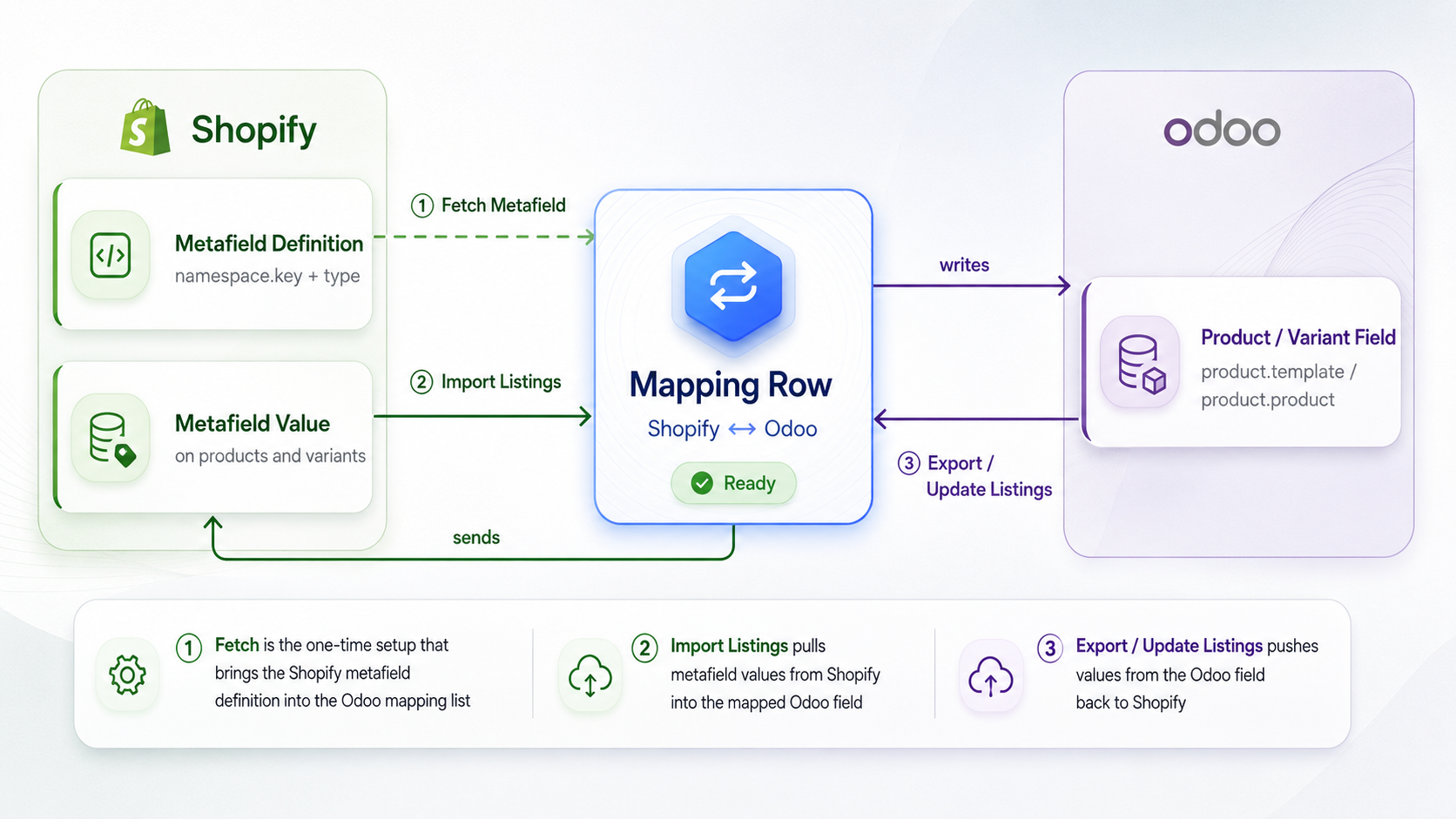
Shopify Product and Variant metafields are custom fields on the Shopify Product and Variant resources. The connector synchronizes their values between Shopify and Odoo as part of the regular Import Listings, Export Listings, and Update Listings operations. There is no separate metafield import or export operation.
For details about metafield configuration, mapping list columns, supported metafield types, status badges, and error logs, refer to Configure Shopify Metafields.
Sync Metafields During Product Import
When you import products from Shopify, the connector also imports mapped metafield values automatically with the product data. You do not need to run a separate metafield import.
- To import products
First see Import Products In Odoo.
Metafields are imported only when:
The Active toggle is enabled for that resource on the Metafields tab of the Shopify instance.
The metafield mapping status is
Ready.
Important
Mappings with status
Missing,Not Found, orInactiveare skipped automatically.If the resource Active toggle is turned off, metafields for that resource are not imported at all.
If a
Readymapping has a value in Odoo but Shopify no longer returns a value for that metafield, Odoo clears the value on the matching field so both sides stay aligned. This clearing happens only when the metafield list is fetched in full from Shopify.
During the import, the connector reads each metafield value from Shopify and saves it in the Odoo field selected in the metafield mapping.
Shopify
Productsmetafields are saved on Product.Shopify
Variantsmetafields are saved on Product Variant.
Note
See the Supported Metafield Types table in Configure Shopify Metafields for compatible Odoo field types and special behavior such as unit field, anchor text, and references handling.
Sync Metafields During Product Update/Export
Metafield values are sent from Odoo to Shopify in two cases:
Export Listings→ When creating new products in Shopify.
Update Listings→ When updating existing Shopify products.
In both cases, the connector sends values of metafields along with the regular product data. There is no separate operation available for exporting or updating metafields.
To run an export or update operation, see Export Products From Odoo and Update Products From Odoo.
Metafields are updated only when:
The Active toggle is enabled for that resource on the Metafields tab of the Shopify instance.
The metafield mapping status is
Ready.
Important
Metafield synchronization itself does not depend on any update option selected in the wizard. Even if no checkbox is selected, mapped metafield values are still updated in Shopify. The only requirement is that the metafield resource Active toggle is enabled and the mapping status is Ready.
Metafield values are sent to Shopify only after the product is successfully created during Export Listings. If the product export fails, the metafield values are also not exported.
During metafield update, mappings with status
Missing,Not Found, orInactiveare skipped automatically.If the resource Active toggle is turned off, metafields for that resource are not updated at all.