
Mark As Paid Orders From Odoo To BigCommerce
When a BigCommerce order is paid offline (cash on delivery, manual bank transfer, external POS, etc.) the BigCommerce control panel still shows the order as awaiting payment. With this feature, you can flip the order to Paid in BigCommerce directly from Odoo once the matching invoice is paid.
Behind the scenes the connector records a manual capture transaction on the BigCommerce order — marked as an offline payment from a custom gateway — and then updates the order’s payment status in Odoo to Captured.
Method - 1: Manual Mark As Paid
Open and select the BigCommerce order.
Confirm the order is fully paid in Odoo (the Invoices smart button shows all invoices in Paid or In Payment state).
Click Mark As Paid In BigCommerce.
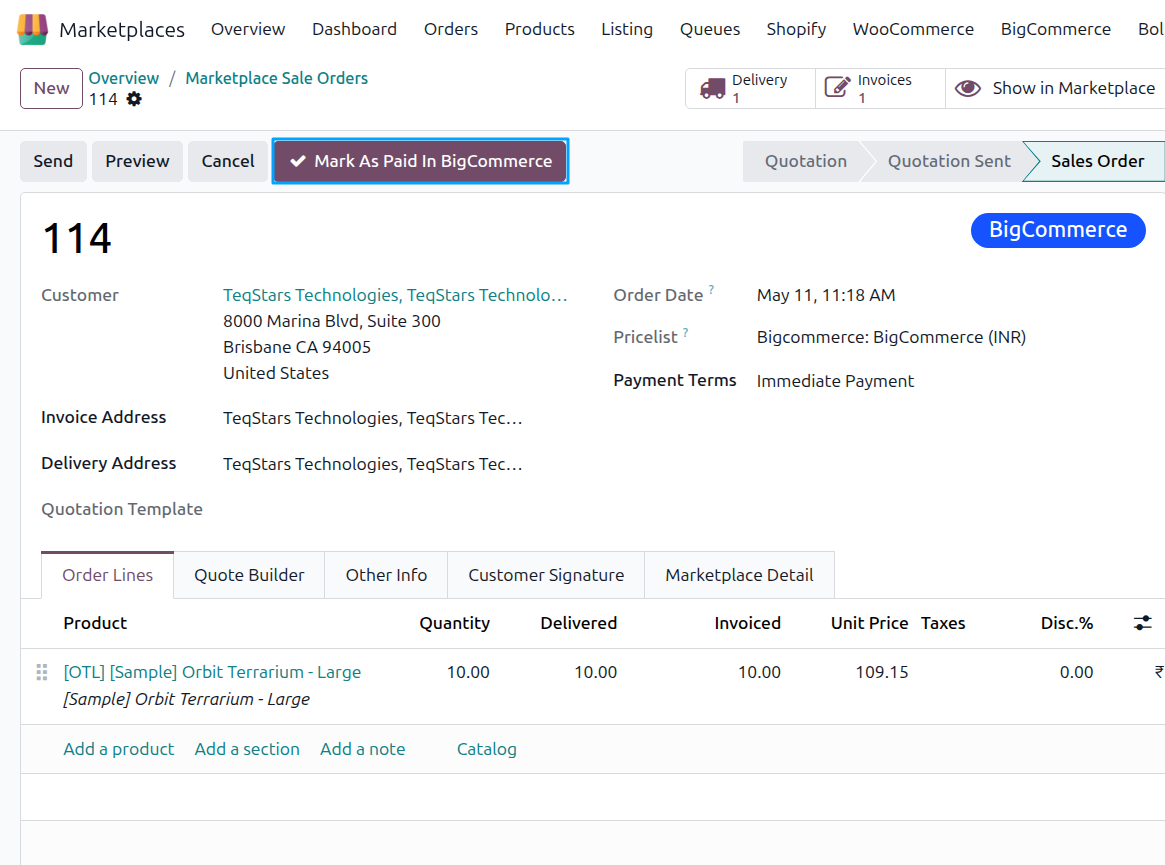
The connector posts the capture transaction to BigCommerce.
On success, the order’s BigCommerce Payment Status field is updated to Captured and the BigCommerce admin shows the order as Paid.
Method - 2: Automatic Mark As Paid
Once Mark Order as Paid in BigCommerce? is enabled on the instance, the connector also flips the order to Paid automatically whenever an invoice payment is registered against a fully invoiced BigCommerce order. No additional cron is needed — the action runs as part of Odoo’s payment-registration flow.
Note
The Mark As Paid In BigCommerce button is not shown for orders processed through a real BigCommerce gateway (Stripe, PayPal, Authorize.Net, etc.) where the gateway already captures payment. The feature is intended for offline and manual payment scenarios.
If the matched workflow’s last step is Register Payment, the order is considered fully paid only after the payment is registered in Odoo.