
Import Price In Odoo
Go to the menu in Odoo.
Click on the
Operationsbutton from the instance record.Select Import Operation and then select Import Listings/Offers option.
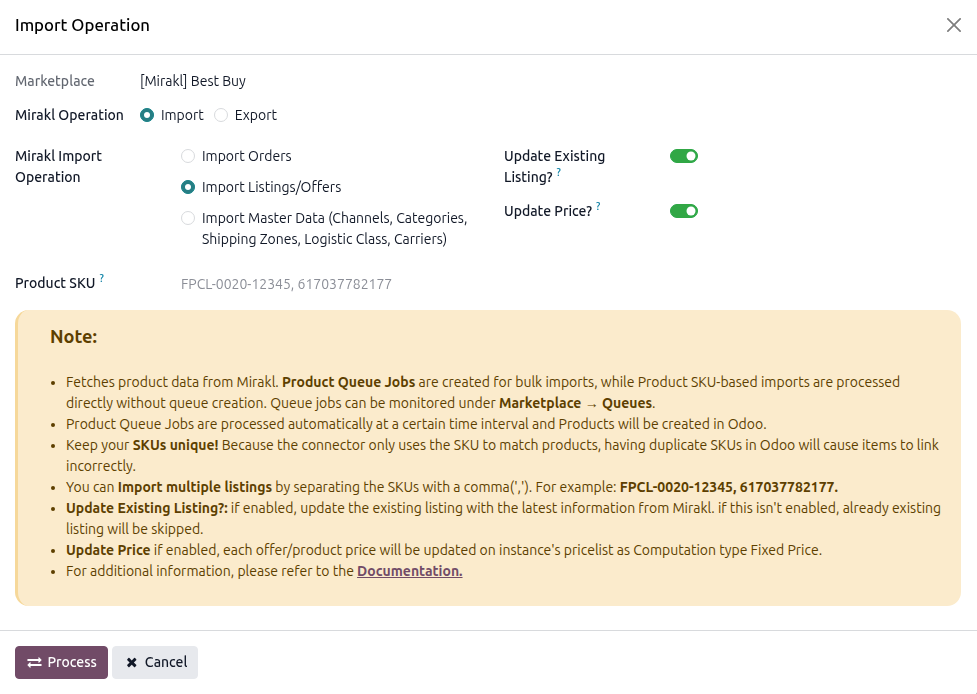
Within the listing import operation, you’ll encounter below options.
Update Existing Listing?
Enable this if you want to update listing and listing items that already exist in Odoo.
Update Price?
Enable this if you want to update the listing item price in Odoo.
Press
PROCESSbutton.
This will start importing listing with price details from mirakl into Odoo.
Important
The Update Price option is available only when Update Existing Listing is enabled.
When importing prices from Mirakl, Odoo updates the price in the instance pricelist for the related Listing Item.