
Import Etsy Listings In Odoo
The Etsy Odoo Connector allows you to import Etsy listings into Odoo. This is a useful way to streamline your product management and keep your product catalog up-to-date.
Before importing, make sure to configure the product configuration on the Instance and to import the Etsy Master Data (categories, properties, shipping profiles, return policies, and readiness states).
The connector supports importing all active listings, only specific listings (by listing ID), and only draft listings. Listings in other Etsy states (inactive, sold out, expired, removed) are not fetched.
Go to the menu in Odoo.
Click on the Operations button from the instance record.
Select Import as the operation type and then choose Import Listings.
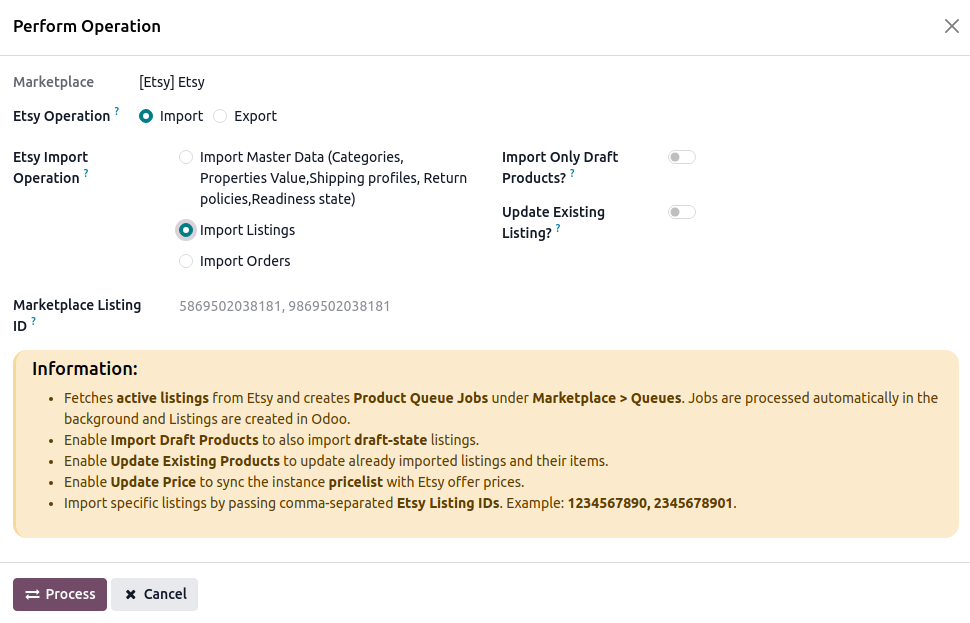
Within the listing import operation, you’ll encounter the following options:
Marketplace Listing ID: You can import specific Etsy listings by entering their Etsy listing IDs in the Marketplace Listing ID field. Separate the IDs with a comma (‘,’) like this: 1234567890, 9876543210. These listings are fetched one by one and imported immediately, without a queue job, and the imported listings open when it finishes.
Import Only Draft Products?: When enabled, only listings that are currently in draft state on Etsy are imported (active listings are not fetched in that run).
Update Existing Listing?: When enabled, listings that already exist in Odoo are updated with the latest data from Etsy. When disabled, existing listings are skipped and logged.
Update Price? (shown when Update Existing Listing? is enabled): When enabled, the pricelist linked to the instance is updated with the latest price from Etsy for each imported variant. Prices of newly imported variants are always written to the pricelist.
Press the Process button.
This fetches the listings from Etsy (100 per page, including inventory and images) and adds them to a Product Queue Job, split into batches of Queue Batch Limit listings. The queue is processed by the Marketplace : Process Queue Job scheduled action (every 15 minutes by default) or manually with the Process Manually button on the queue job; failed lines can be retried with Retry Failed Lines, which fetches the listing from Etsy again. Every run fetches all listings of the selected state; the Last Listing Imported On date is recorded but is not used as a filter. If a page is too large for Etsy to return, the connector halves the page size (down to 5) and retries the same page.
Important
The connector matches Etsy listings to existing Odoo products by SKU (or by the listing item already linked to the Etsy product ID).
If no Odoo product matches and Create Odoo Products? is disabled, the listing is not imported and the reason is logged.
Listings with variations need an Etsy attribute mapping and value mapping for every property, at category or global level (see Product Attribute Mapping). A listing with an unmapped property or value is not imported; the log names the missing mapping.
Etsy’s Who Made, When Made, tags, category and shipping profile are stored on the listing. Return policy and readiness state are not read from Etsy listings.
See also