
Create A Return In TikTok Shop
A seller can raise a return on the buyer’s behalf, for example when a buyer asks you directly, or when the goods come back outside TikTok Shop’s own flow.
The return is created on TikTok Shop, and comes back into Odoo through the return import, so it is handled like any other return afterwards.
What can be sent back, how many of each unit, and the reasons offered are TikTok Shop’s answer for that order, read when the popup opens.
Create The Return
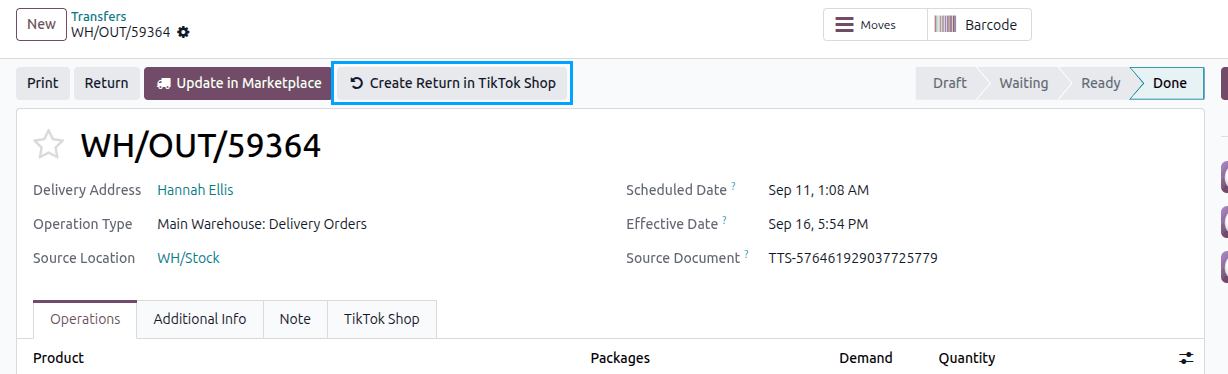
Open the done delivery order the goods went out on.
Note
An order imported already shipped has no delivery order: its goods went out on stock moves. Open the order’s Stock Moves and then the move, which carries the same button.
Click the Create Return in TikTok Shop button.
In the Create Return in TikTok Shop popup, set:
Request: whether the buyer is only refunded, or the goods come back as well. Changing it switches the units, quantities and reasons to what TikTok Shop allows for that kind of request.
Reason: one of the reasons TikTok Shop offers for that request.
Return Shipping and Handover: who arranges getting the goods back, and how the buyer hands the parcel over. The handover is asked for only where TikTok Shop arranges the parcel.
Refund Total: what the buyer is refunded. Left at nothing, TikTok Shop works it out itself.
The Quantity to Return of each unit, up to what TikTok Shop will still take back (Returnable). A unit TikTok Shop will not take back is greyed out, with the Ineligible Reason in its own words.
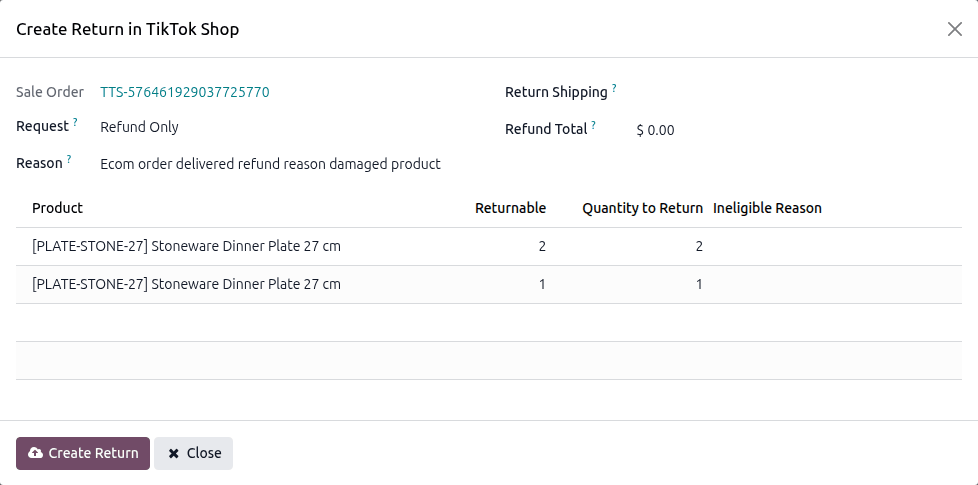
Click Create Return and confirm.
Odoo then imports the new return and opens it, so you can follow it like any other.
Note
TikTok Shop answers for the order, not for one delivery, so the units offered are the order’s.
Important
The popup refuses what TikTok Shop would refuse: more than the returnable quantity, a unit it will not take back, a missing reason, or a reason that does not belong to the chosen request.
Tip
An order TikTok Shop will take nothing back for says so with Nothing to Return instead of opening an empty popup.