
Import eBay Orders In Odoo
The eBay Odoo Connector allows you to import eBay orders into Odoo. This can be a useful way to streamline your order management processes and keep your inventory and accounting data up-to-date.
Before importing orders, it’s necessary to configure certain order configuration in the Instance.
You have the flexibility to import orders from eBay to Odoo, either through manual imports or automated processes.
Method - 1: Manual Order Import
Go to the menu in Odoo.
Click on the
Operationsbutton from the instance record.Select Import Operation and then select Import Orders option.
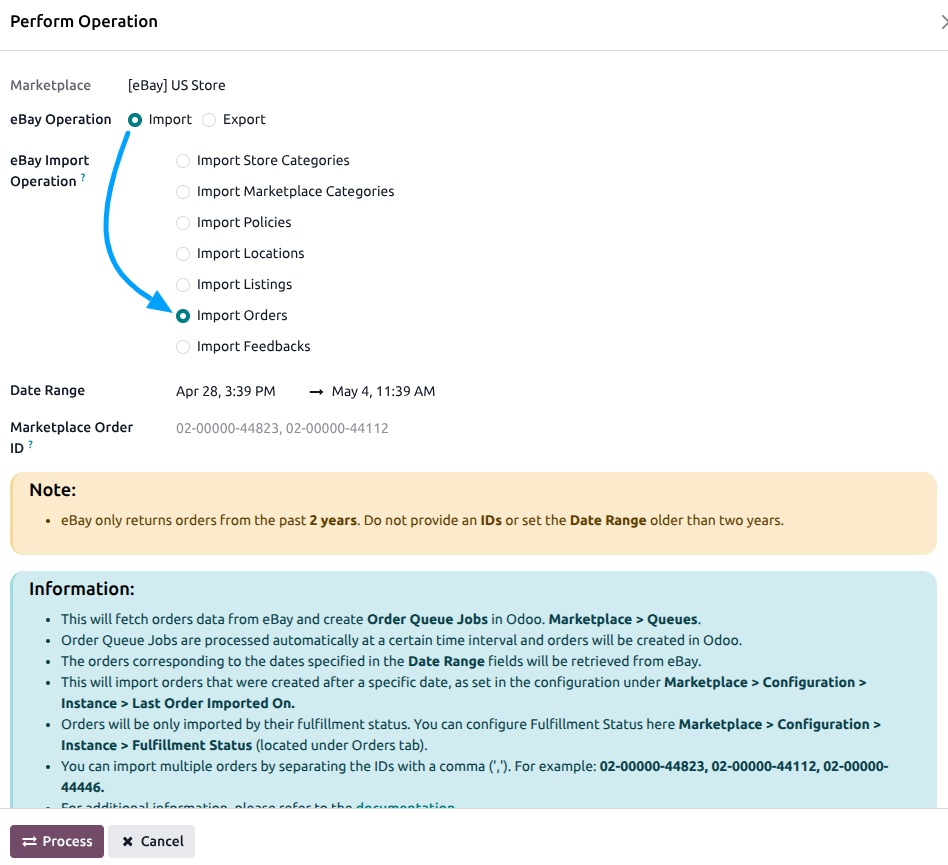
Within the order import operation, you’ll encounter the following options:
Date Range: Orders corresponding to the dates specified in the From Date and To Date fields will be retrieved from eBay.
Marketplace Order ID: You can import specific eBay Orders by entering their IDs in the Marketplace Order ID field. Separate the IDs with a comma (‘,’) like this: 12-12345-12345, 98-98765-98765.
Press
PROCESSbutton.
This will start fetching orders from eBay and add them to the Order Queue Job for processing. The order queue job will be processed automatically at a certain time interval. The orders will be created in Odoo based on the order workflow that you have configured based on payment gateway and financial status.
On each imported sale order, you can see the following eBay-specific fields:
Financial Status: The payment status of the order (Pending, Paid, Partially Refunded, Fully Refunded, Failed). This value determines which order workflow is triggered.
eBay Payment Gateway: The payment gateway used for the transaction.
Ebay Fulfillment Status: The order’s fulfillment progress (Not Started, In Progress, Fulfilled).
eBay Fulfillment Type: The fulfillment method (Ship To, Digital, Prepare For Pickup, Seller Defined, Fulfilled By eBay).
If some orders fail to import due to not having a configured order workflow in the eBay Instance, check the error messages provided. Based on the error message, configure the order workflow accordingly in the eBay Instance to resolve the issue. You can also use the Configure Workflow button directly from the error log to quickly set up the missing workflow.
Method - 2: Automatic Order Import
Order import from eBay to Odoo can be automated using the Automatic Schedule action, which enables you to define a specific time interval for executing the import process. This automation ensures that the latest orders from your eBay store are consistently and seamlessly created/updated in Odoo without requiring manual intervention.
Go to your eBay instance setting by navigating to .
Here you will see the Automatic Jobs tab. In that tab you can configure the Import Orders automatic action by setting Interval Number, Interval Unit, and then Active.
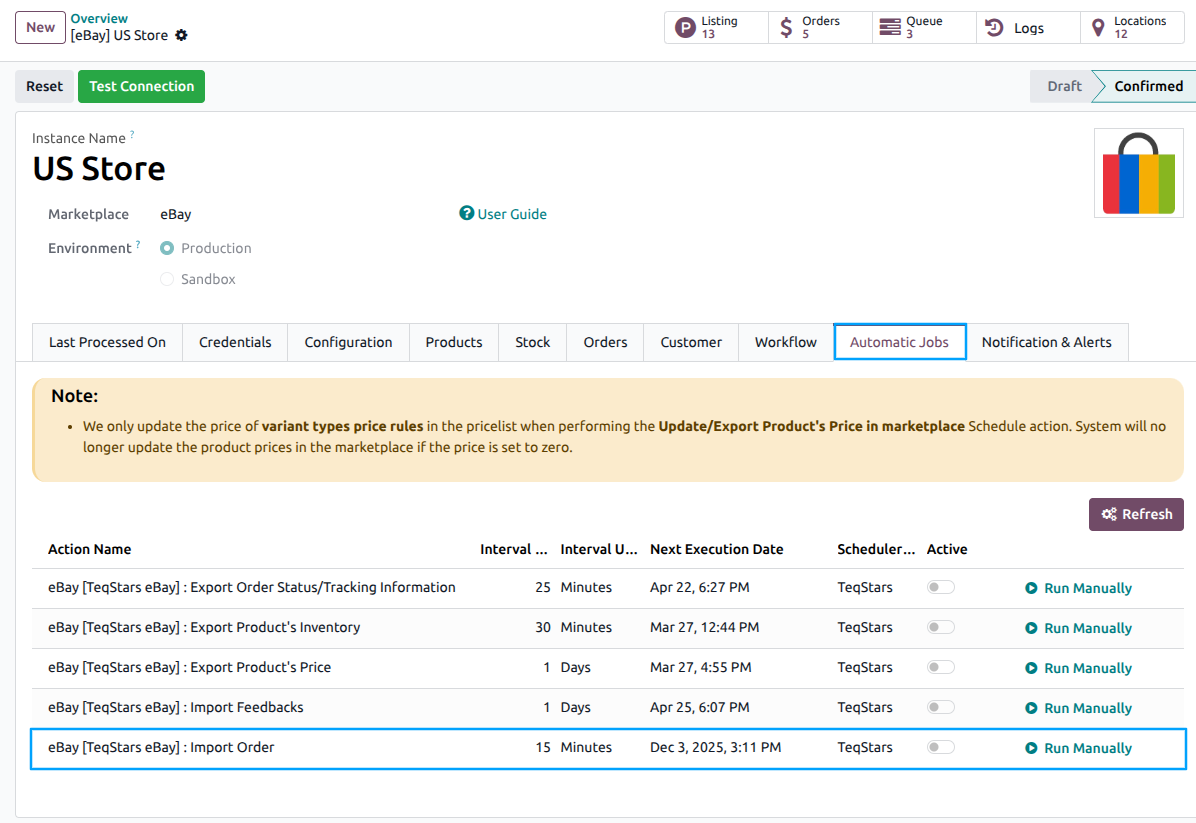
Important
Orders will only be imported based on their fulfillment status filter configured on the instance. You can configure the Fulfillment Status filter under tab.
If an order is fulfilled in eBay, at the time of importing in Odoo, a stock move will be directly created instead of generating a delivery order.
If an existing order is found, any unfulfilled orders in Odoo that are already fulfilled in eBay will be marked as fulfilled in Odoo. The tracking reference in the Delivery order will also be updated.
Canceled Orders
If an order has been canceled on eBay, the connector automatically detects this and cancels the corresponding order in Odoo. The connector checks the cancelStatus of each order during import.
eBay-Managed Payments
For orders with eBay-managed payments (financial status = PAID), the connector can:
Automatically create and validate the invoice.
Register the payment using the configured payment journal.
Reconcile the payment with the invoice.
This is controlled by the Workflow configuration settings.
Note
Existing orders are updated when re-imported (e.g., fulfillment status changes, cancellations).
See also