
Import Walmart Orders In Odoo
The Walmart Odoo Connector allows you to import Walmart orders into Odoo. This can be a useful way to streamline your order management processes and keep your inventory and accounting data up-to-date.
Before importing orders, it’s necessary to configure certain order configuration and workflow configuration in the Instance.
You have the flexibility to import orders from Walmart to Odoo, either through manual imports or automated processes.
This page covers seller-fulfilled orders. Orders fulfilled by Walmart are covered in Import Walmart WFS Orders In Odoo.
Method - 1: Manual Order Import
Go to the menu in Odoo.
Click on the
Operationsbutton from the instance record.Select Import Operation and then select Import Orders option.
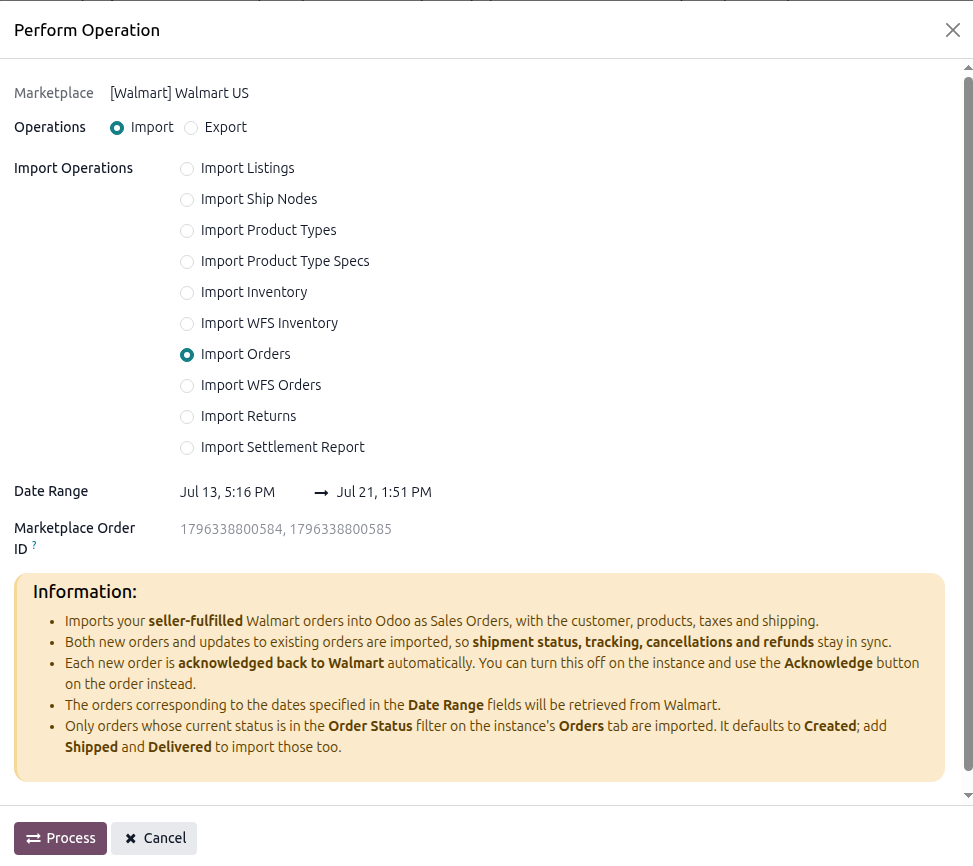
The order import operation has the following options:
Date Range: Orders between the From Date and To Date are retrieved from Walmart. For the United States and Canada, the filter is on when the order last changed, not when it was placed, so re-running an import picks up status changes on older orders. For Mexico and Chile, the filter is on when the order was placed, so a Date Range import only picks up orders created in that window; it does not catch status changes on orders placed earlier. The automatic schedule compensates for this with its own 30-day lookback; a manual Date Range import does not.
Marketplace Order ID: You can import specific Walmart Orders by entering their IDs in the Marketplace Order ID field. Separate the IDs with a comma (‘,’), like this: 1796338800584, 1796338800585.
Press
PROCESSbutton.
This will start fetching orders from Walmart and add them to the Order Queue Job for processing. The order queue job will be processed automatically at a certain time interval. The orders will be created in Odoo based on the Seller Order Workflow configured on the instance.
Method - 2: Automatic Order Import
Order import from Walmart to Odoo can be automated using the Automatic Schedule action, which enables you to define a specific time interval for executing the import process. This automation ensures that the latest orders from your Walmart account are consistently and seamlessly created/updated in Odoo without requiring manual intervention.
Go to your Walmart instance setting by navigating to .
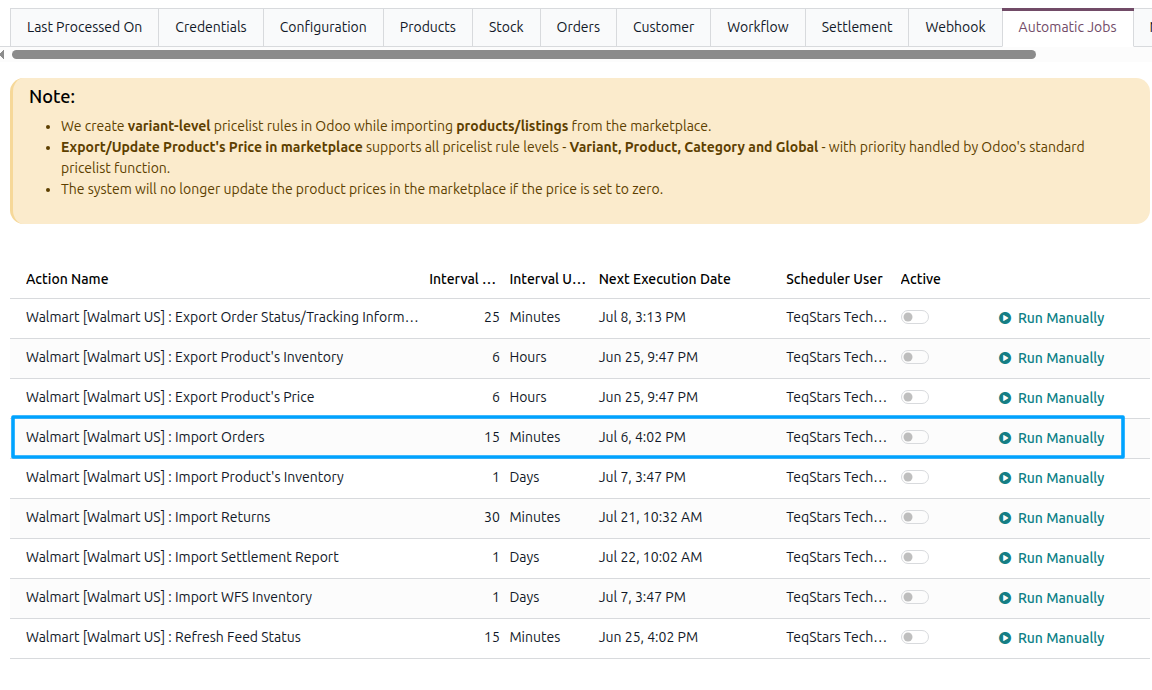
Here you will see the Automatic Jobs tab. In that tab you can configure the Import Orders automatic action by setting Interval Number, Interval Unit, and then Active.
Note
The scheduled action is created inactive. Tick Active for it to run. See Automatic Jobs.
Note
A single Import Orders job covers every fulfillment type the instance handles. If the instance is
set to Both, the same job imports your seller-fulfilled orders and your WFS orders.
Which Orders Are Imported
Important
Orders are only imported if their current Walmart status is in the Order Status filter on the instance. A new instance has only Created selected, so it imports newly-placed orders and nothing else until you change it.
Orders are also skipped when:
The order was created before the date set in Import Order After on the instance.
The order has already been imported. Re-importing an existing order updates it rather than duplicating it.
Cancelled Orders
If every item on an order has been cancelled on Walmart, the connector detects this during import and cancels the corresponding order in Odoo, noting “The order was cancelled on Walmart.” in the chatter. An order that was already cancelled on Walmart before you imported it is imported and then cancelled, so your records stay complete.
To cancel an order from Odoo and update its status on Walmart, see Cancel Walmart Orders.