
Import Price In Odoo
Use the offer/product sync to bring Bol.com offer prices back into Odoo’s instance pricelist.
Go to the menu in Odoo.
Click on the
Operationsbutton from the instance record.Set Operation For to FBR & FBB, then select Sync Offer/Products option.
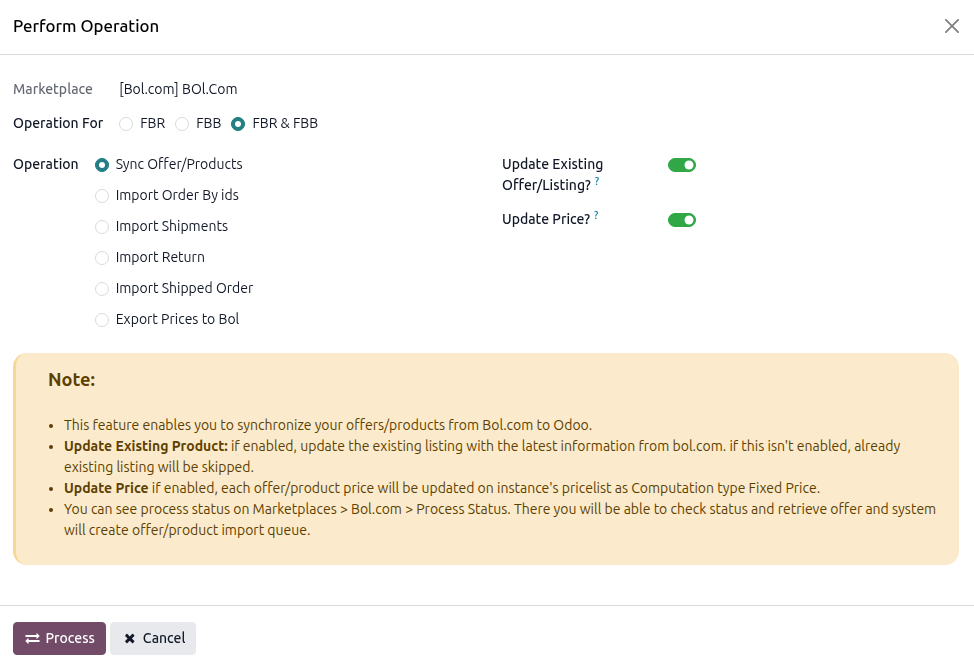
Enable the price-related options:
Update Existing Offer/Listing?: required. The connector only updates prices for existing listings.
Update Price?: enable to refresh the Listing Item price in the instance pricelist.
Click PROCESS.
The connector imports listing data from Bol.com and updates the instance pricelist with the latest offer prices.
Important
Update Price? is available only when Update Existing Offer/Listing? is enabled.
Prices are written to the Pricelist configured in Product Configurations, against the related Listing Item.
Imported prices are stored as Fixed Price computation rules at Product Variant level only. Template, category, and global rules are not created on import.
Existing pricelist rules for the product variant that do not match the imported quantity tiers are removed. Custom pricing rules for those variants will be overwritten.
See also