
Customer Creation During Order Import
When you import a ManoMano order, the connector creates its customer in Odoo from the billing and shipping addresses of the order. You do not need a separate customer import step.
How Customers Are Resolved
Customers are created while orders are imported, by the Import Orders operation or by the Import B2B Orders and Import B2C Orders scheduled jobs. See Import ManoMano Orders In Odoo.
When the order carries no company, a single customer is created for the order.
When the order carries a company, the result depends on the Create Company Contact? setting. See Company Contacts.
You find the customers in .
Company Contacts
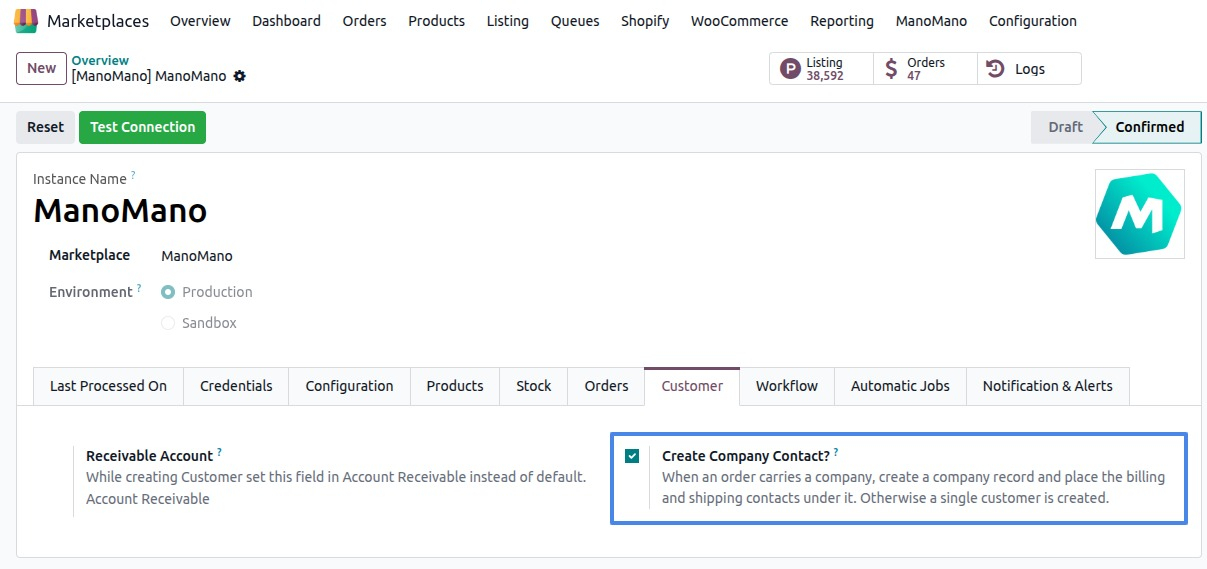
The Create Company Contact? setting on the instance decides how a buyer’s company is stored. It matters when you want the contacts of a business buyer kept together under one company.
When it is enabled and the order carries a company, the connector creates a company record and places the billing and shipping contacts under it.
When it is disabled, or the order carries no company, a single customer is created.
To enable it:
Go to and open your ManoMano instance.
Tick Create Company Contact?.
Save the instance.
What Information Is Brought In
The connector reads the customer and address details that come with each ManoMano order. It needs them to create the customer, so an order without them is not imported.
Important
When the customer or address details are missing on the order, the import stops for that order and the log shows: “IMPORT ORDER: ManoMano order … could not be imported because the customer or address details are missing on the order.” Check the log in , review the order in ManoMano and import it again.
Configuration Reference
The settings that shape the customers are on the ManoMano instance, in . See Create a ManoMano instance in Odoo.
Create Company Contact?: see Company Contacts.
Receivable Account: the connector sets this account as the receivable account of the customers it creates, instead of the default one.
Note
There is no standalone customer import operation. Customers are created while orders are imported.
See also