
ManoMano Connector Features
ManoMano is a marketplace for DIY, home and garden products, with a store for private customers and a store for professionals. By connecting ManoMano with Odoo using the ManoMano Connector, you manage your product feed, offers, prices, stock, orders, shipments and refunds for both stores from a single Odoo database.
Supported Features
- B2B and B2C Seller Contracts
Each instance sells on up to two seller contracts: one B2B contract and one B2C contract.
Each contract has its own seller contract ID, selling pricelist, retail pricelist and feed URL, so the two stores keep their own prices and their own product feed. See ManoMano Seller Contracts.
Imported orders and their deliveries show the ManoMano Contract Type, so you always know which store an order comes from.
- Product Feed
ManoMano pulls your products from a CSV feed that Odoo publishes, one feed URL per contract. See ManoMano Product Feed.
Before a product is written to the feed, the connector checks that it has at least one image and at least one shipping grid (carrier).
- Product / Listing Management
Export new products to the feed and update the products that are already listed. See Export Products From Odoo and Update Products From Odoo.
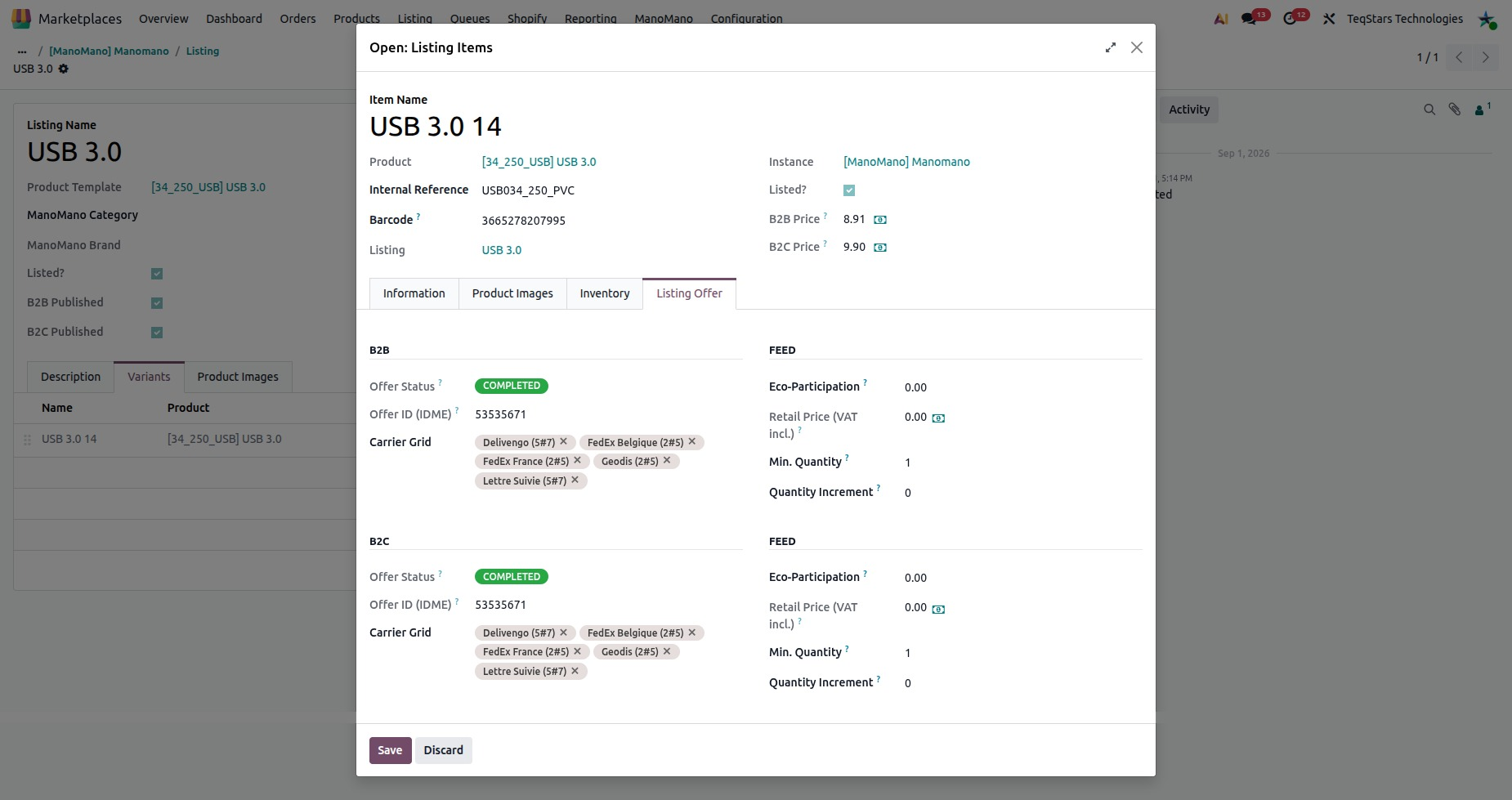
Fill in the ManoMano category, brand and the B2B and B2C offer details of each listing on the Listing Offer tab. See Offer Details On A Listing.
Import a ManoMano product export CSV to create or update products in Odoo, matched by SKU or EAN. See Import Products In Odoo.
Read back the current price, stock and offer status of your listed products from ManoMano. See Import Offers From ManoMano.
- Categories, Brands & Carriers
Import the ManoMano category tree and the brand list. See Import Categories From ManoMano and Import Brands From ManoMano.
Keep the carriers and shipping times used in the feed and when you declare a shipment. See ManoMano Carriers.
- Price and Inventory
Prices come from the pricelist of each seller contract. The struck-through retail price has its own retail pricelist.
Send the price or the stock of your listed products straight to ManoMano, without waiting for the next feed pull. See Export Price From Odoo and Export Inventory From Odoo.
- Order Management
Import ManoMano orders with their lines, and choose which ManoMano order statuses are imported. See Import ManoMano Orders In Odoo.
Each ManoMano order status, such as Pending, Preparation or Shipped, follows its own order workflow. See ManoMano Order Workflow Configuration.
Accept an order on ManoMano from Odoo. See Accept ManoMano Orders From Odoo.
Declare the carrier, tracking number and tracking URL of your validated deliveries to ManoMano. See ManoMano Update Order Status From Odoo.
Send a full or partial refund to ManoMano from the credit note, with the reason Customer Cancellation or No Stock. See Refund ManoMano Orders From Odoo.
- Customer Management
Create the customer and its billing and shipping addresses from each imported order, with an optional company contact. See Customer Creation During Order Import.
- Results and Monitoring
Every operation writes its result to , with the SKU or the ManoMano order reference and the message.
Imported orders pass through queues. One failed record never blocks the others, and you can retry a failed queue line.
- Multi Account Selling
Connect several ManoMano seller accounts by creating one instance for each. See Create a ManoMano instance in Odoo.
Synchronization
The connector synchronizes data in two ways: scheduled actions and operations you run yourself. Each scheduled action runs on a schedule you can change. You find the scheduled actions in two places:
On the instance: go to , open your instance and go to the Automatic Jobs tab.
In . This menu needs the Developer Mode (debug mode).
Import B2B Orders |
Import |
Import B2C Orders |
Import |
Export Order Status/Tracking Information |
Export |
Export B2B Product’s Stock |
Export |
Export B2C Product’s Stock |
Export |
Export B2B Product’s Price |
Export |
Export B2C Product’s Price |
Export |
Regenerate B2B Product Feed |
Export |
Regenerate B2C Product Feed |
Export |
Verify B2B Feed Status |
Import |
Verify B2C Feed Status |
Import |
Import Orders |
Import |
Import Listings Offers |
Import |
Export Listings |
Export |
Update Listings |
Export |
Update Offer Price |
Export |
Update Offer Stock |
Export |
Update Order Status |
Export |
Import Listings (CSV) |
Import |
Fetch Categories |
Import |
Fetch Brands |
Import |
Accept Order |
Export |
Refund in ManoMano |
Export |
How A ManoMano Offer Reaches The Store
ManoMano does not receive new products from Odoo directly. It pulls them from your product feed.
When you export or update listings, Odoo writes the products to the feed for both contracts at once. See Export Products From Odoo and Update Products From Odoo.
ManoMano reads the feed URL of each contract on its own schedule. You paste each URL in ManoMano Toolbox once. See ManoMano Product Feed.
A product is marked as listed only once ManoMano confirms the offer. The Verify B2B Feed Status and Verify B2C Feed Status jobs check this for you.
Price and stock changes can also go straight to ManoMano, without waiting for the feed. See Export Price From Odoo and Export Inventory From Odoo.
Each listing shows the offer status and any error ManoMano returns for each contract. See Offer Details On A Listing.
Benefits
- Less Manual Work
Products, prices, stock, orders, shipments and refunds are managed from Odoo, so you do not enter the same data twice.
- Two Stores, Kept Apart
B2B and B2C each keep their own seller contract, pricelists and feed, so a price change for one store never touches the other.
- Fewer Rejected Products
Missing images and missing shipping grids are caught before anything is written to the feed.
- Faster Order Fulfillment
Orders arrive in Odoo and follow the workflow of their ManoMano status. Tracking goes back to ManoMano once the delivery is validated.
- Clear Troubleshooting
Logs and queues show what succeeded and what failed, so you fix one record and retry it.
Conclusion
The ManoMano Connector turns your ManoMano B2B and B2C stores into a managed sales channel inside Odoo, with the product feed, offers, stock, prices, orders and refunds synchronized with minimal manual effort.
Note
The connector uses the API Key you generate in ManoMano Toolbox, together with your
B2B Seller Contract ID and B2C Seller Contract ID (see Create a ManoMano instance in Odoo).
ManoMano reads the product feed from your feed URL, so your Odoo must be reachable over HTTPS at its public address. Orders and offers are imported by Odoo calling ManoMano, so they need no inbound connection.