
BigCommerce Sales Channels
A sales channel is a place where you sell your products in BigCommerce, such as a storefront. The connector brings your BigCommerce sales channels into Odoo. You can then choose on which channels each listing is published, without leaving Odoo.
Sales Channels list
When you confirm a BigCommerce instance, the connector imports your sales channels together with your categories, brands, locations, order statuses and tax classes.
To see them, go to .
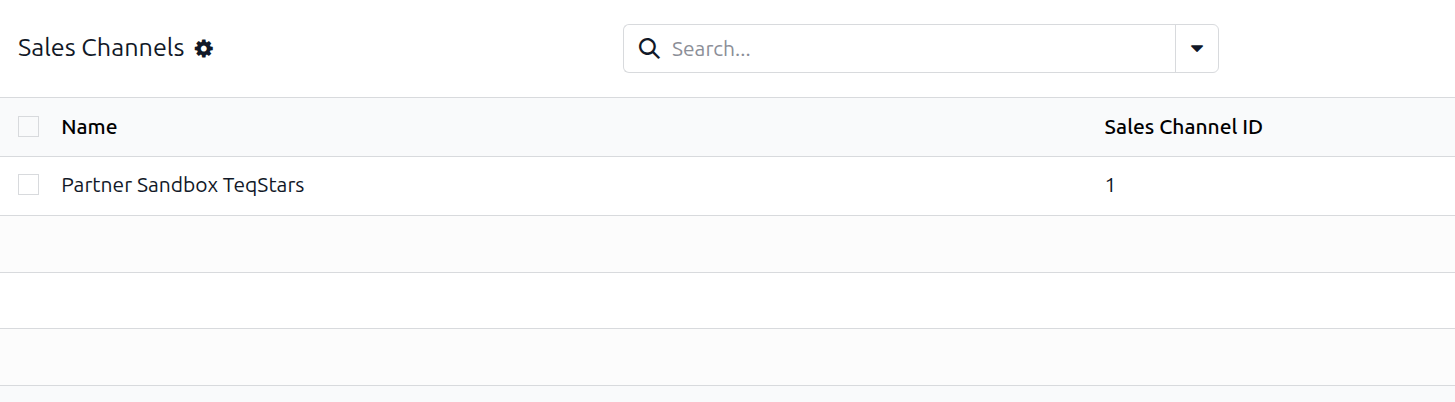
Each sales channel shows:
Name: the name of the sales channel.
Sales Channel ID: the ID of the sales channel in BigCommerce.
Sales channels on a listing
Each BigCommerce listing has a Sales Channels field. It shows the sales channels where the product is published.
For a new listing, you choose the sales channels when you export it. In the operations wizard, choose Export Listings, pick the products and the Sales Channels to publish to, and run it. The connector creates the listing in BigCommerce and publishes it to the selected sales channels.
For a listing that is already in BigCommerce, use the wizard below.
Publish or unpublish products to sales channels with the wizard
You can publish or unpublish a listing on selected sales channels. Your listing stays as it is on the other sales channels.
Open the listing and click Manage Sales Channels. The sales channels wizard opens.
In Sales Channels, select the BigCommerce sales channels where the product should be added or removed.
Click Publish to publish the product on the selected sales channels.
Or click Unpublish to remove the product from the selected sales channels.
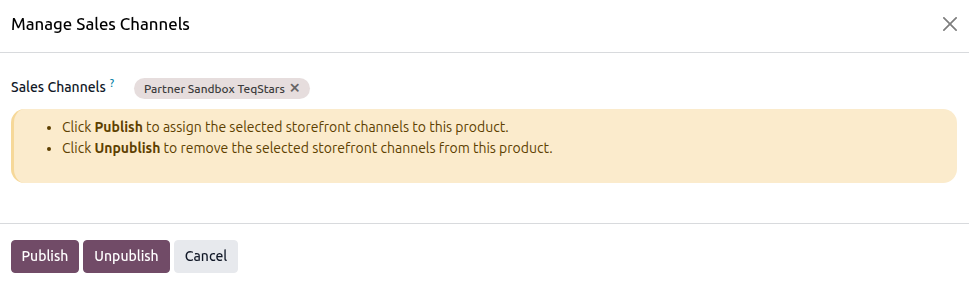
To close the wizard without changes, click Cancel.