
Email Summaries
Each person can get the Today page by email: the figures for this month so far and the Needs your attention list. People turn it on themselves. The email is built with their own access rights, so it shows only what they may read in Odoo.
Turn the Email On
Go to .
On Today, click Email me this.
Choose Every morning or On Mondays. Choose Never to turn it off.

If the user has no email address, Odoo shows Add an email address to your Odoo user before turning the summary email on. Add it in the user’s preferences and try again.
What the Email Holds
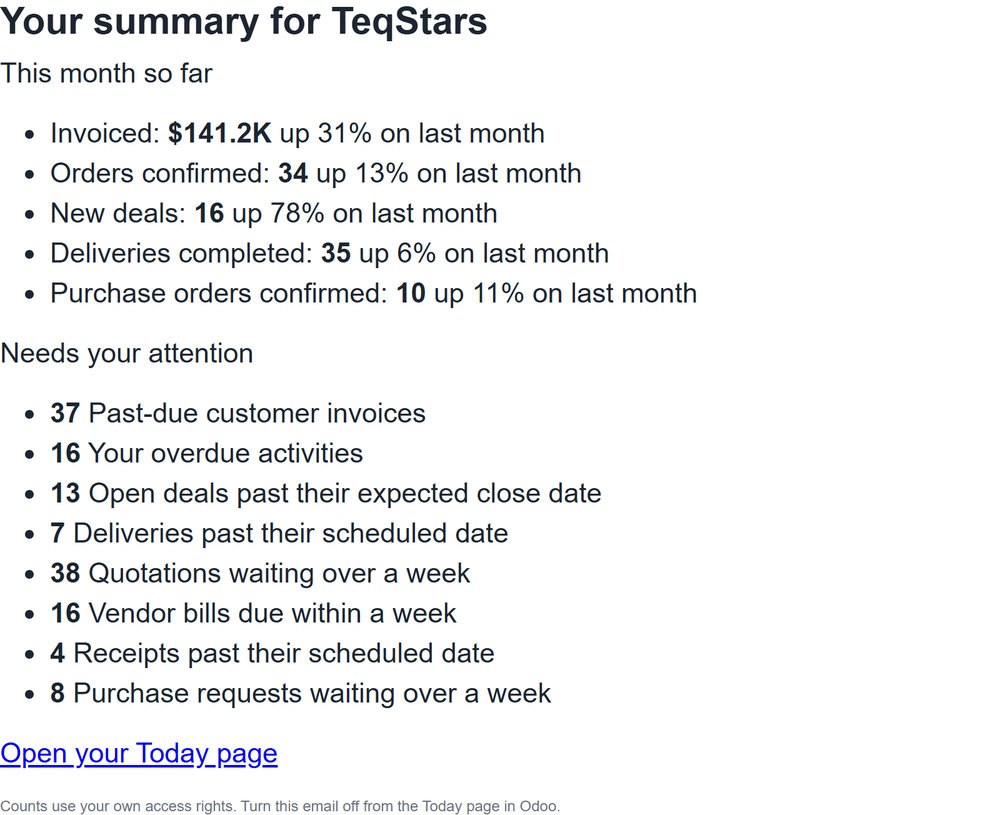
The subject Your summary for followed by the company name.
This month so far: each Today figure with its change on last month. Early in the month, when a zero is normal, it says what last month made instead.
Needs your attention: the same ranked counts as the Today page.
A link, Open your Today page.
When there is nothing to report (no figure and nothing waiting), no email is sent.
How It Is Sent
The scheduled action IMPERIUM: send email digests sends the emails. It runs on a schedule you can change in . People who chose On Mondays receive theirs on Mondays only, and nobody receives more than one email per day.
The email goes out through your Odoo’s outgoing mail server, from the company’s email address. Without a working server, the scheduled action logs a warning and tries again on its next run.
A person who leaves, loses the Dashboard Imperium role, no longer works in that company or has no email address is taken off the list automatically.
Note
The email is sent by your own Odoo to the person who asked for it. Nothing is sent to any outside service.
See also