
Import Products In Odoo
The eBay Odoo Connector allows you to import eBay products (listings) into Odoo. This can be a useful way to streamline your product management processes and keep your product catalog up-to-date.
Both Auction and Fixed Price listings can be imported, along with their variants, images, prices, categories, and item specifics.
Before importing products, it’s necessary to configure certain product configuration in the Instance.
The connector supports multiple import strategies depending on your needs.
Go to the menu in Odoo.
Click on the
Operationsbutton from the instance record.Select Import Operation and then select Import Listings option.
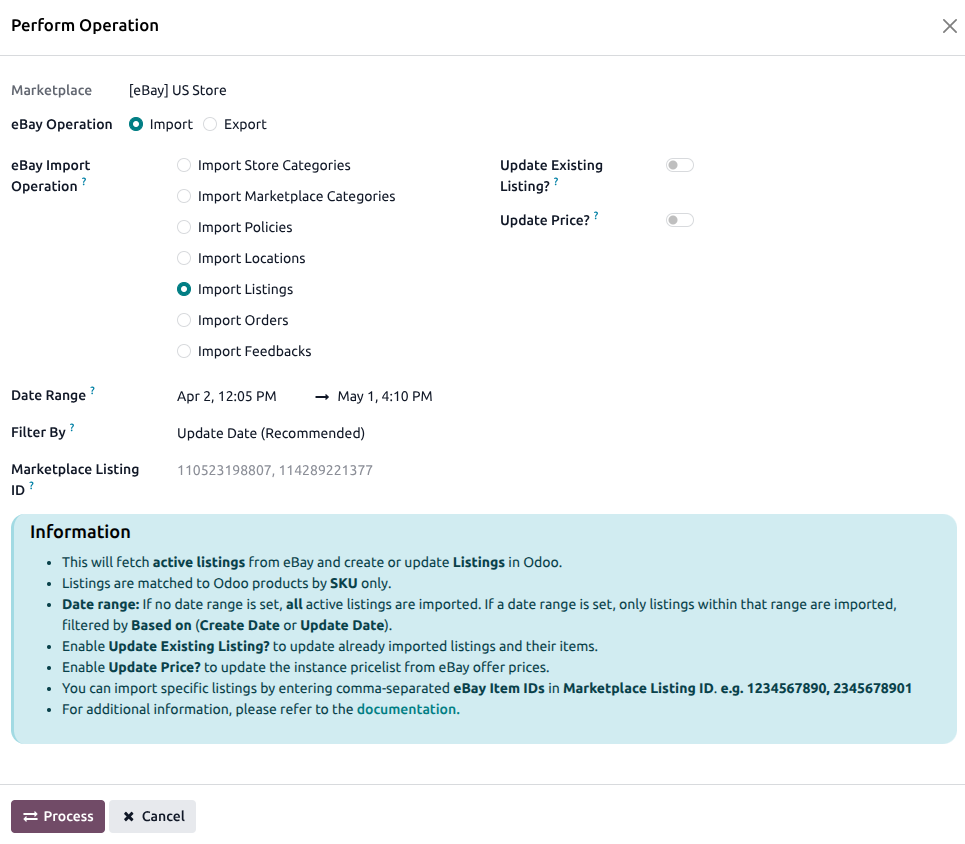
Within the product import operation, you’ll encounter the following options:
Filter By: Choose whether to import based on Create Date or Update Date.
Date Range: Products corresponding to the dates specified in the From Date and To Date fields will be retrieved from eBay.
Marketplace Listing ID: You can import specific eBay products by entering their eBay Item IDs in the Marketplace Listing ID field. Separate the IDs with a comma (‘,’) like this: 123456789012, 987654321098.
Update Existing Listing?: If you wish to update existing products in Odoo while importing from eBay, you can check the option labeled Update Existing Listing?
Update Price?: If you wish to update existing product’s price in the pricelist related to instance, you can check the option labeled Update Price?
Press
PROCESSbutton.
This will start fetching product data from eBay stores and add it to the Product Queue for processing. A scheduled/cron job will then start processing the queues one by one. The job will only process products that have been updated after the Last Listing Imported On. If the last execution date is not found, the job will fetch all the products. You can find the details of the last execution of the import operation under a particular instance’s Last Processed On configuration.
Important
The connector will search for existing products in Odoo based on the SKU.
Syncing a Single Listing
For a listing that is already imported and active in Odoo, you can sync the latest data from eBay for that listing individually without running a full import:
Go to the menu and click the
Listingbutton on the instance record.Open the individual listing you want to refresh.
Click the Sync to Odoo button shown next to the Marketplace ID field on the listing form.
This pulls the latest listing data from eBay (title, description, price, quantity, category, item specifics) and updates the record in Odoo.