
Webhook Delivery
When an Event Subscription has a Webhook URL, the MCP Server sends every matching event to that URL as an HTTP POST. This page describes the payload, the security envelope, and the per-attempt delivery log.
Payload shape
By default Odoo posts a generic JSON body containing the event metadata (event id, model, event type, record ids, user id, timestamp). Endpoints that accept arbitrary JSON work straight away.
When the destination expects a specific shape (Slack,
Microsoft Teams, Discord …), the AI sets a custom
Payload Template at the moment it creates the
subscription via the subscribe_events tool. You will
see the rendered body on each row in the Deliveries
log. That is the only place an admin normally needs to
look. There is no need to author templates by hand; let the
AI build them from the user’s request.
Tip
If a webhook receiver rejects messages (HTTP 400 / 422), open one of the failed delivery rows, copy the actual payload, and compare it with what the receiver expects. Then ask the AI to update the subscription template accordingly: “the Slack webhook expects this shape: … please update the subscription”.
Webhook Secret (HMAC-SHA256)
Set a Webhook Secret on the subscription to sign every outgoing POST:
The header
X-MCP-Signaturecarriessha256=<hex_digest>of the request body.Your endpoint reproduces the digest using the shared secret and compares; equal digest = authentic call.
Use a long, random secret (32+ bytes). Rotate it by editing the field; the next delivery uses the new value.
Per-delivery log
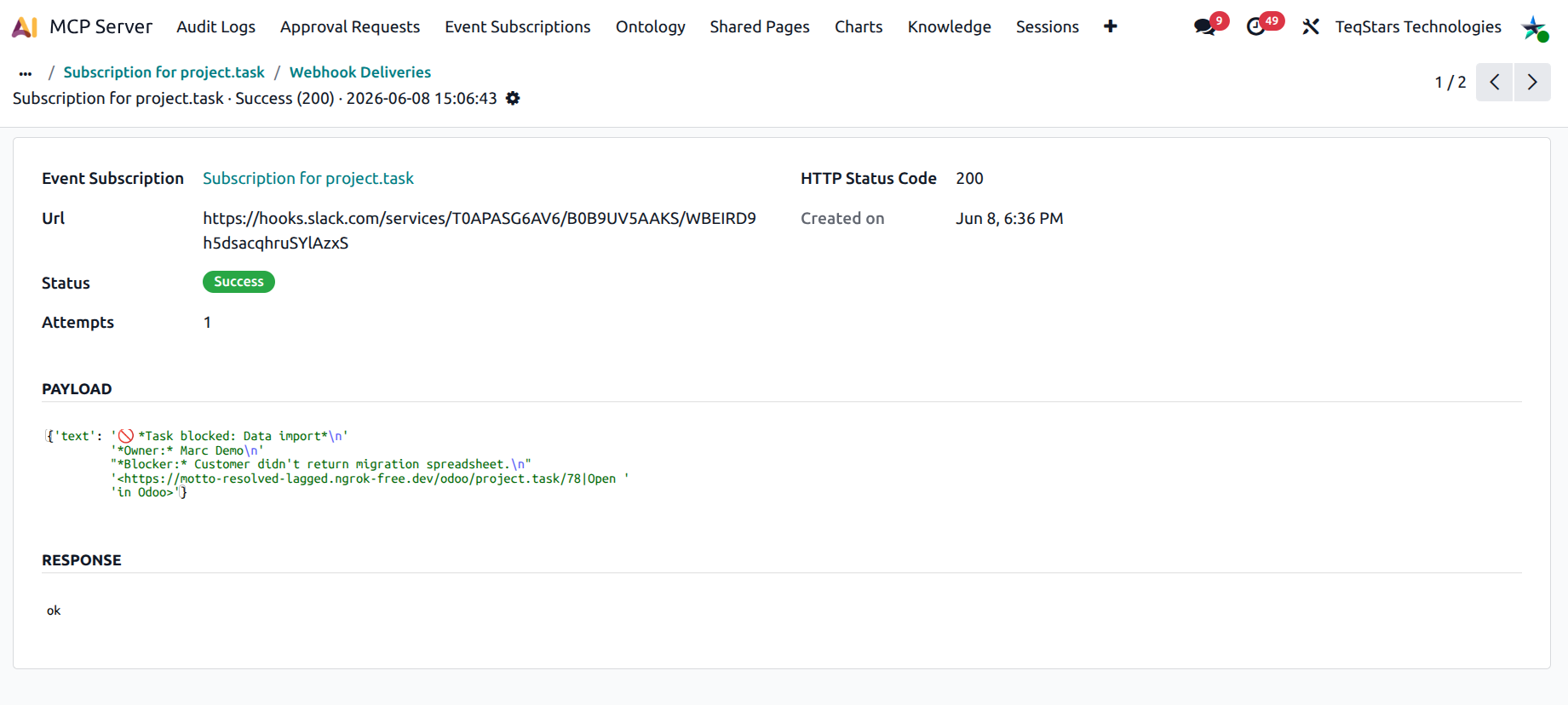
Each webhook attempt creates an mcp.webhook.delivery row
under the subscription. The form view shows:
Status: success, failed, pending.
Response Code: the HTTP status the endpoint returned.
Payload: the exact body that was posted.
Response Body: the body returned by your endpoint.
Created on: timestamp.
The subscription’s Last delivery status field mirrors the most recent delivery’s status as a coloured badge in the list view, so you can spot subscriptions that need attention.
Note
Delivery is one-shot per event in this release: the server posts to the URL once, with a request timeout, and records the outcome on the delivery row. There is no automatic retry / exponential backoff. If your endpoint was briefly down, the event for that moment is non-recoverable. Plan your receiver accordingly (e.g. an internal queue / relay that buffers requests).
What goes wrong, and how to fix it
404 from endpoint: the URL is wrong; update it on the subscription.
401 / 403 from endpoint: your endpoint expects a signature header or an auth token; set the Webhook Secret or change the URL.
5xx / timeout from endpoint: the receiving service is down. Because delivery is one-shot, that event is lost. Fix the receiver, then ask the user to repeat the Odoo action so a fresh event fires.
400 / 422 from endpoint: the payload shape is wrong; add or fix the Payload Template.
Each failure increments the subscription’s Failure count; a quick sort lets you spot the noisiest endpoints.
See also