
Periods and Comparison
Every dashboard opens on its default period. You can change it for the whole dashboard or for one card, step it forward and back, and compare it with an earlier period. These choices change only what you see; the shared dashboard stays as it is.
Change the Dashboard’s Period
Click the period chip at the top right, such as Year to date with its dates.
Choose one of the common periods: Today, This week, This month, Last month, This quarter, Last quarter, Year to date or Last year. The dashboard’s own period wears a small Default tag.
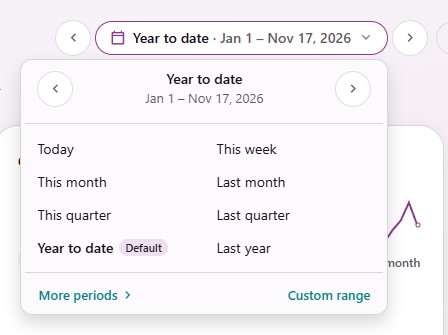
The dashboard updates as soon as you choose.
More periods › opens the rest in the same menu:
Rolling periods: Yesterday, past 7, 14, 30, 60 and 90 days, past month and past 3 months.
Weeks, Months, Quarters, Years and Fiscal periods.
Coming up: Next 7 days, next 30 days, next month and next quarter, for pipelines and due dates.
All time and Your saved ranges. Click × to delete a saved range.
Custom Range
Choose Custom range. From and To start with the dates on screen. Both dates are included.
Change the dates and click Done.
To keep the range, click Save this range and give it a name. It then shows under More periods ›, for you only.
Step to the Previous or Next Period
The ‹ and › arrows beside the period chip move the period by its own length: This month steps to the month before, Year to date to the same days last year. Back to and the period you started from returns there. All time has no arrows.
On a phone, the arrows are in the period menu.
Give One Card Its Own Period
Point at the card and click its Period button (always shown on a phone).
Choose a period, or Same as dashboard to follow the dashboard again.
A card with a period of its own names it on its button, such as Last month. A card that shows how things stand now (Right now) has no period to change.
Compare With an Earlier Period
Click Compare beside the period chip.
Choose Previous period or Same period last year. Off, the default, keeps each number card’s own comparison.
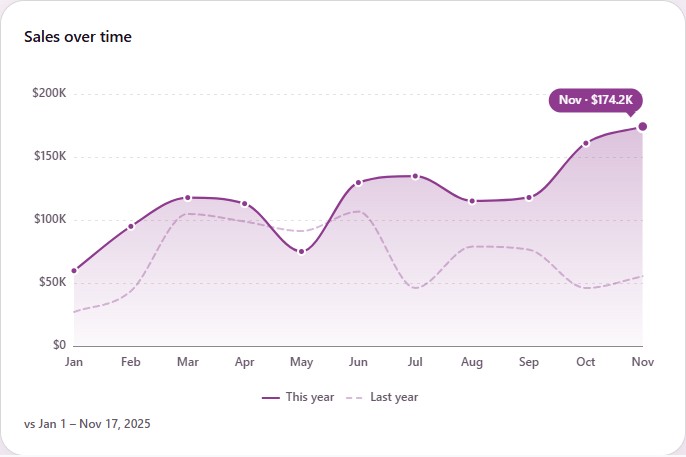
The chip then reads vs last year or vs previous period, and the whole dashboard follows:
Number cards with a date compare with your choice instead of their own setting.
Lines and areas draw the earlier period as a faint dashed line behind the solid one. Columns and bars get a dark tick at each bar’s earlier value. A This year / Last year legend names both.
Pointing at a month reads both numbers and the change. The data table and the downloads gain the earlier period and Change % columns.
A period that runs past today is compared on its days so far, and the card says so under it.
Pies, maps, pivots and split charts say Not compared on this chart. Lists and Right now cards say nothing.
When the earlier amounts are in another currency, the card says so instead of mixing them.
Your choice is kept for this dashboard in this browser. A click on a number, Show records and saved views always show this period’s records, never the earlier period’s.
Note
The previous period compares weeks, months and quarters only when both periods start where a week, month or quarter starts. Otherwise a chart says Not compared: the earlier period’s points don’t line up with these. Its number cards still compare their totals, and Same period last year lines the months up.