
Saved Views and Layouts
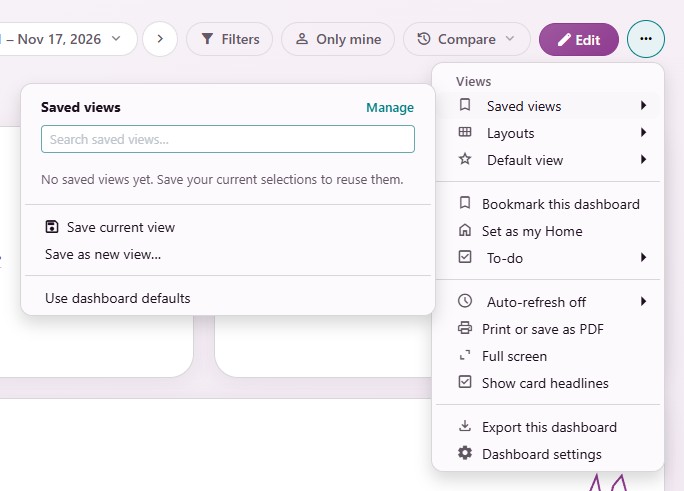
A saved view keeps your period, filters and chart choices on a dashboard so you can come back to them in one click. A layout keeps another arrangement of the same cards. Both live in the dashboard’s ⋯ menu.
Saved Views
Save a View
Set the period and filters you want on the dashboard.
Open ⋯ and choose Saved views, then Save as new view….
Give it a clear name you can find again.
Choose who can use it: only you, People who can view this dashboard or Shared with chosen people (up to 100 people).
Click Save view.
Sharing a view never changes anyone’s access to the dashboard or to business records. Only people who can still open the dashboard and its records can use a shared view. To turn a personal view into a shared one, or the other way round, save a copy.
Use and Manage Saved Views
Choose a view in Saved views to apply it. Use dashboard defaults returns to the dashboard’s own choices.
Manage offers Edit view, Rename, Save a copy and Delete on each view. Deleting a view never deletes dashboard or business records.
A choice marked Default follows the dashboard’s future defaults. To keep the current choices instead, choose Keep the current selections when you save.
Your Default View
Default view in the ⋯ menu sets what this dashboard opens on for you:
Make this saved view my dashboard default: The dashboard opens on the view you are using.
Use dashboard defaults for future opens: The dashboard opens on its own choices.
These choices apply only to you and do not change your current results.
Layouts
Charts, filters and themes stay the same in every layout; only the arrangement of the cards changes.
Create My arrangement: An arrangement for you only, listed under My arrangements.
Create shared layout: An arrangement for everyone who reads the dashboard. People who may edit the dashboard create shared layouts and choose the shared default with Set shared default.
Pick a layout in Layouts to use it. Use shared default returns to the shared one.
On a layout, Copy to My arrangements makes your own copy, and Archive layout puts it away.
A layout whose cards changed since it was saved says Structure changed; review required. Open it with Edit, repair or rename to fix it.