
Dashboard Imperium Features
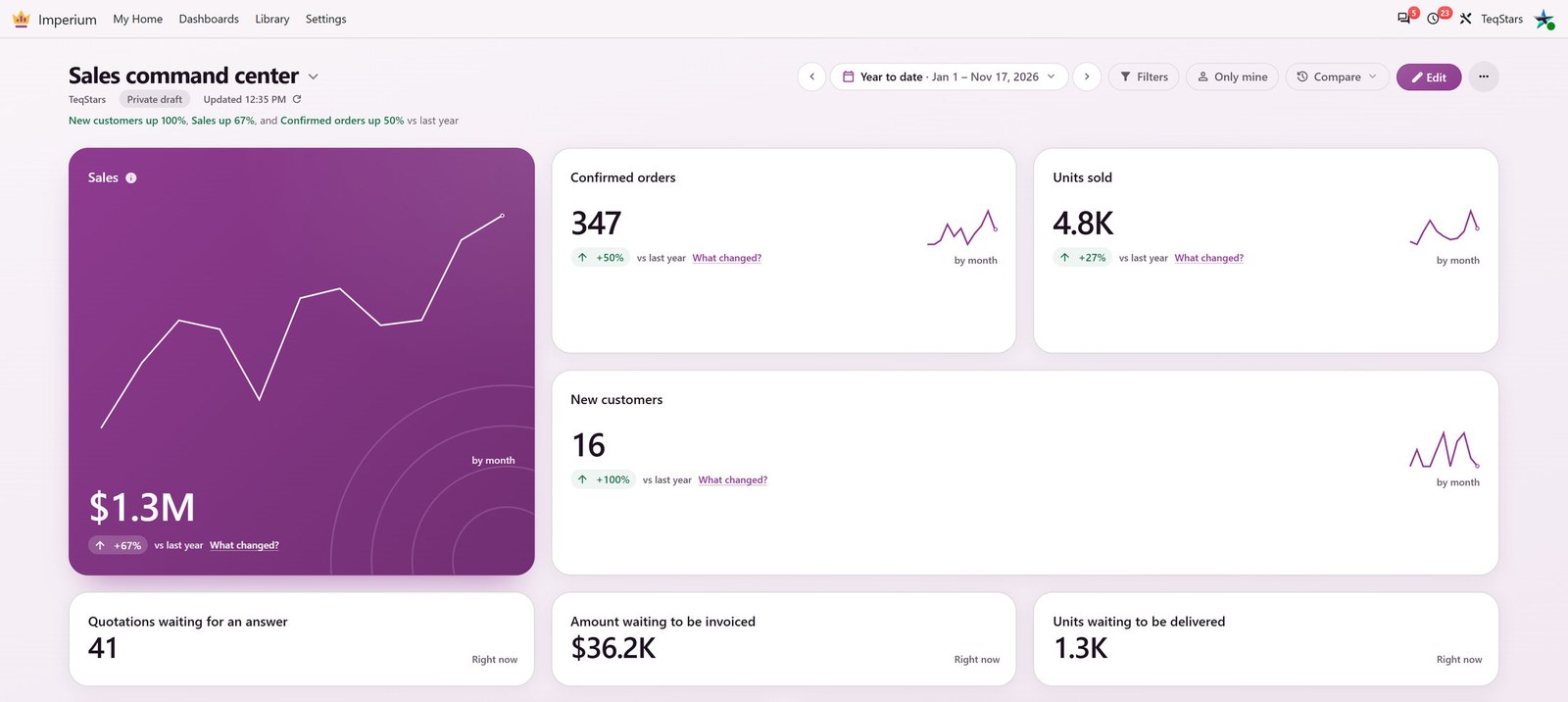
Dashboard Imperium by TeqStars adds dashboards to Odoo that open on the answer: what is late, what is stuck and what changed since last month. You get a Today page for each person, ready-made dashboards for Sales, CRM, Accounting, Inventory and Purchase in one click, and a card editor that opens on your live numbers. Every number follows the viewer’s own access rights and opens the exact records behind it.
The app needs only Odoo’s web client. When Sales, CRM, Accounting, Inventory or Purchase is installed, its dashboards and ready-made measures switch on by themselves, even for an app you add later.
Supported Features
- Today Page
My Home opens on Today: a few figures for this month so far, each against the same days of last month, and a ranked Needs your attention list. See My Home and Today.
People can get the same summary by email every morning or on Mondays. See Email Summaries.
- Ready Dashboards in One Click
The template gallery offers a full dashboard for each app you have installed (Sales, CRM, Invoicing, Purchasing, Inventory, Manufacturing, Point of Sale) and a Company overview. See Start From a Template.
My scorecard and Team performance cover hours, check-ins, time off and tasks when the attendance, time off, timesheet or project apps are installed.
- Numbers You Can Check
Click a number, a bar, a slice or a country and the records behind it open in Odoo’s own list. See Records Behind the Numbers.
What changed? splits a number’s change by customer, product, salesperson and team. See What Changed?.
How it’s calculated shows what a ready-made measure counts and which date it uses. See How It’s Calculated.
- Periods, Comparison and Focus
Change the period of the whole dashboard or of one card, step it with arrows and compare it with the previous period or the same period last year. See Periods and Comparison.
Focus the whole dashboard on one bar, break a bar down another way, or show only your own records. See Focus and Break Down Bars and Filters and Only Mine.
- A New Card in a Minute
Add card starts from a ready-made measure, splits it by time or by a group and shows a live preview. See Add a Card.
Any data charts any business data you can already read, with conditions and Use me for personal scorecards. See Chart Any Data.
Choose among numbers, gauges, columns, lines, pies, funnels, maps, pivot tables, heatmaps, lists and more. See Choose a Chart Type.
- Layout and Appearance
Move and resize cards on live numbers, with separate desktop, tablet and phone layouts. See Edit the Dashboard.
Thirteen themes in light and dark, and your own brand theme. See Themes.
- Sharing and Access
A dashboard stays a private draft until an administrator publishes it for the groups and people you name. A card can have its own audience. See Publish and Share.
Every figure is calculated with the viewer’s own access rights and selected companies.
- Take It With You
Download a card as Excel, CSV or an image, print the dashboard or save it as a PDF, and run it full screen on a wall display. See Downloads, PDF, Full Screen and Refresh.
Move a dashboard to another database with a small file. See Export and Import Dashboards.
Benefits
- Answers on Day One
Today and a ready dashboard for each app you run, before you configure anything.
- Exact, Not Guessed
Every number opens its records, and What changed? is plain arithmetic on your own data, so it gives the same answer every time.
- Your Data Stays Home
The app has no AI provider and makes no outside calls. Your numbers never leave your Odoo.
- Access You Can Trust
Sharing a dashboard never changes what a person may read. Each viewer sees only the records their own access allows.
Conclusion
Dashboard Imperium turns Odoo’s data into dashboards your team reads every day: a Today page that says what needs attention, ready boards for each app, cards you build in a minute and numbers that always open the records behind them.
Note
The email summary needs an outgoing mail server in Odoo. Nothing else is sent outside your database.